Product Photography Checklist for Ecommerce: Every Shot You Need Before Publishing
An ecommerce product photography checklist defines the exact five to seven images you need to publish a converting product page. You need a clean hero shot, two detail shots, a scale reference, and lifestyle context. Launching with less leaves money on the table.
Definition
An ecommerce product photography checklist is a standardized set of visual requirements used during a photo shoot to ensure all necessary product angles and technical specifications are captured. It acts as a strict set of instructions for production teams, preventing missing assets that would otherwise delay a product launch.
I have personally delayed product launches by weeks because a studio photographer forgot to capture the back of a garment or the inside of a bag. When you realize a critical angle is missing the night before a campaign goes live, you have two bad choices. You can delay the launch and ruin your marketing timeline, or you can publish an incomplete page and watch your conversion rate tank.
Hope is not a production strategy. You cannot hand a loose mood board to a creative team and expect a complete set of catalog assets. A strict product photo checklist protects your launch timeline. It forces you to capture every visual requirement before the product ever leaves the studio.
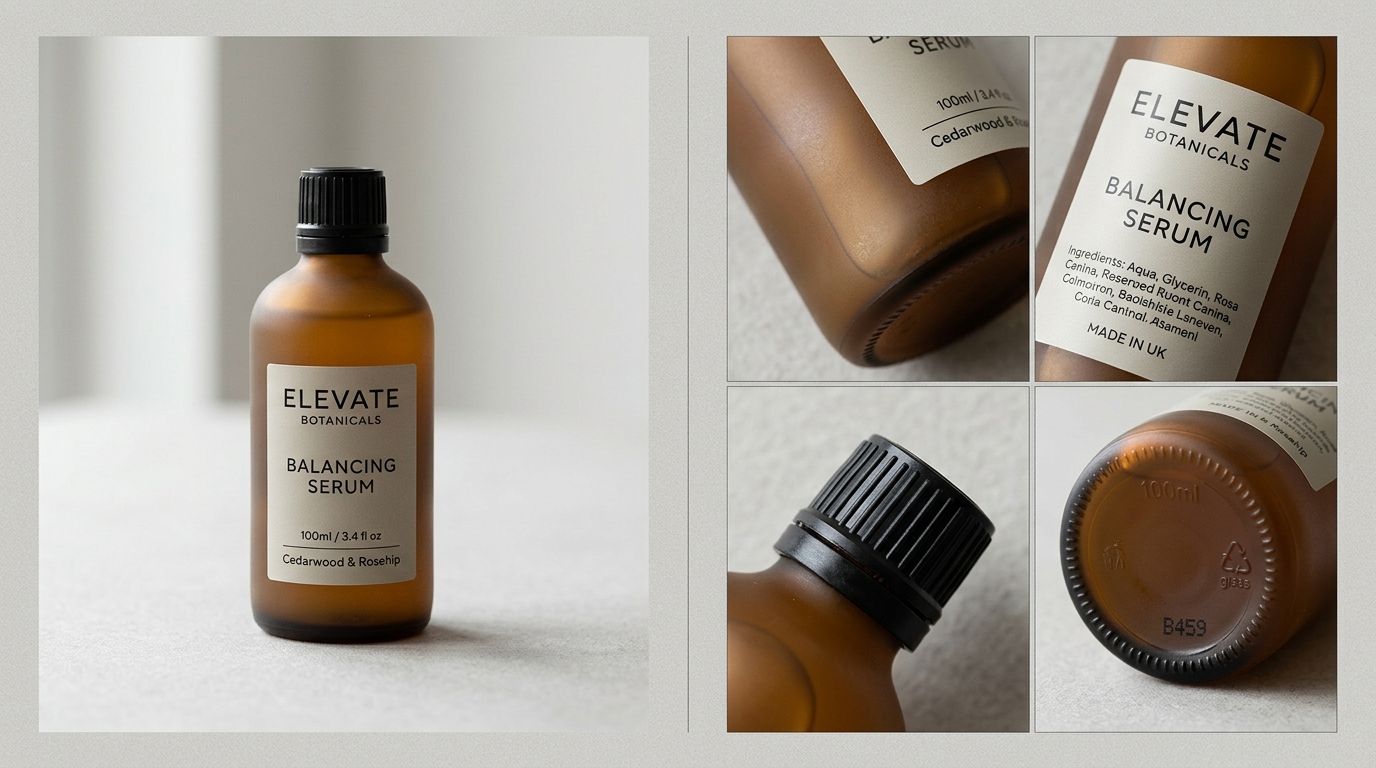
The non-negotiable ecommerce product photography requirements
Every product category has quirks, but the baseline visual requirements remain identical whether you sell leather boots or industrial coffee grinders. Your gallery needs to answer the immediate questions a buyer has when they land on your page. If they have to scroll to your description to figure out what the product is made of, your imagery has failed.
The hero shot on a white background
The hero shot is the absolute core of your product photography minimum requirements. This is the first image in your gallery. It is the image that appears on your collection pages, in your search ads, and in your Google Shopping feed. It must be brutally clear.
Shoot this straight on or at a slight three-quarter angle. The product should fill eighty percent of the frame. Use a pure white background (hex code #FFFFFF) with soft, even lighting that eliminates harsh shadows. The goal here is not to be artistic. The goal is rapid visual comprehension.
(Worth noting: some high-end apparel and fragrance brands intentionally break these rules with editorial hero shots. But until your brand equity is strong enough to sell on mood alone, stick to the clear white background for your primary image.)
The detail and texture shots
Buyers cannot pick up your product to examine the craftsmanship. You have to do the examining for them. Detail shots build trust by proving the quality you claim in your copy.
If you sell a backpack, you need a macro shot of the reinforced stitching on the straps and a close-up of the metal zippers. If you sell skincare, you need a swatch image showing the exact viscosity and texture of the cream. You must capture the specific elements that justify your price point. If you skip this, you are forcing the customer to take a leap of faith.
The absolute scale reference
A white background destroys any sense of scale. A coffee mug that holds eight ounces looks exactly the same as a mug that holds sixteen ounces when shot in a void.
You must include an image that grounds the product in reality. This could be a model holding the item, the product sitting next to a common object like a smartphone, or a graphic overlay indicating dimensions. Getting this wrong creates massive post-purchase friction.
What photos do I need for ecommerce beyond the basics?
Meeting the minimum requirements will keep your store functional. Pushing beyond them is what actually drives revenue. Once the foundational shots are secure, you need images that create desire and eliminate buying hesitation.
The difference between an average conversion rate and a top-tier one often comes down to context. If you are struggling with this phase, getting granular and creating a product photography brief will ensure your creative team actually delivers the contextual assets you need.
The aspirational lifestyle shot
Lifestyle shots show your product living in the real world. They answer the subconscious question of whether this item fits into the buyer's ideal identity.
If you are selling a cast iron skillet, the hero shot shows the pan. The lifestyle shot shows the pan on a rustic stove, sizzling with fresh vegetables, surrounded by a nicely set kitchen. It creates an emotional anchor. You generally only need one or two strong lifestyle images per product page to set the tone.
The exhaustive variant images
Nothing spikes cart abandonment faster than a customer selecting the "Navy Blue" option from a dropdown menu and watching the main image stay locked on "Charcoal Gray."
You must have dedicated imagery for every single variant you sell. Historically, this was the most expensive part of production. Bringing ten different colorways into a physical studio meant massive logistical overhead. Today, this is entirely solvable without a camera. You can capture the base model once, upload a product image to CherryShot AI, select a visual mode, and generate campaign-ready photos for every other colorway in minutes. The cost drops significantly, and your page gets the visual coverage it needs to convert.
Technical checklist: Image resolution and format
A beautiful photo saved in the wrong format will either slow your website to a crawl or look like a pixelated mess on a modern phone screen. The technical requirements of your product photo checklist are just as strict as the creative ones.
When you are evaluating your logistics and understanding the true cost of a catalog overhaul, you must factor in the time required to properly size and format these assets before they hit your server.
Sizing for speed and zoom functionality
Most modern ecommerce platforms have built-in zoom features that activate when a user hovers over an image. For this to work without blurring, your images need to be at least 1500 pixels on the longest side. Pushing past 2000 pixels is usually unnecessary and just wastes bandwidth.
Consistency in aspect ratio is mandatory. Whether you choose a 1:1 square or a 4:5 vertical crop, you must apply it to every single image in your catalog. Mixing horizontal and vertical crops will break your collection page grid and make your store look like an amateur operation.
File formats that balance quality and load time
Never upload an uncompressed PNG or a raw TIFF file to your Shopify store. Your images must be compressed to balance visual fidelity with page speed.
The trade-off of compressing images for page speed is a slight loss in sharpness on retina screens, but a slow page will kill your conversion rate faster than a slightly softer image ever could. Aim for file sizes under 300KB per image. Use WebP format where possible, as it offers superior compression to JPEG without the heavy data footprint.
| Image Format | Typical Size | Best Ecommerce Use Case |
|---|---|---|
| WebP | Under 150KB | Primary uploads for modern platforms like Shopify |
| JPEG | 150KB - 300KB | Fallback format for older browsers and email marketing |
| PNG | Over 1MB | Avoid entirely for product galleries due to slow load times |
Final review: Product page readiness
Before you mark a SKU as complete, you need to verify that the asset package works holistically. Having six great photos means nothing if they are all redundant wide shots.
Look at the entire gallery as a silent sales pitch. Start with the hero shot to establish the baseline. Move to the alternate angles. Zoom in on the details. Show the scale. Place it in a lifestyle setting. If you want to dive deeper into the psychology of this sequence, exploring what makes product photos convert will show you exactly why this specific progression builds trust.
The mobile scroll test
The ultimate test of your checklist is the mobile swipe. Open a staging link of your product page on your phone. Do not read the title. Do not read the bullet points. Just look at the images.
Can you figure out exactly what the product does, how big it is, what it feels like, and what color variations are available just by swiping with your thumb? If you find yourself needing to scroll down to the text to answer a basic question, your photography checklist failed. Send the product back to production.
Frequently Asked Questions
What is the minimum number of photos needed per ecommerce product?
Every product requires a minimum of four distinct images to drive conversion on an ecommerce storefront. Launching with fewer assets forces prospective buyers to guess about critical physical attributes like material quality and actual dimensions. You must capture one clear hero shot on a pure white background, two close-up detail photos highlighting texture or hardware, and one scale reference image placing the item next to a familiar object.
What should be on an ecommerce product photography checklist?
A standard ecommerce photography checklist demands a front-facing hero image, multiple alternate angles, macro detail shots, a clear scale reference, contextual lifestyle photos, and dedicated assets for every available colorway. Forgetting just one of these angles causes friction during the purchasing decision and drives up return rates. Your list must also mandate strict technical specifications for output resolution, consistent crop ratios, and compressed file sizes to ensure optimal page load speeds.
What technical specifications should ecommerce product photos meet?
Product image files must measure between 1500 and 2000 pixels on the longest edge to activate native zooming features without losing visual clarity. Uploading massive uncompressed files destroys page load speeds and directly harms your conversion rates across mobile devices. You should export every final asset in WebP or JPEG format with a total file size under 300KB, while maintaining a strict 1:1 or 4:5 crop ratio across the entire catalog.
How do I know if my product photos are ready to publish?
Your image gallery is ready for publication when a shopper can fully understand the item solely by swiping through the assets on a mobile device. Buyers rarely read text descriptions first, meaning your visual sequence must independently answer questions about dimensions, materials, and specific use cases. Test the staging link on your phone to verify that the hero shot, scale reference, and detail angles communicate everything necessary to make a confident purchase.
Key Takeaways
- Launch with at least four images per product to cover basic buyer questions.
- Include scale references to prevent returns caused by sizing misunderstandings.
- Provide dedicated images for every single colorway to prevent cart abandonment.
- Enforce strict technical rules for resolution and compression to protect page load speeds.
A rigorous photography checklist removes the subjective debate from asset creation. It sets a clear, binary standard. Either the shots are captured and formatted correctly, or they are not. When you standardize your requirements, you stop treating every new product launch like an entirely new logistical puzzle.
Generate your variant images without a reshoot
If you are missing colorway images from your last production run, you do not need to book another studio day. Upload your base product image to CherryShot AI to instantly generate matching visuals for every missing variant in your catalog.
Try CherryShot AI