Product Video vs Product Photography for Ecommerce
Stop trying to choose between product video and photography. They do entirely different jobs on an ecommerce product page. You use product photography to earn the click. You use product video to close the sale. A static image shows the customer exactly what the item looks like. A video proves the item actually works as advertised. If you treat video as just a moving photograph, you are wasting margin on production costs that will not lift your conversion rate.
Definition
Product photography involves capturing still images to showcase the appearance, color, and design details of an item. Product video is motion-based media used to demonstrate how an item functions, moves, or fits in real-world scenarios. Ecommerce brands use both formats together to build visual galleries that drive purchasing decisions.
Most ecommerce founders look at their analytics, see a plateau, and decide they need to pivot entirely from still images to video content. They rip out their image galleries and replace everything with looping MP4 files. Six weeks later, they wonder why their page speed tanked and their bounce rate doubled.
(Worth noting: forcing mobile video autoplay on your product gallery is the fastest way to ruin a shopping experience. If your page takes four seconds to load over a cellular connection because a massive video file is buffering, the customer will leave before they even see your product.)
Visual content is an operational lever. Every asset you upload should answer a specific customer question. Let us break down exactly where still photography dominates, where video takes the lead, and how you structure a product page that actually converts traffic into revenue.
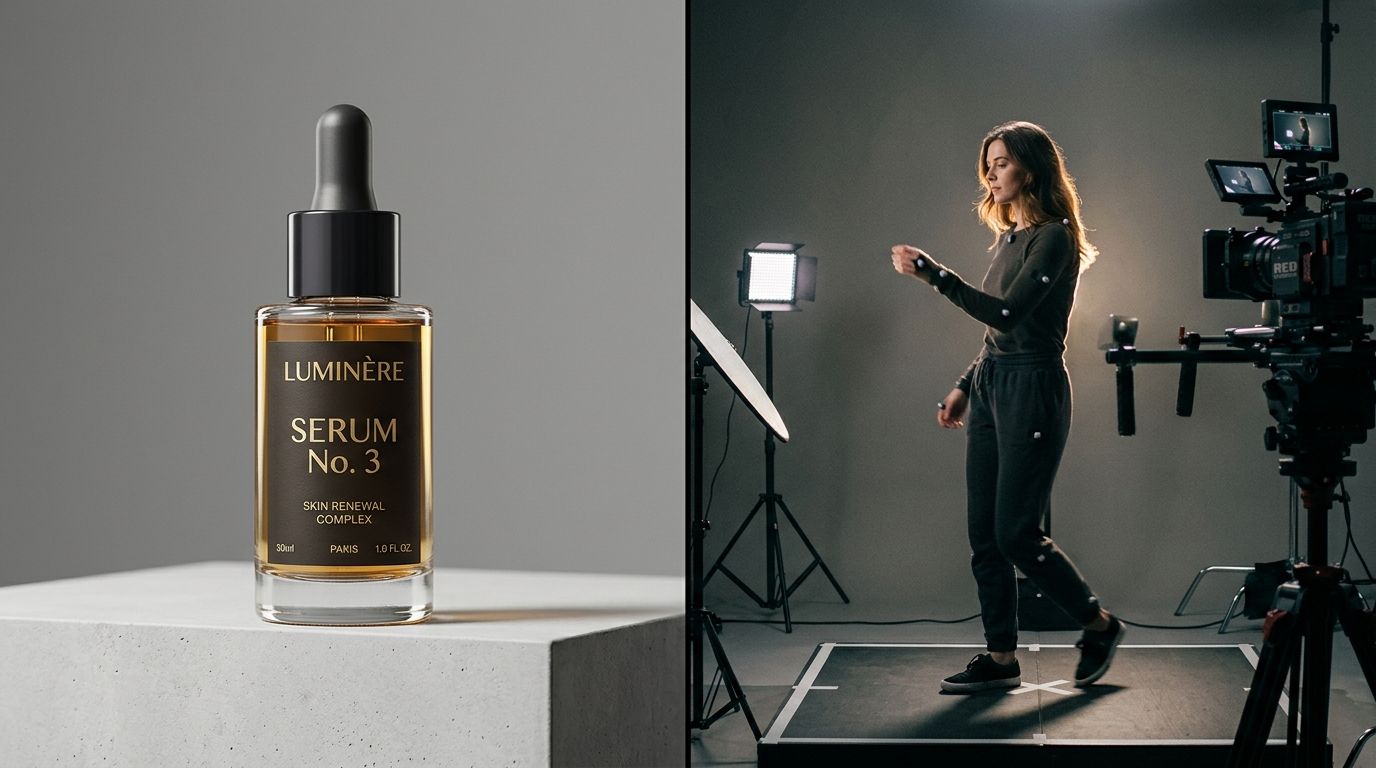
The production footprint for video is exponentially larger than still photography, which is why asset strategy dictates your margin.
The Heavy Lifting of Product Photography
Photography is the foundation of your ecommerce store. Without a high-quality static gallery, nothing else matters. A customer scrolling through a category page is not looking for nuance. They are scanning for shape, color, and style. They need instant visual feedback.
A photograph processes instantly in the human brain. The moment the page loads, the user knows exactly what you are selling. This speed is critical for mobile shoppers aggressively scrolling with their thumbs. They are making sub-second decisions about whether a product deserves a closer look.
Establishing trust through consistency
A massive part of what makes high-converting product photography so effective is its uniformity. When a customer lands on a grid of twenty shirts, those shirts need to be shot from the exact same angle with the exact same lighting. This consistency signals professionalism. It tells the buyer that you run a legitimate operation.
You cannot easily achieve this tight grid consistency with video. Thumbnails often look messy, and having twenty videos playing simultaneously on a category page is a technical disaster. Still photography provides the clean, organized catalog experience that users expect from premium brands.
Detailing the finish and material
High-resolution still images allow a customer to pinch and zoom. If you are selling a leather bag, the customer wants to zoom in on the stitching. They want to see the exact grain of the material. A compressed web video rarely holds enough detail to survive a severe zoom. A crisp, brilliantly lit photograph does this job perfectly.
Where Product Video Takes Over
If photography gets the customer onto the product page, video does the work of the sales associate. When a shopper pauses on a product page and hesitates to add the item to their cart, they have objections. They are worried about the size. They do not understand how a specific feature works. They are unsure how the fabric moves.
This is exactly when video converts better than photos. Video provides the context that static images lack.
The power of the product demo video
If your product requires any assembly, moves in a unique way, or solves a physical problem, a product demo video is mandatory. You can write five paragraphs describing how easily your stroller folds with one hand. Nobody will read it. A three-second clip of a parent holding a baby in one arm and collapsing the stroller with the other proves the claim instantly.
A good lifestyle video does not need high-end cinematic production. It just needs to be honest. It needs to show the product doing exactly what you promised it would do. Customers are highly skeptical of overly polished commercials. They respond to clear, direct demonstrations.
Selling scale and drape
Scale is notoriously difficult to communicate in a photograph. A purse shot on a white background looks identical whether it is six inches wide or sixteen inches wide. You can list the dimensions in the product description, but humans are terrible at visualizing measurements.
A video of a model walking with the bag immediately establishes scale. For apparel, video solves the problem of drape. A static photo shows how a dress looks pinned and posed. A video shows how the hem flows when the wearer turns. This drastically reduces your return rate because the customer receives exactly what they expected.
| Visual Asset Type | Primary Function | Best Used For |
|---|---|---|
| Still Photography | Earning the initial click and building catalog trust | Category grids, detail shots, and mobile hero images |
| Product Demo Video | Explaining complex mechanics or features | Tools, electronics, and items requiring assembly |
| Lifestyle Video | Establishing real-world scale and physical movement | Apparel drape, handbag sizing, and footwear context |
| 360-Degree Views | Allowing user-controlled full physical inspection | Hardware, appliances, and highly structured hard goods |
The Hidden Costs of Production
We have to talk about the reality of producing these assets. This is the biggest factor driving the product video vs photography ecommerce debate. The economics of visual production have completely fractured over the last few years.
AI product photography completely changes the math for stills. Upload a product image to CherryShot AI, pick a visual mode, and you get campaign-ready photos in minutes. If you launch a new colorway, you do not need to book a studio. You generate the assets and push them live the same afternoon. The cost drops to under $5 an image.
Video is brutally unforgiving if your product changes. This is the ultimate limitation of the format. If you tweak the clasp on a handbag or update the logo on your packaging, updating an AI product photo takes two minutes. Updating a product demo video requires a reshoot, editing, and color grading. You cannot just patch a video.
This is why creating product videos without a massive production team has become a priority for lean brands. They use AI tools like CherryShot AI to build out their massive static catalogs for pennies, then allocate their actual camera budgets exclusively to high-impact demo videos that answer complex customer questions.
Mixing Video and Photos on the Product Page
How do you structure the actual page? The order of your media matters just as much as the quality.
The hierarchy of the carousel
Never put a video in the first slot of your product gallery. Ever. The hero slot belongs to a clean, crisp photograph. This image loads instantly and confirms to the buyer that they clicked the correct link.
The second slot is where your lifestyle video belongs. Once the user knows what the product is, they swipe to see it in action. The third and fourth slots belong to lifestyle photography and detail shots highlighting specific textures or features.
When to use a 360 degree view
Many brands get stuck trying to decide between a video and a 360 degree view. A 360 degree view is essentially a massive sequence of photographs stitched together to act like a video. It allows the user to drag their finger across the screen to rotate the product.
These are incredibly powerful for hard goods like footwear, electronics, and hardware. They let the user inspect the product from every conceivable angle. However, they are heavy files. They require a significant amount of code to render smoothly. If your site speed is already struggling, adding an interactive 360 view will hurt your conversion lift more than it helps.
The Final Verdict
You need both. But you need them in the correct proportions.
Use high-quality product photography for scale. Use it to populate your grid, run your social ads, and fill the majority of your product carousels. It is fast, affordable, and easy to update. When you use tools like CherryShot AI, you can generate thousands of lifestyle images without ever booking a photographer.
Reserve product video for friction points. Find the products in your catalog that have the highest bounce rates or the most customer service inquiries. Shoot simple, direct videos that explain exactly how those items work. That is how you build an ecommerce engine that actually converts.
Frequently Asked Questions
Does product video increase ecommerce conversion more than photography?
Neither format automatically guarantees a higher conversion lift over the other. Photography secures the initial click from the category grid, while video closes the sale by answering specific objections about the product. Adding a concise demonstration video to an otherwise perfectly photographed technical jacket will drastically increase the add-to-cart rate by proving how the zipper functions and the fabric moves.
When should I use product video instead of photos?
You deploy product video in addition to a complete static photo gallery when an image leaves a specific question unanswered. A static image captures the exact silhouette of a garment, but a video proves how that fabric drapes and flows while the person walks. If you sell a mechanical tool, recording a five-second clip of a person successfully operating the device builds immediate buyer confidence.
How do I decide between investing in product video or product photography?
Allocate your initial production budget to complete your static product photography pipeline first. A comprehensive, high-quality photo gallery establishes baseline buyer trust and ensures shoppers do not immediately bounce from the catalog. Once your image generation process is fast and affordable, fund video production strictly for top-selling items or products that suffer from high return rates caused by sizing misunderstandings.
Where in the product gallery should video appear?
Insert your video asset into the second or third slot of your product page image carousel. The primary hero slot must always feature a clean, high-resolution static photograph because it loads instantly on mobile networks. Once the shopper confirms the visual identity of the product, they will naturally swipe horizontally to the video to understand physical context and real-world scale.
Key Takeaways
- Product photography earns the click by communicating visual information instantly.
- Product video closes the sale by answering unspoken objections regarding scale and function.
- Never place a video in the first slot of your product carousel because it slows down the initial visual hook.
- Use AI tools to scale your static photography quickly, saving your budget for strategic demo videos.
Great ecommerce brands stop viewing their content as art and start treating it as an operational system. If you want to stop waiting weeks for your static assets to be ready, CherryShot AI turns flat product shots into campaign-ready photography in minutes.
Audit your product page media hierarchy
Review your top five best-selling products right now on a mobile device to ensure every gallery starts with a fast-loading static photograph. Shift any existing videos to the second or third slot to improve initial page speed. If you need to upgrade those hero images, CherryShot AI can generate campaign-ready stills in minutes.
Try CherryShot AI