Amazon Main Image Requirements: What Gets Listings Suppressed and How to Stay Compliant
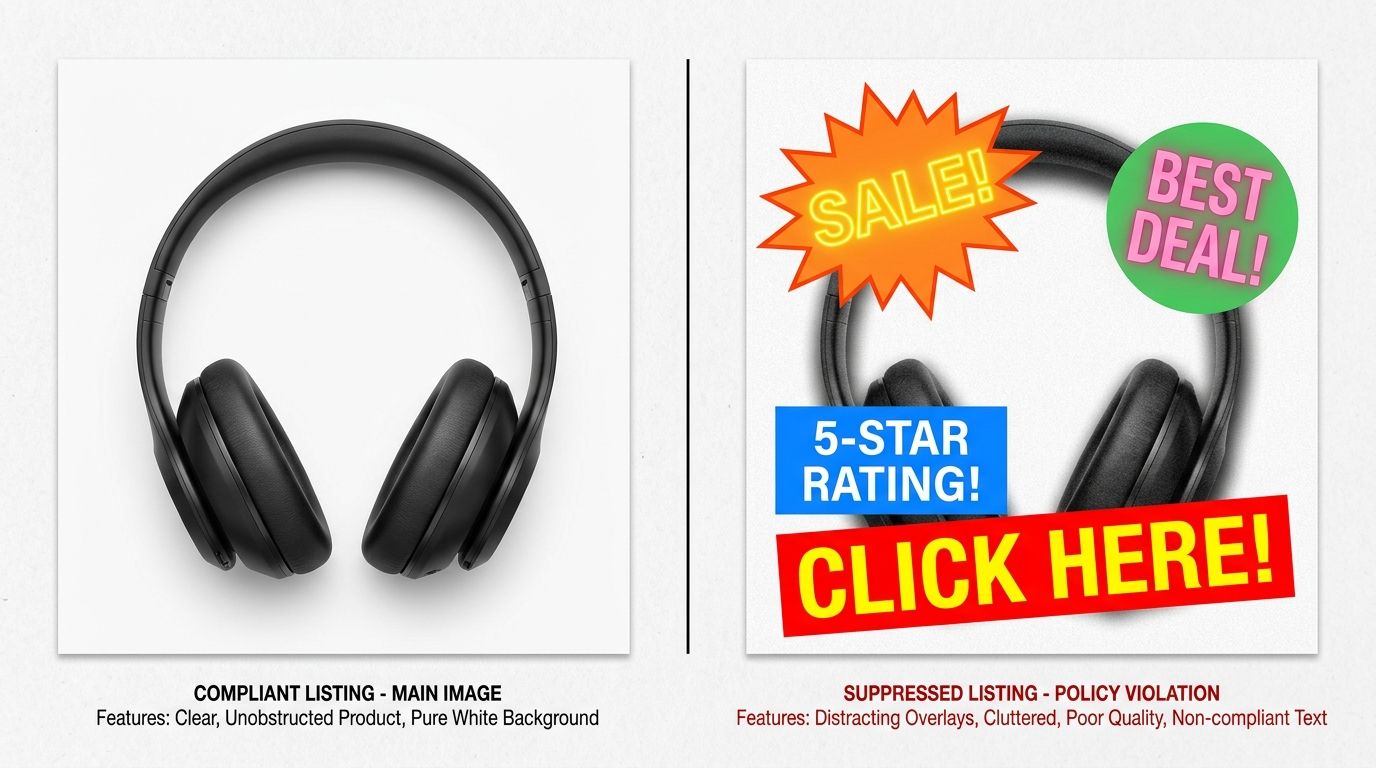
Your main image is the single most important asset on your product page. If it fails to meet the strict technical standards set by the platform, your listing will be suppressed. This means your product effectively disappears from search results, stalling your revenue overnight. Navigating these constraints is not optional if you want to scale on the marketplace.
Definition
Amazon main image requirements are the set of mandatory visual guidelines enforced by the platform to ensure a uniform catalog experience. These rules dictate that the product must be captured against a pure white background, free of text, logos, or secondary props. Noncompliance results in listing suppression, where the product remains active in the backend but is hidden from customer searches.
Why Your Listing Gets Suppressed
The marketplace relies on automated bots to scan every image uploaded to the catalog. These bots are looking for specific violations. If they see anything other than a clean product shot, the system flags the SKU for review.
Common Triggers for Image Rejection
Most sellers think they have a great image until they see their listing inactive. The most common cause is the background color. If the white is not pure, the automated system rejects the file. Furthermore, adding lifestyle elements, infographics, or comparative text to your main image is a fast way to get flagged. Even if the text is helpful to the user, it is prohibited in the main slot.
Other technical issues include incorrect dimensions or file types. You need to follow the Amazon image size guide to ensure your files meet the pixel minimums while staying under the upload limit. Failing to meet these specs is a recurring problem that confuses many new sellers.
The Cost of Poor Compliance
When your listing is suppressed, you lose the ability to capture traffic. You are paying for PPC campaigns for products that customers cannot actually find on the store pages. It is a silent drain on your budget that often goes unnoticed until your weekly sales report shows a sharp decline. Relying on an ecommerce image checklist before you launch a new colorway or product variant can save you days of lost revenue.
| Constraint | Main Image Rule | Result of Failure |
|---|---|---|
| Background | Pure White (RGB 255,255,255) | Listing suppression |
| Content | Only the product, no props | Bot flagged rejection |
| Composition | 85% frame coverage | Reduced click-through rate |
| Annotations | No text, logos, or watermarks | Search visibility loss |
Scaling Without Suppression
The brands that win on the marketplace are the ones that automate the production of compliant assets. When you have dozens of SKUs to manage, you cannot afford to wait for a studio photographer to re-shoot an angle just to fix a white balance issue. Many successful sellers now use AI product photography to ensure their catalog remains perfectly consistent without the typical turnaround delays.
This does not mean you abandon quality. It means you stop paying for unnecessary logistics when the job is simply about adhering to a technical requirement. Once you have your compliance workflow down, you can focus on the images that actually drive conversions further down the page.
Frequently Asked Questions
What are Amazon's main image requirements?
Amazon requires your main image to show the product clearly on a pure white background with an RGB value of 255, 255, 255. The product must occupy at least 85 percent of the image frame, and you must exclude any text, logos, or watermarks. Ensure your images are in JPEG, TIFF, or PNG format for compatibility. Following these rules prevents automated systems from flagging your listing for removal.
Why would an Amazon listing be suppressed for image issues?
Listings often face suppression when the main image fails to meet specific technical or aesthetic standards defined by the platform. Common triggers include non white backgrounds, inclusion of props, or low resolution files that do not meet the minimum pixel requirements. When an algorithm detects these violations, it automatically hides your product from search results to maintain site quality. Correcting the visual file typically resolves the issue within twenty four hours.
Does the main image on Amazon have to be on a white background?
Yes, the main image must be shot or edited against a pure white background to meet marketplace standards. This consistency ensures that search results look clean and professional for the customer shopping experience. If your product is white, you can use a drop shadow or a light gray border to create distinction. Any variation from this standard risks your product listing being taken down without prior warning.
How do I fix a suppressed Amazon product image?
Start by checking your Seller Central dashboard to identify the specific error message associated with your product listing. Once identified, replace the non compliant image with one that adheres to the pure white background and framing requirements. You may need to use professional editing or AI product photography tools to generate a compliant asset quickly. After uploading the new file, monitor the status for updates.
Key Takeaways
- Main images must feature a pure white background to prevent immediate suppression.
- Automation bots strictly enforce rules against text and secondary props.
- Suppressed listings are hidden from search, costing you critical organic traffic.
- Maintain catalog compliance by using tools that allow for fast, iterative image generation.
Fix your image compliance today
Stop worrying about listing suppression and get your products back in the search results. Upload your product photos to CherryShot AI to generate perfectly compliant main images in minutes.
Try CherryShot AICompliance is the baseline. Once you have secured your presence with proper main images, you can begin optimizing for the details that turn browsers into buyers.