Electronics Product Photography: Call Out Features
Every electronics brand hands their photographer the exact same brief. They want their new device to look like a flagship phone launch. The result is thousands of Amazon listings featuring identical black rectangles floating in a perfectly sterile white void. Achieving technical accuracy in electronics product photography is entirely possible. Standing out from the competition is the actual challenge.
Definition
Electronics product photography is the specialized practice of lighting and capturing technology hardware for ecommerce platforms. It focuses on exposing glowing screens correctly, revealing tactile manufacturing materials, and visually explaining technical features to drive conversions.
To photograph tech products that actually sell, you have to show context and specific features instead of just blasting the device with flat lighting. Shoppers do not buy a smart speaker because the chassis looks completely devoid of shadows. They buy it because they can see the premium fabric texture and envision exactly how it will look sitting on their credenza.
You have to rethink the entire visual approach. Stop trying to hide the physical reality of the gadget and start emphasizing the tactile details that justify your price point.
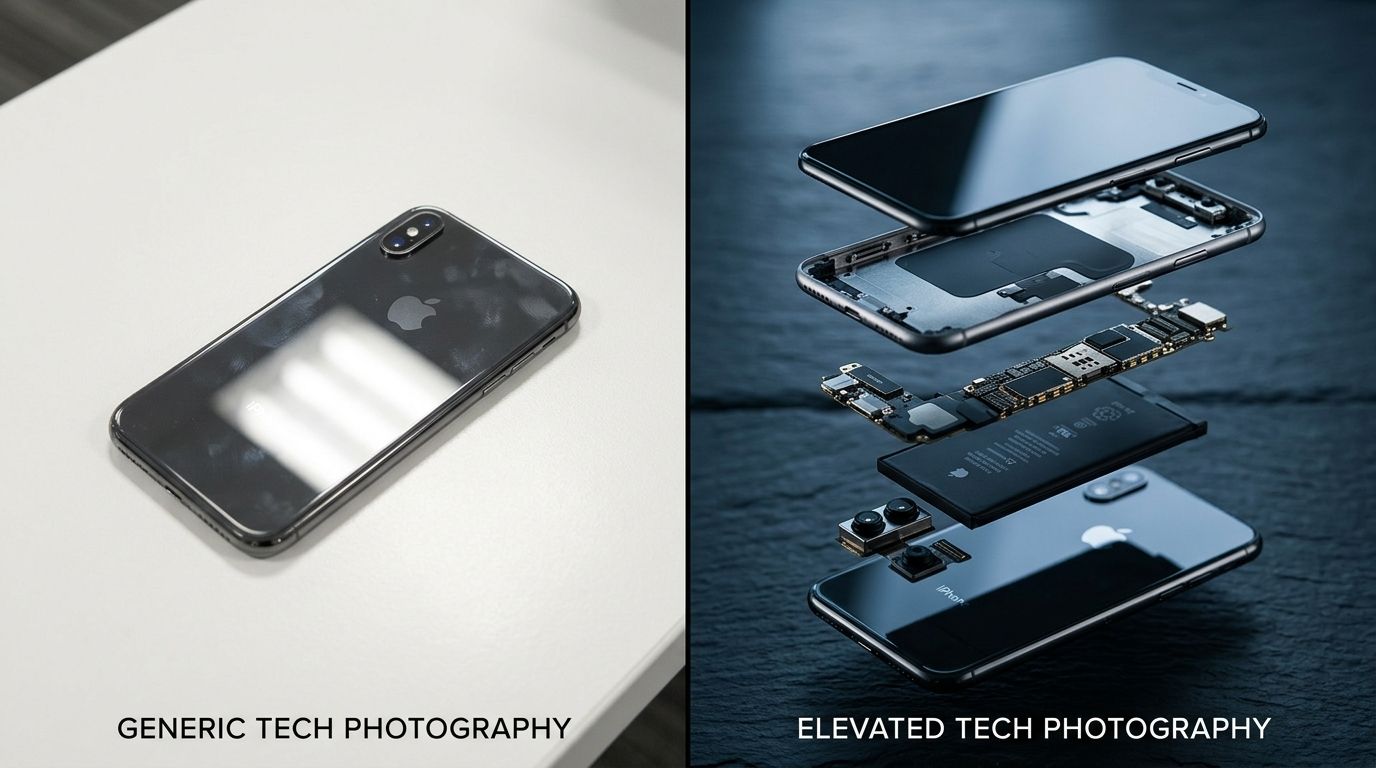
A clean directional lighting setup highlights the metallic texture of the chassis without washing out the finer product details.
The problem with standard technology product images
If you put five competing wireless earbuds next to each other on a white background, the average consumer cannot tell them apart. When your technology product images lack environmental context or texture, you force the buyer to read a spec sheet to find your value proposition. Most buyers will never read the spec sheet.
Flat lighting is the primary offender here. Photographers default to flooding the product with large softboxes to avoid creating harsh reflections on glossy plastic. This safely illuminates the entire device but destroys the micro-textures that signal build quality. Brushed aluminum starts to look like cheap gray plastic. Matte finishes lose their grip texture. By trying to make the shot technically perfect and shadowless, you strip away the exact visual cues that make the product feel expensive.
Beating the white background trap
A pure white catalog shot is necessary for platform compliance. It should never be the only image you upload. Modern ecommerce requires a visual hierarchy. The hero image secures the click, but the secondary images do the heavy lifting of proving value. If your carousel is just six different angles of the device on a white background, you are wasting valuable real estate.
To fix this, you must introduce deliberate shadows. Mastering the essential lighting setups prevents your gadgets from looking like cheap knockoffs. Use a hard directional light raking across the top of the device to catch the edge of the buttons. Let deep shadows form on the opposite side to establish depth. A product that casts a shadow feels real. A product floating in nothingness feels like a rendering.
How to photograph electronics without losing the details
Consumer electronics are arguably the most frustrating items to shoot in a studio. You are dealing with injection-molded plastics, glass screens, chrome bezels, and LED indicators all housed in one tiny footprint. Each of these materials requires a completely different approach to light.
If you expose the camera sensor for the dark matte chassis, the bright LED screen will blow out into a pure white mess. If you expose for the screen, the chassis drops into absolute blackness. There is no single correct exposure setting that solves this.
Mastering reflective surface photography
Tackling screen photography electronics is an exercise in composite building. You must lock your camera down on a heavy tripod. You cannot bump it even a millimeter.
First, you take an exposure with the studio strobes firing. This lights up the plastic, catches the metallic edges, and gives the physical device volume. During this shot, the screen will likely reflect your softboxes or just look gray and dead. Second, you turn off all the studio lights. You plunge the room into total darkness. You wake the device up, dial the screen brightness to maximum, and take a long exposure that captures only the glowing interface. Finally, you blend these two images in post-production. The chassis from the first shot frames the perfect screen from the second shot.
(Worth noting: this composite process adds significant post-production time per SKU. If you have a tight margin on a low-cost accessory, you must weigh whether perfect screen glow is worth the hourly retouching rate).
Showing scale and context in lifestyle electronics photography
Numbers on a page mean very little to a consumer trying to visualize a product in their home. Stating that a bluetooth speaker is eight inches tall does not help them know if it will fit under their kitchen cabinets. You have to anchor the tech in reality.
This is where understanding creating lifestyle product photos becomes critical to your conversion rate. A drone sitting on a table is just a piece of plastic. A drone sitting on the tailgate of a truck next to a hiking backpack tells a story about adventure. Lifestyle electronics photography bridges the gap between technical specs and human utility.
Making tech look human
Tech often feels cold. Incorporating human elements softens the presentation. You do not always need a full model holding the device. Often, a hand reaching into the frame to adjust a dial is enough to convey scale and interaction. If you are selling a smart thermostat, show a hand turning the outer ring. The user instantly understands the physical mechanics of the device without reading a manual.
The limitation of lifestyle photography has always been the budget. Renting a mid-century modern living room just to shoot a soundbar is a logistical nightmare. The invoices pile up before you even press the shutter. Today, brands simply shoot the soundbar clean in the studio and upload it to CherryShot AI. By selecting the Lifestyle or Minimalist visual mode, they generate photorealistic living room environments around the product in minutes.
Highlighting what matters with feature callout photography
Consumers have a remarkably short attention span. If your device has a revolutionary new cooling vent or a proprietary magnetic charging port, you cannot hide that detail in bullet point number seven on your product page. You must pull it forward visually.
Electronics brand photography relies heavily on macro lenses. A 100mm macro lens allows you to get incredibly close to the device without distorting the straight lines of the casing. You want to fill the entire frame with the single feature that sets you apart. If your mechanical keyboard uses custom switches, pull a keycap off and shoot the exposed switch housing so the buyer can see the engineering.
Infographic product photography tech
The best gadget photography ecommerce brands take these macro shots and turn them into infographics. They overlay clean text and arrows directly onto the image. This immediately addresses buyer hesitation.
If you are selling a USB-C hub, an infographic shot showing exactly which cords plug into which ports removes the guesswork. You visually answer the compatibility questions that normally result in cart abandonment. Do not assume the customer knows what an HDMI 2.1 port looks like. Point to it. Label it. Make the buying decision effortless.
| Photography Style | Primary Purpose | Lighting Approach |
|---|---|---|
| White Background Catalog | Meet marketplace compliance requirements | Soft, even flooding to eliminate deep shadows |
| Feature Callout Macro | Explain proprietary technical details | Directional lighting to highlight textures |
| Lifestyle Environment | Demonstrate physical scale and context | Natural ambient blending with practical set lights |
Scaling gadget photography ecommerce operations
The biggest hurdle for any electronics brand is the launch cycle. When you refresh a product line, you are suddenly dealing with three new devices, each in four different colorways. That is twelve distinct SKUs that need heroic catalog shots, macro feature callouts, and diverse lifestyle environments.
Running a traditional shoot for that volume will easily consume your entire quarter's marketing budget. The math simply does not work anymore. Smart founders are shifting their workflow. They capture one perfect, cleanly lit hero image of each new colorway. Then they use AI to build out the rest of the campaign assets.
The math of launch cycles
If you want to understand the exact shift in production margins, seeing how AI product photography works clarifies the new baseline. You upload the base product shot to CherryShot AI. You select the Magazine mode for your high-contrast hero banners. You switch to Influencer mode for your social media assets. You generate dozens of usable, campaign-ready images while your competitor is still waiting for their photographer to send over the first round of raw files for review.
This approach protects your margin. It also frees you up to launch products faster, unblocking your supply chain from your content calendar.
Tech products demand precision. Your photography should reflect the engineering that went into the device. Light it carefully, show the scale, call out the features that matter, and use modern tools to generate the environments your customers want to see.
Key Takeaways
- Flat lighting destroys the premium micro-textures of plastics and metals.
- Screens and chassis must be photographed in separate exposures and merged later.
- Macro feature callouts paired with text overlays prevent cart abandonment.
- AI generation replaces the need for renting expensive lifestyle studio sets.
Frequently Asked Questions
How do I photograph electronics for ecommerce?
You must use directional lighting setups to shape the product while avoiding flat exposure on reflective surfaces. Consumer tech products rely on physical micro-textures like brushed aluminum or matte plastic to convey a premium price point to the buyer. Combine a hard, angled strobe light for the physical chassis with a separate, long exposure shot in a dark room to capture the glowing screen interface perfectly.
How do I photograph a product with a reflective screen?
You capture the glowing interface and the physical bezel in two separate exposures before merging them in post-production. Camera sensors lack the dynamic range to correctly expose a bright internal light source and a dark matte chassis at the exact same time. Lock your camera onto a heavy tripod, shoot the unlit screen with your studio strobes firing, then turn off all ambient light to photograph the active display.
What is feature callout photography for electronics?
This visual technique pairs tight macro shots of specific device components with clean text overlays to explain technical functionality. Shoppers rarely read the entire technical specification sheet before making a purchase decision on an expensive new gadget. Frame a 100mm lens directly on a unique cooling vent or a proprietary magnetic charging port, adding arrows to answer compatibility questions instantly.
How do I make electronics photos look premium?
You introduce deliberate, dramatic shadows across the device to establish depth and highlight the manufacturing materials. Flooding a gadget with massive softboxes eliminates the subtle visual cues that separate an expensive smart home hub from a cheap plastic replica. Position a single hard light source at a steep angle above the product to catch the sharp edge of the buttons and the curve of the glass.
Can AI help with electronics product photography?
Artificial intelligence tools generate photorealistic living environments around flat catalog images of your hardware. Renting architectural studio sets and hiring professional set designers destroys the production margin on lower-cost consumer tech accessories. Upload a cleanly lit base shot of a soundbar on a white background and use software like CherryShot AI to place it directly onto a styled mid-century modern credenza.
A great tech product deserves imagery that matches its engineering. Stop settling for the same sterile white backgrounds your competitors use. Focus on the details, nail the lighting, and build out environments that show exactly how the gadget fits into your customer's daily life.
If you are ready to scale your visual assets without waiting weeks for an agency to deliver, upload your clean product shots to CherryShot AI and generate campaign-ready environments today.
Audit your product page images before your next campaign
Review your current electronics listings to see if flat lighting is hiding your premium materials. Take your cleanest white-background catalog shots and place them into natural lifestyle environments to test how context impacts your conversion rates.
Try CherryShot AI