CherryShot AI

    Bag Photography Ecommerce: How to Photograph Handbags That Actually Sell

    April 01, 2026

    Shooting bag photography ecommerce listings requires capturing shape, texture, and scale in a single frame. You must stuff the bag to its natural volume, light the leather to reveal its grain without blowing out the hardware, and provide on-model context to show accurate proportions. Any brand still shooting flat, lifeless bags on seamless white paper is losing sales to competitors who understand visual context.

    The standard requirement for how to photograph handbags for an online store includes a minimum of five specific shots per product. You need a front hero angle, a 45-degree three-quarter profile, a detailed macro shot of the hardware or stitching, a view of the interior lining, and a lifestyle image demonstrating true scale against a human body. Providing these visual answers directly reduces customer hesitation at checkout.

    Key Takeaways

    • Stuff bags with tissue paper or bubble wrap to retain their structural shape during shooting.
    • Use diffused side lighting to highlight leather textures without causing harsh reflections on metal hardware.
    • Capture at least five distinct angles per product to answer buyer questions and decrease return rates.
    • Leverage AI tools to generate on-model contextual images without the high costs of hiring human models.
    75%

    of online shoppers say product photo quality is the most important feature influencing their purchase decision. eMarketer Industry Benchmark (Needs Verification), 2023

    Setting Up the Perfect Bag Photography Ecommerce Shoot

    Getting the physical product ready is the most labor-intensive part of the entire photography process. Bags shipped from a manufacturer arrive flat, severely creased, and lacking the internal structure they will have when a customer actually uses them on the street. Your very first job is to bring that silhouette back to life before a camera ever enters the studio. Doing this correctly prevents hours of tedious digital manipulation later.

    Stuffing and Shaping Your Handbags

    You should almost never photograph a structured bag while it is empty. Soft leather, canvas, and unstructured tote bags might drape beautifully on their own, but briefcases, cross-body bags, and satchels require serious internal support. Use plain white tissue paper, clean bubble wrap, or dedicated photography stuffing blocks to fill out the interior volume. Avoid using old newspaper because the printing ink can easily transfer and ruin light-colored interior linings.

    Fill the bag until it looks exactly how it would appear if a customer had their wallet, mobile phone, and daily essentials inside. Pay extremely close attention to the carrying straps and handles. Let them fall naturally over the front, or suspend them upright using clear fishing line that you can easily clone out in post-production. The handles often communicate the overall rigidity of the piece, so they need to sit exactly right.

    Choosing Between Flat Lays and Upright Styling

    Accessories flat lay photography works exceptionally well for small items like wallets, cardholders, and unstructured canvas totes. Flat lays allow you to arrange multiple items creatively, style them with complementary props, and shoot directly from directly above using an overhead arm. This method is incredibly fast and efficient for smaller goods.

    However, structured handbags absolutely require upright styling. You need to show the base, the side gussets, and the true three-dimensional silhouette of the product. Prop the bag upright on an invisible acrylic stand if it struggles to sit perfectly flat on its own. Ensure the bottom edge is perfectly horizontal to the camera lens so the bag does not look warped or distorted in the final image.

    Mastering Lighting for Leather Goods Photography Ecommerce

    Lighting dictates exactly how expensive your product looks to the consumer. High-end leather requires careful manipulation of shadows and highlights to communicate material quality purely through a computer screen. You want the customer to practically feel the grain of the material just by looking at the thumbnail. Standard flat lighting will ruin this effect completely.

    Highlighting Texture in Suede and Grain Leather

    Suede and pebble-grain leathers absorb and reflect light entirely differently than smooth calfskin or synthetics. To capture these distinct textures accurately, you must rely heavily on directional side lighting. Position your main light source at a sharp forty-five-degree angle relative to the product. This steep angle creates micro-shadows across the microscopic grain of the leather.

    Those tiny shadows are precisely what give the material a three-dimensional appearance on a flat digital screen. If you blast the bag with direct frontal light from right beside the camera, you wash out all of that beautiful detail and make expensive leather look like cheap vinyl.

    (Worth noting: adjusting your lighting ratio to favor one strong directional light rather than two perfectly equal lights will save you hours of complex color correction later.)

    Avoiding Glare on Hardware and Glossy Finishes

    Patent leather and polished brass hardware act exactly like curved mirrors. They will inevitably reflect your studio lights, your camera equipment, and even your own silhouette if you stand too close. To combat this, use massive diffusion panels or bounce your main strobe off a large white ceiling or V-flat to drastically soften the light source.

    If the metallic hardware is still catching harsh hot spots that distract the eye, use a small piece of black foam core to block the light specifically from hitting that reflective surface. This technique, called negative fill, adds deep contrast back into glossy surfaces and prevents the metal details from blowing out to pure white pixels.

    AI-generated product photo of a structured tan leather handbag sitting on a textured stone plinth with soft directional lighting
    Directional side lighting highlights the natural grain of the leather while keeping the metallic hardware free from harsh glare.

    Essential Handbag Photography Angles You Must Capture

    Your bag product photography guide must prioritize answering vital visual questions for the prospective buyer. Online customers cannot pick the item up, test the zipper, or check the stitching depth with their own hands. Your carefully chosen camera angles must do all of that heavy lifting for them.

    The Hero Shot vs The Detail Shot

    The hero shot is the primary main image on your product page. It should always be a clean, well-lit, three-quarter angle that shows the front face and one side panel of the bag simultaneously. This specific angle instantly communicates depth, shape, and overall scale to the viewer. Never use a perfectly flat straight-on shot as your hero image unless the bag has a completely flat profile.

    Detail shots come immediately after the hero image. Zoom in tightly on the custom zipper pulls, the logo embossing, the base studs, and the strap connections. Highlighting these structural elements proves the construction quality of the piece and justifies a premium price point to the consumer.

    Capturing the Interior and Hardware

    Many ecommerce stores completely forget to show the inside of their bags. Buyers desperately need to know if their laptop fits or if there is a dedicated secure pocket for their valuables. Open the bag fully, adjust your studio lighting to illuminate the dark interior cavity, and take a clear overhead shot of the internal compartments.

    If the lining features a custom print or premium suede finish, make sure your lighting captures that texture just as well as the exterior leather. Consumers view the interior finishing as a massive indicator of overall brand quality.

    Scaling Your Accessories Photography Ecommerce Strategy

    Producing these five essential shots for every single SKU in a massive collection takes weeks of expensive studio time. Traditional photo shoots require coordinating lighting technicians, prop stylists, and post-production retouchers. The heavy logistics involved throttle how fast you can bring new inventory to market, putting you behind faster competitors.

    Moving From Studio Shoots to AI Workflows

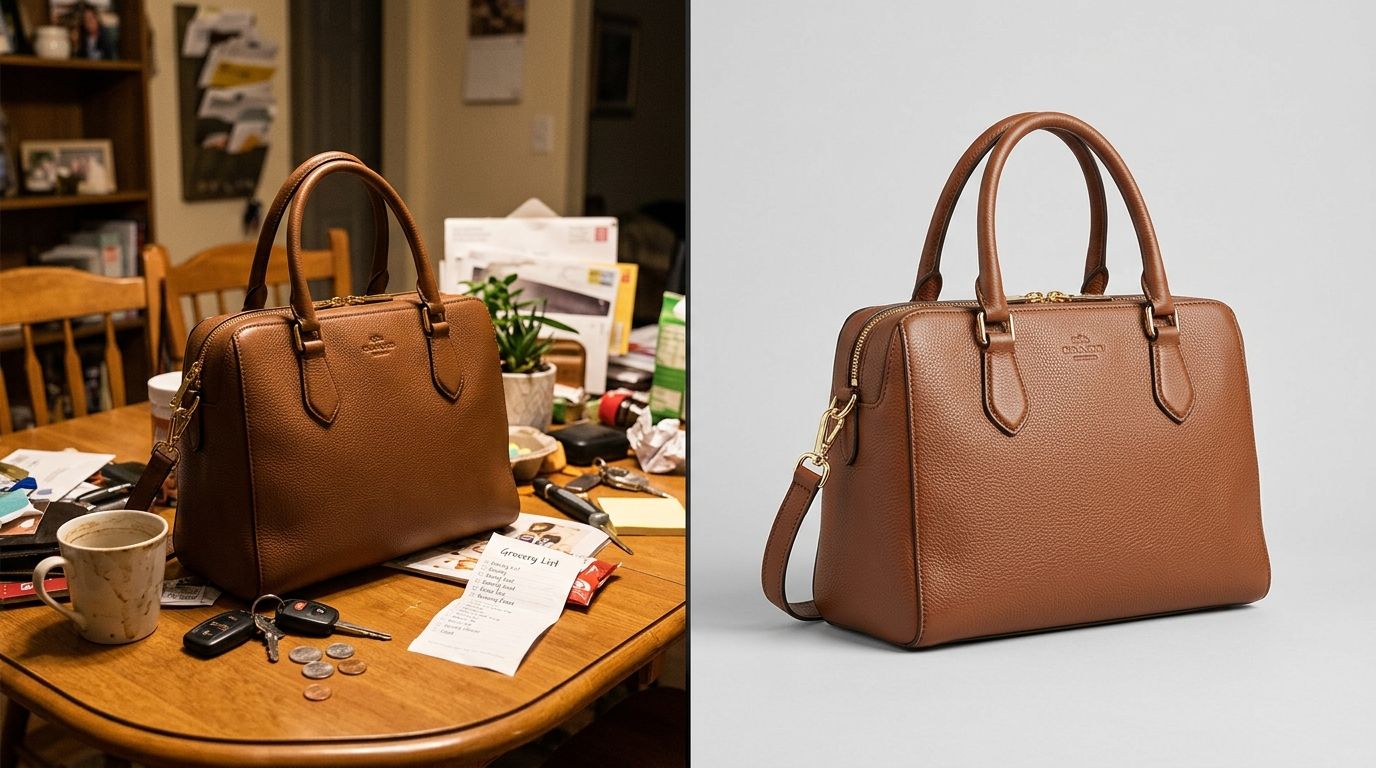
    Brands are now skipping the traditional studio entirely for their vast catalog volume. You can shoot a basic, well-lit image of your handbag on a smartphone in your office and let intelligent software handle the complex environmental styling.

    Tools like CherryShot AI take that single basic input and place the bag in a high-end editorial environment automatically. You simply select a visual mode like Minimalist, Luxury, or Lifestyle, and the system generates incredibly realistic campaign-ready images in just a few minutes.

    This approach completely removes the need to build physical sets or rent expensive studio space.

    The average DTC brand shoots new inventory four times a year. Swapping those quarterly physical shoots for an AI workflow cuts weeks out of the standard launch timeline and saves thousands of dollars in contractor day rates.

    Ensuring Consistency Across Your Entire Catalog

    Visual consistency builds brand trust.

    If one bag in your store is shot on a stark white background and the next is shot on a moody gray gradient, the catalog looks entirely disjointed and amateurish. Using an AI product photography tool allows you to lock in a highly specific aesthetic for your entire brand. You can batch process a completely new line of accessories through the exact same visual mode, ensuring that every single thumbnail on your collection page matches perfectly.

    This uniformity creates a premium shopping experience that keeps customers engaged on the page longer.

    Frequently Asked Questions

    What angles work best for bag and handbag photography?

    The most effective angles include a straight-on front view, a 45-degree three-quarter profile to show depth, a clear shot of the back, and extreme close-ups of the hardware. You must also include an overhead view of the interior to demonstrate capacity and pocket layout.

    How do I show the size of a bag accurately in photos?

    The best way to communicate scale is by placing the bag next to a recognizable object or placing it on a human model. Standard measurements in the product description are rarely enough for shoppers to visualize the physical dimensions. If you cannot arrange a lifestyle shoot with a human model, photographing the bag with common items like a smartphone, a 13-inch laptop, or a standard wallet provides immediate visual context. AI lifestyle generation tools also solve this by rendering the bag in a proportionally accurate real-world setting.

    Should bags be photographed stuffed or flat?

    Always photograph structured bags firmly stuffed with tissue paper to demonstrate their true silhouette and prevent unnatural creasing.

    What lighting works best for leather bag photography?

    Diffused side lighting is the optimal setup for leather products. By placing a softbox at a 45-degree angle to the side of the bag, you create subtle shadows that emphasize the texture and grain of the material. A secondary fill light or a white reflector placed on the opposite side ensures those shadows do not become completely black, preserving the details in the darker areas of the product.

    If you want to see what this looks like for your specific product category, CherryShot AI starts at $10 for 50 images at cherryshot.ai.