Pinterest Product Photography: How to Create Images That Get Saved, Shared, and Drive Purchase Intent
Most ecommerce brands treat Pinterest like a dumping ground for existing creative assets. They take the square product photos they already shot for Instagram, crop them awkwardly into a vertical frame, and wonder why their referral traffic stays flat. Pinterest product photography requires a completely different approach. It is not a social network. It is a visual search engine built around future planning. Your images need to show the product living in the exact world the customer wants to build.
Definition
Pinterest product photography involves capturing and formatting physical goods specifically for a vertical visual search engine. The practice prioritizes realistic lifestyle context and a strict 2:3 aspect ratio to maximize mobile screen real estate. Proper execution aligns your visual assets with user inspiration boards to drive outbound ecommerce traffic.
If your current strategy consists of uploading plain white background catalog shots, you are entirely invisible to the platform algorithm. Users do not pin isolated objects. They pin aesthetics, ideas, and complete looks. To drive actual purchase intent on this platform, you have to completely rethink how you frame your products.
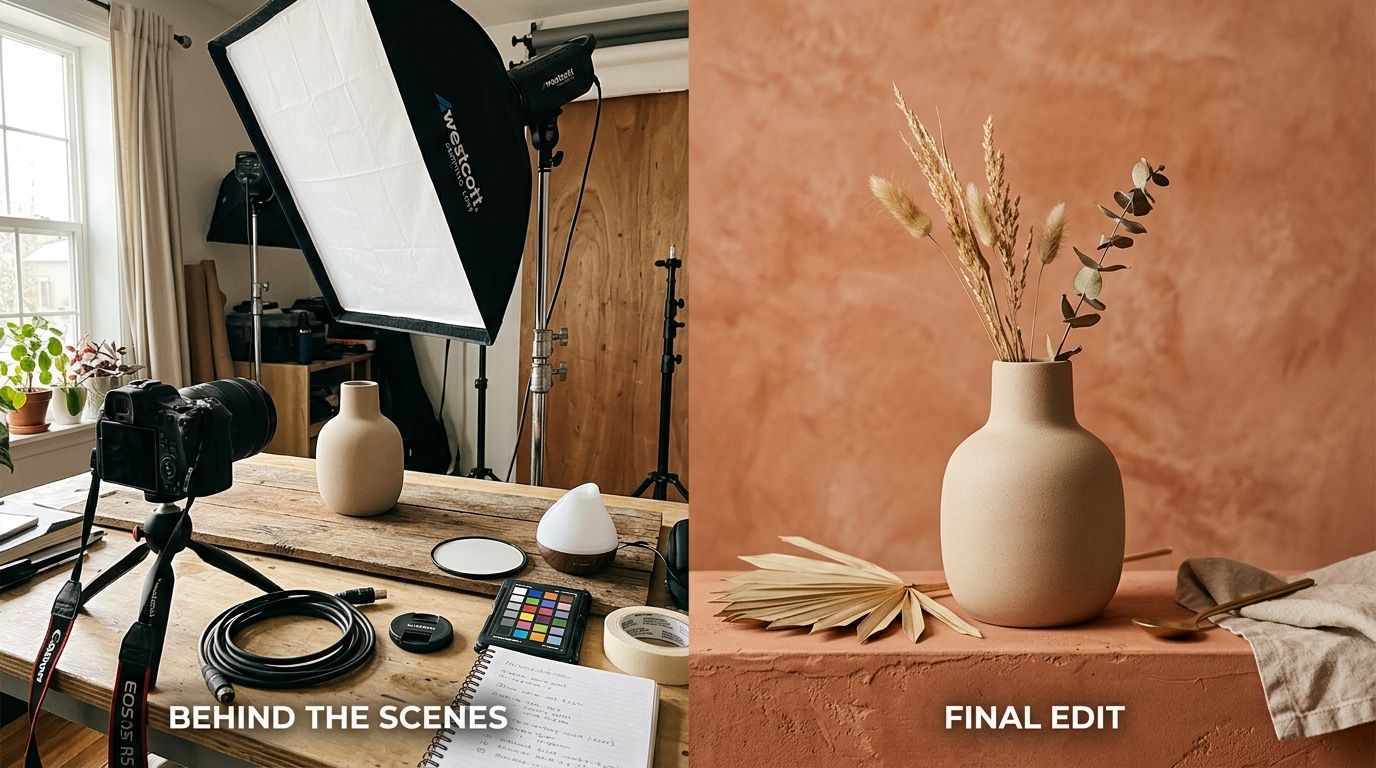
Products shot in realistic, aspirational environments consistently outperform isolated studio assets on Pinterest.
(Worth noting: pinning an isolated product on a pure white background might work if someone is specifically searching for your exact SKU using the platform shopping tab. But for discovery and organic growth, pure studio shots simply do not get saved to user boards.)
The visual language of a high-converting Pin
Understanding how to photograph products for Pinterest starts with understanding the screen real estate of a mobile device. Pinterest feeds are organized into masonry grids. The width of a pin is fixed, but the height is variable. This means taller images physically take up more space on the screen.
| Feature | Standard Ecommerce Photo | Pinterest Product Pin |
|---|---|---|
| Aspect Ratio | 1:1 (Square) or 4:5 | 2:3 (Vertical) |
| Environment | Pure white or solid color | Realistic lifestyle context |
| Subject Placement | Fills the entire frame | Lower third to leave room for text |
| Primary Function | Clear product examination | Aesthetic inspiration and discovery |
Aspect ratio dictates your framing
The non-negotiable standard for a Pinterest product pin image is a 2:3 aspect ratio. Most brands output these at 1000 pixels wide by 1500 pixels tall. If you shoot your products horizontally, you will be forced to crop out massive amounts of contextual detail to make the image fit the platform standards.
You must plan your shoot with verticality in mind. When looking through the viewfinder, the photographer needs to leave room at the top and bottom of the subject. This negative space is critical. Pinterest is highly text-driven. A tall image pinterest products strategy almost always involves placing a text overlay at the top of the image to give the user context about what they are clicking on. If your product takes up the entire vertical frame, any text you add will cover the item itself. We see this constantly when brands try to build scroll-stopping product images for social media but fail to adjust their focal length for the specific platform they are publishing to.
Context is the algorithm
If you want to know what makes a good Pinterest product image, look at the boards your target customers are building. A user looking for a new sofa does not just want a picture of a sofa. They want to see what rug goes under it, what coffee table sits in front of it, and how the morning light hits the fabric.
Why lifestyle always beats the white background
Pinterest visual standards for ecommerce demand context. Your job is to reduce the imagination required for the customer to see your product in their own life. If you sell skincare, do not shoot the bottle floating in a void. Shoot it sitting on a marble bathroom counter next to a plush white towel and a running faucet.
For a deep dive into building out these environments, our guide on mastering lifestyle product photography covers the specific lighting and prop setups required to make these scenes feel authentic rather than staged. Authentic scenes get saved. Staged scenes look like ads, and users aggressively scroll past ads on their way to authentic inspiration.
Scaling Pinterest ecommerce photos without breaking the bank
Knowing that you need contextual, vertical lifestyle imagery is one thing. Actually producing it at a volume that satisfies the Pinterest algorithm is a logistical nightmare.
The volume problem
Pinterest rewards fresh pins. You cannot upload one image of your product and expect it to drive traffic for a year. The most successful brands on the platform create five to ten different pin variations for a single SKU. They change the background, the text overlay, and the styling to appeal to different aesthetic boards.
Any brand trying to execute this volume through a traditional studio shoot is going to destroy their profit margins. Booking a studio, hiring stylists, and swapping out sets just to get ten different variations of a moisturizer bottle takes days and thousands of dollars. The invoice is heavy, and the turnaround time means you are always behind your marketing schedule.
AI product photography completely eliminates this bottleneck. You can upload a basic, well-lit photo of your product to CherryShot AI and instantly place it into dozens of different environments. By selecting the Lifestyle, Magazine, or Influencer modes, you can generate campaign-ready Pinterest pins in minutes. The per-image cost drops to under $5, and pricing starts at just $10 for 50 images. You get the massive volume of fresh, vertical imagery the platform demands, without the three weeks of back-and-forth with a freelance photographer.
Anatomy of a Pin that drives purchase intent
A beautiful image might get saved to a mood board, but a save does not pay your warehouse staff. You need that save to turn into an outbound click to your store.
Text overlays and product placement
Using text overlays on your Pins increases click-through rates, but it comes with a trade-off. Heavily text-branded images get saved slightly less often to personal aesthetic mood boards because users want their boards to look clean. You have to decide if you are optimizing for immediate clicks or long-term brand presence. Most successful brands test both.
When planning your pinterest shopping product photography, position the product in the lower third of the vertical frame. This allows the user to see the item clearly while leaving the upper two-thirds open for beautiful background elements and elegant typography. If you are trying to figure out what drives actual sales across platforms, understanding the elements of high-converting product photos will help you balance aesthetic appeal with commercial viability.
Common mistakes killing your outbound clicks
The most frequent mistake I see from ecommerce operators is treating Pinterest like a secondary distribution channel. They refuse to invest the time required to format their assets correctly.
Cropping traditional square assets
Taking an Instagram square and slapping blurred borders on the top and bottom to make it fit a vertical format looks incredibly cheap. The Pinterest user base is highly visual. They immediately spot low-effort content and ignore it. If you do not have native vertical imagery, you are better off not posting at all until you can generate the correct formats.
Furthermore, failing to leverage rich pins is a massive unforced error. Your photography should be paired with metadata that pulls the current price and availability directly from your Shopify or BigCommerce store. When users see a beautiful image of a product, they need to know instantly that it is actually available for purchase.
Key Takeaways
- Pinterest product photography demands a strict 2:3 aspect ratio to maximize screen real estate.
- Lifestyle imagery dramatically outperforms isolated studio backgrounds by providing vital aesthetic context.
- Leave intentional negative space in your vertical framing to accommodate text overlays.
- Use AI generation tools to scale the massive volume of fresh image variations required by the platform algorithm.
Frequently Asked Questions
What is the best image format for Pinterest product photos?
The optimal image format for Pinterest product photos is a vertical layout built on a strict 2:3 aspect ratio. This specific structural dimension guarantees your visual assets consume the maximum allowable vertical space in the mobile feed before the algorithm forces a crop. Output your final files as compressed JPEG or WebP formats at exactly 1000 pixels wide by 1500 pixels tall to maintain fast loading speeds.
How do I photograph products for Pinterest?
Photograph products for Pinterest by building a wider contextual scene around the item instead of shooting it in isolation. Framing shots vertically through the camera viewfinder provides the necessary negative space near the top and bottom margins for future text overlays. If you sell a ceramic mug, style it full of coffee resting next to a book and reading glasses on a textured wooden surface.
What Pinterest image size is best for ecommerce?
Ecommerce operators must rigidly adopt the 1000 by 1500 pixel specification for all platform uploads. Files shorter than this standard lose valuable screen real estate, while anything taller than a 2:1 ratio forces algorithm truncation that requires extra user clicks. Format your final exports to these exact dimensions to guarantee your visual merchandising displays perfectly across all mobile devices.
Does lifestyle photography do better on Pinterest?
Lifestyle photography consistently outperforms standard studio background shots across all organic Pinterest categories. Shoppers browse the platform to plan their physical environments and personal wardrobes, meaning they deliberately save complete aesthetic concepts rather than isolated objects on white backgrounds. Style your physical merchandise inside a realistic room setting with complementary props to help the prospective customer immediately visualize owning the item.
How do I drive ecommerce traffic through Pinterest photography?
Generating outbound ecommerce traffic from Pinterest requires optimizing your images for user saves first. Photography that perfectly matches the aesthetic quality of organic inspiration boards naturally accumulates these required saves before users decide to click through. Pair your highly visual lifestyle shots with clear text overlays promising a specific solution, and always route the backend link directly to the exact product page.
Building a robust presence on Pinterest requires treating it as a primary visual channel, not a recycling bin for your Instagram feed. By committing to vertical framing, lifestyle contexts, and high-volume testing, you turn your product catalog into a discovery engine. When you are ready to stop fighting with freelance schedules and start producing dozens of campaign-ready variations in an afternoon, CherryShot AI is exactly where you should start.
Format your catalog for Pinterest in minutes
Stop manually cropping horizontal photos into awkward vertical frames for your inspiration boards. Take your existing product images and instantly place them into authentic lifestyle environments scaled exactly to the optimal 2:3 vertical ratio.
Try CherryShot AI