Product Photo Retouching: What to Fix and What to Leave
Retouching product photos is a balancing act between making an item look premium and making it look entirely fake. The second you cross the line into fake, you are buying a return label. Most ecommerce founders treat post-production as a magical step where a mediocre shoot is rescued by a freelance editor. This mindset is dangerous. You pay an hourly rate to have someone systematically erase the reality of your product.
Definition
Product photo retouching is the systematic post-production process of correcting lighting, removing temporary flaws, and ensuring strict color accuracy in ecommerce imagery. It focuses on presenting physical goods exactly as they appear in real life without altering their permanent structural reality.
Any retouching process that removes the natural texture of a leather bag or the subtle weave of a cotton shirt is actively stealing money from your margin. Customers do not buy digital renders. They buy physical goods. When the package arrives and the item inside lacks the impossible plastic smoothness of the website photo, the customer feels lied to. Trust evaporates instantly.
You need a strict framework for what gets fixed and what gets left alone. Light retouching product photography should focus purely on standardizing backgrounds, correcting color to match the physical item, and removing temporary flaws. Everything else is structural reality. If you alter the shape or the permanent texture of an item, you are no longer selling the product you actually manufacture.
The financial cost of getting it wrong
We need to talk about what happens when your product photography retouching guide allows editors to run wild. Founders often complain about low conversion rates on heavily trafficked product pages. They tweak the copy, they lower the price, and they change the button color. They rarely look at the images with an objective eye.
If your item looks like it was generated by an early video game engine, shoppers will bounce. Consumers have spent decades looking at screens. They subconsciously know what real light looks like when it hits real fabric. If your images have been airbrushed to death, the brain flags it as cheap.
The bigger issue happens after the sale. Poor imagery is the leading driver of preventable returns. If you want to understand where that specific cost hides in your warehouse logistics, learning how to fix high return rates with photography is the fastest way to plug the leak. You are paying shipping twice for a transaction that generated zero revenue, purely because an editor thought the product would look better without shadows.
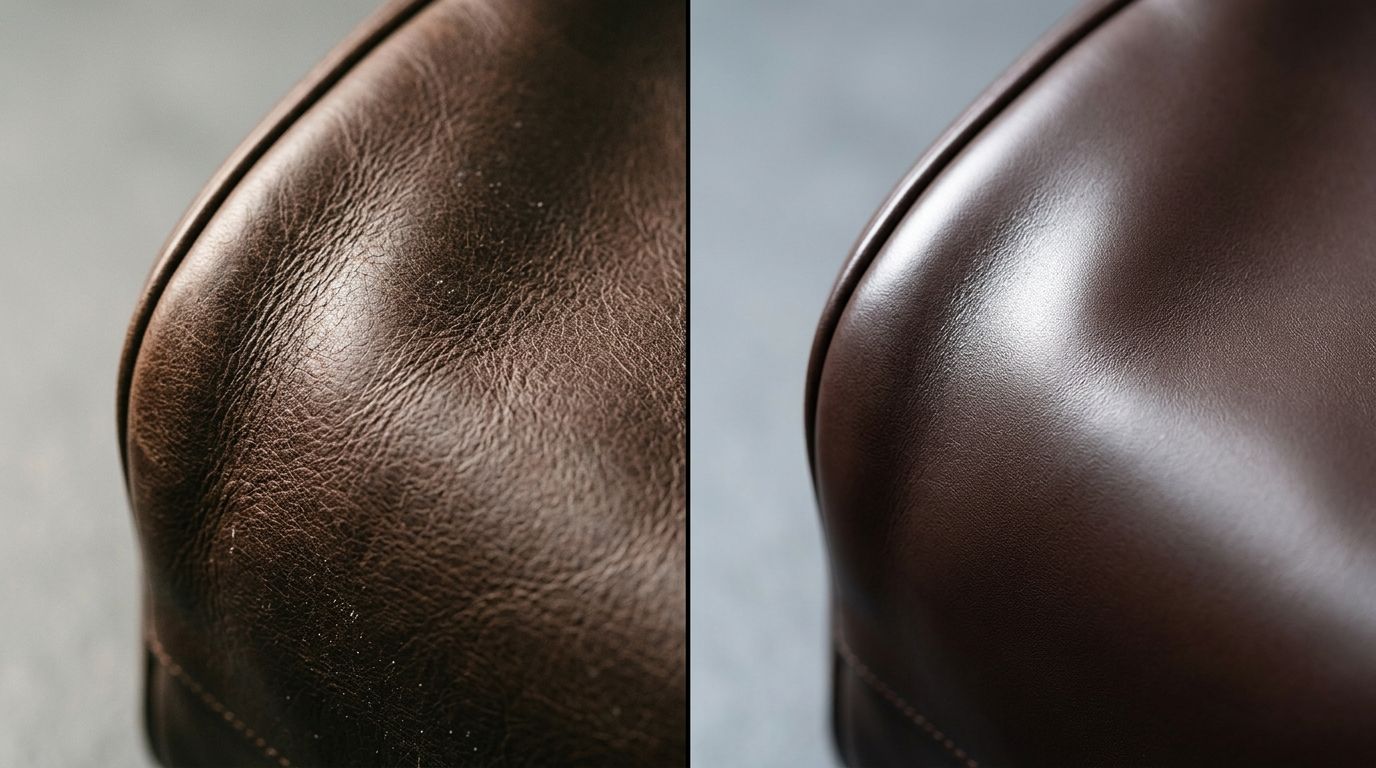
Over-smoothing removes the physical reality of the product, directly inflating your return rates when the item arrives.
The non-negotiables: What you must fix
Having a natural aesthetic does not mean uploading raw files directly from the memory card. There is a baseline level of ecommerce product image retouching required just to be taken seriously as a brand.
Temporary flaws and distractions
The golden rule of retouching is simple. If the flaw will not be on the product the customer receives, you remove it from the photo. A piece of lint on a dark sweater is a temporary flaw. A scuff on the studio floor is a temporary flaw. A stray thread that the stylist forgot to snip is a temporary flaw.
You use the healing brush to eliminate these distractions because they degrade the perceived value of the item. Customers should not be staring at a speck of dust on the camera lens when they should be looking at the hardware on your handbag.
Color correction is mandatory
Color retouching ecommerce catalogs is arguably the most important step in post-production. Camera sensors interpret light differently than the human eye. Studio strobes can cool down warm tones, while continuous lighting can cast unnatural yellow hues over white fabrics.
The red on the screen must perfectly match the red in the box. This requires the editor to have the physical product sitting next to a color-calibrated monitor while they adjust the white balance. If you skip this step, you are practically begging for a wave of customer complaints.
The danger zone: What you must leave alone
This is where most brands lose the plot. They hand off a folder of raw images to an overseas retouching farm with instructions to make everything look perfect. The files come back stripped of all life and character.
Texture, grain, and structural reality
Real materials have texture. Canvas has a rough weave. Suede has directional nap. High-quality leather has natural grain patterns. When an editor applies heavy noise reduction or frequency separation to these materials, they turn premium goods into cheap plastic.
(Worth noting, the obsession with perfect symmetry usually hurts more than it helps. A jacket hanging with absolute mathematical perfection looks like a 3D render, not something a human being can wear.)
If your product has natural imperfections that are part of its character, leave them. If every single item off the manufacturing line features a specific weld mark or a wood knot, masking that out is lying to your buyer. If you find yourself frequently asking why your product images are losing conversion despite high ad spend, check to see if your editors have smoothed away the reality of your inventory.
Shadows and natural light falloff
Shadows prove that an object exists in a physical space. Many amateur editors attempt to lift every shadow until the product appears flat and fully illuminated from all angles. This destroys depth. It makes items look like paper cutouts. Leave the natural contrast alone. It tells the customer the shape and volume of the product they are buying.
AI retouching product photos versus manual correction
We are currently sitting at a massive shift in how brands handle post-production. The old model required booking a studio, shooting raw files, waiting two weeks for basic edits, sending notes back, and finally receiving usable images.
Where the new tools make sense
I will admit a hard truth about our own category here. General-purpose AI image tools are incredible for generating conceptual art, but if you feed them a terrible reference photo lacking any real texture, they cannot magically invent the correct physical material of your product out of thin air. You still need a sharply focused, well-lit baseline shot.
However, purpose-built tools change the math entirely. With CherryShot AI, you upload a standard product image and select a visual mode like Classic, Minimalist, or Luxury. The system automatically handles the background removal, balances the lighting, and generates campaign-ready photos in minutes. It completely bypasses the need for an editor to spend an hour masking out hair or creating fake shadows in complex software. If you are tired of licensing heavy creative suites, editing product photos without Photoshop is now a realistic workflow for catalog volume.
The pricing starts at $10 for 50 images, which immediately undercuts the cost of paying a retoucher by the hour to perform basic background cleanup.
| Element | Manual Rule | AI Approach |
|---|---|---|
| Dust and Lint | Spot heal meticulously. Time consuming. | Cleaned automatically during generation. |
| Backgrounds | Draw complex clipping paths by hand. | Isolated instantly, placed in perfect environments. |
| Material Texture | Requires extreme care not to blur away. | Preserved strictly from the original reference file. |
The brands moving the fastest right now are not debating how many hours to book their freelance editor for the next collection. They are uploading base reference shots, applying the Magazine or Loud Luxury mode, and getting directly to marketing. The bottleneck of waiting weeks for final assets simply does not exist for them anymore.
Frequently Asked Questions
What retouching do product photos need?
Product imagery requires strict color correction, standard background alignment, and the removal of temporary physical distractions. Displaying an item exactly as it looks under optimal studio lighting builds immediate trust with potential buyers browsing your catalog. Editors must eliminate specks of dust, loose lint, or floor scuffs with a healing brush while leaving all permanent material textures strictly untouched.
How much retouching is too much for ecommerce product photos?
Post-production goes too far the moment an editor alters the actual structural reality or permanent physical material of an item. Buyers expect physical goods to look exactly like the photographs presented on your website without artificial enhancements. Erasing the natural grain of a leather wallet or aggressively warping the shape of a cotton garment crosses the line into false advertising.
Does over-retouching product photos increase returns?
Excessive image manipulation directly drives up preventable ecommerce return rates across your entire catalog. Shoppers who purchase an item based on highly altered photos inevitably feel deceived when the physical product lacks that artificial perfection. Stop masking out realistic shadows or smoothing natural fabrics if you want to keep those shipped orders from bouncing back to your warehouse facility.
How do I retouch product photos accurately?
Editors must work from a strictly color-calibrated monitor while keeping the actual physical product sitting nearby as a visual reference. Adjusting exposure and white balance to match the real-life item prevents massive discrepancies between the screen and the shipping box. Limit your healing brush specifically to genuine anomalies like stray threads rather than painting over large sections to correct poor studio lighting.
Can AI retouch product photos automatically?
Modern artificial intelligence platforms handle the heavy lifting of standard catalog post-production without requiring any manual input from expensive retouchers. Automated software systems extract subjects from distracting backgrounds, correct severe lighting imbalances, and place items into professional studio environments. Upload a raw reference image into CherryShot AI to instantly bypass tedious cleanup tasks while fully preserving the true structural integrity of your original inventory.
Key Takeaways
- Remove temporary flaws like dust, but never alter the permanent physical texture of the item.
- Color correction is non-negotiable because the screen color must match the reality inside the shipping box.
- Over-smoothing images makes products look cheap and directly drives up your return rate.
- Automated tools now handle background isolation and lighting correction without the need for manual clipping paths.
Stop paying for post-production that actively harms your conversion rate. By setting strict boundaries on what gets fixed and utilizing tools like CherryShot AI to automate the tedious aspects of image preparation, you protect your margins and your brand trust simultaneously. Get back to launching products instead of arguing over shadows.
Audit your catalog imagery before your next campaign
Review your top-selling product pages today to see if your editors have smoothed away essential material textures. If your current post-production workflow is stripping the physical reality from your items, run your raw photos through CherryShot AI to get clean, professional results that preserve full product integrity.
Try CherryShot AI