TikTok Image Size 2026: Video Dimensions, Thumbnail Specs, and Product Photo Guide
Getting your TikTok image size wrong actively kills your organic reach. The algorithm suppresses content with black bars, odd crops, or low resolutions long before a human ever decides to scroll past it. If you are uploading standard horizontal assets and hoping the platform crops them correctly, you are wasting your production budget.
Definition
TikTok image and video specifications define the pixel resolution and aspect ratio required for native display within the app's vertical feed. Following these constraints ensures your products appear sharp and correctly framed without being obscured by interface buttons.
TikTok video dimensions remain strictly 1080 by 1920 pixels. That is a vertical 9:16 aspect ratio. For ecommerce brands running a TikTok Shop, the rules fracture completely. Your main product photos require a pure white background and a 1:1 square crop. You have to maintain dual asset libraries just to comply with the platform guidelines.
It takes a dedicated team or a fast automated workflow to manage this split. You cannot simply squeeze a lifestyle video into a square catalog slot without degrading the visual authority of your brand.
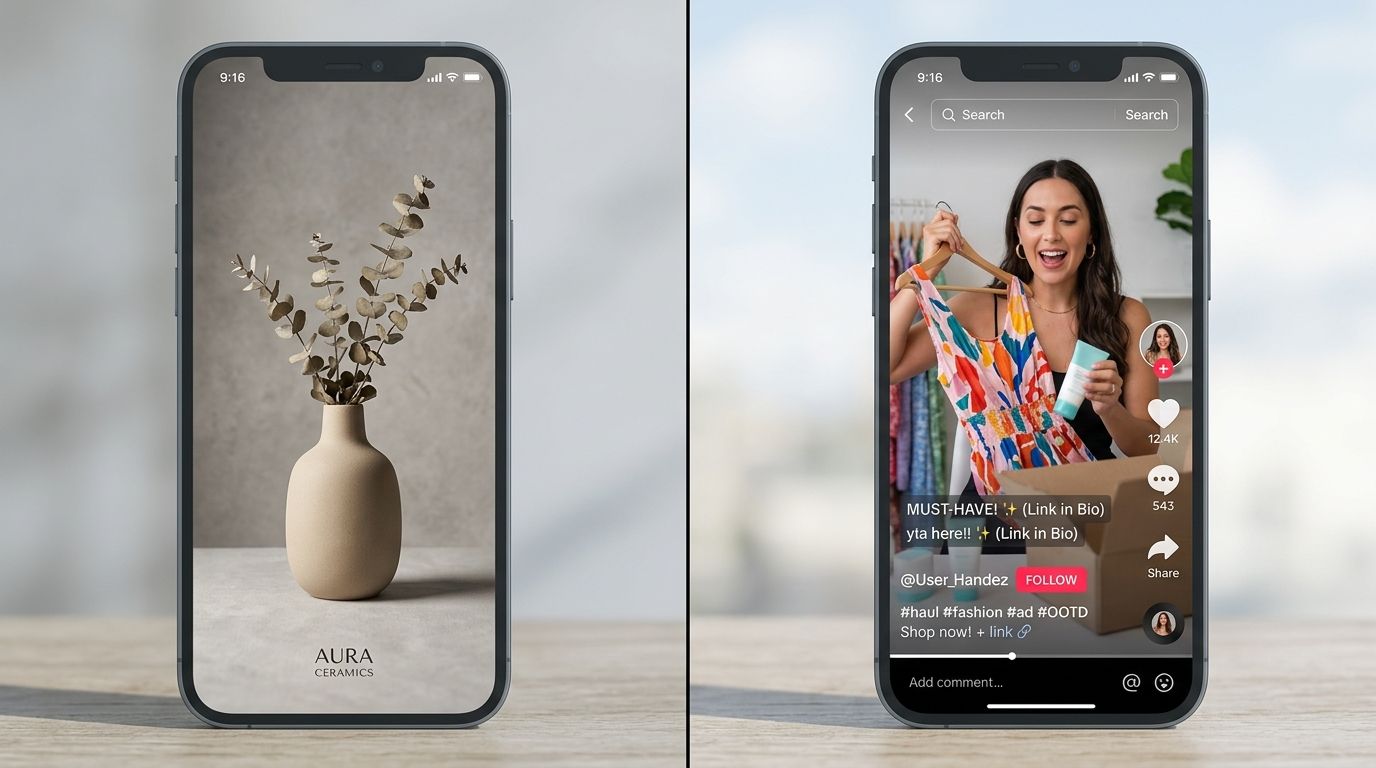
The 9:16 vertical real estate requires strict adherence to safe zones so interface elements do not cover your product.
Core TikTok Video Dimensions
Video is the foundational currency of the platform. If you want maximum distribution on the For You page, your technical specifications must match the native hardware layout of a modern smartphone.
What are the exact video specs?
You need a resolution of 1080 by 1920 pixels. The aspect ratio is 9:16. Your file size must sit below 72 MB for Android devices and 287 MB for iOS devices. Standard MP4 or MOV file types work best. Avoid exotic encoding formats. The platform compresses video heavily upon upload. Starting with the highest possible native resolution prevents your final asset from looking like a pixelated mess.
The safe zone problem
Shooting vertical is only half the job. You have to account for the interface overlay. TikTok places a profile button, like count, comment icon, and share button on the right side of the screen. The bottom holds your caption, hashtags, and music ticker. The top houses system icons and the following feed tabs.
If your product sits in the bottom third of the frame, the caption covers it entirely. We routinely see brands spend thousands on a video shoot only to realize the hero product is completely obscured by the shopping link overlay. Keep all critical visual information in the exact center of the screen. Leave a 150-pixel buffer at the top and a 300-pixel buffer at the bottom.
TikTok Photo Carousel Dimensions
Photo carousels command massive engagement right now. Users swipe through static images at their own pace. This format requires the exact same dimensions as video to look professional.
How do you format carousel photos?
Use 1080 by 1920 pixels. The 9:16 aspect ratio ensures your photos fill the entire screen. If you upload a horizontal image or a standard 4:5 Instagram portrait, TikTok places heavy, blurred backgrounds above and below your image. This destroys the aesthetic of a premium brand. The eye immediately registers the upload as a lazy cross-post.
When mapping out your broader social strategy, checking the latest social ad image dimensions prevents costly formatting errors across Facebook and Instagram. But do not assume those Instagram assets map perfectly to a TikTok carousel. Instagram favors a 4:5 ratio. TikTok demands a full 9:16 bleed.
TikTok Shop Image Requirements
The rules change the moment you transition from content creator to seller. TikTok Shop operates like a traditional ecommerce marketplace wrapped inside an entertainment app. The visual guidelines are rigid. Break them, and your product listings face automatic suspension.
The mandatory main product image
Your primary image must be a 1:1 square. The absolute minimum resolution is 800 by 800 pixels. High-volume sellers upload at 1200 by 1200 pixels to maintain crisp detail when users tap to inspect the item.
The background must be pure white. Not light gray. Not off-white. Pure hex #FFFFFF white. The product itself must occupy at least 60 percent of the image frame. If the product is too small, the listing fails review.
Secondary variant images
Once the algorithm approves your pure white hero image, you gain flexibility. Secondary images can feature lifestyle settings. They can showcase the product in use. You can mix aspect ratios here, allowing 1:1 squares alongside 9:16 vertical lifestyle shots. Most top-performing brands upload a mix of tight macro detail shots and full-body lifestyle imagery in these secondary slots.
The rejection triggers
TikTok Shop automation ruthlessly enforces visual compliance. They will block your listing if the main image includes promotional text, watermarks, or discount graphics. Adding a badge that says "50% Off" directly onto your main product photo results in an immediate flag. You cannot show multiple unrelated products in the primary thumbnail. The image must represent exactly what the customer is buying.
| Platform Use | Ratio | Focus |
|---|---|---|
| Organic Feed | 9:16 | Engagement |
| TikTok Shop | 1:1 | Conversion |
Profile and Thumbnail Specifications
Your profile grid acts as your storefront window. A sloppy grid signals a low-quality brand. The formatting here dictates first impressions when a viral video sends traffic to your main account page.
How do grid thumbnails work?
Video thumbnails pull from your 1080 by 1920 video file. The profile grid crops that vertical image into a tight rectangle right in the center of the frame. If your product sits near the top of your video, it gets cut off entirely on your profile grid. Always center your key visual hooks.
Profile picture rules
Profile pictures must be 200 by 200 pixels. They display as a circle. Do not place critical text near the corners of your square upload file. Ensure your logo fits entirely within the central radius. A clean, high-contrast brand mark works infinitely better than a shrunk-down lifestyle photo for the profile slot.
The Workflow Problem with Vertical Commerce
Any brand running a full studio shoot for standard catalog images in 2026 is paying for logistics, not quality. The invoice is not just the photographer. It is studio rental, the stylist's half-day, the art director's back-and-forth, and the three weeks between brief and delivery.
The requirement to produce 1:1 pure white catalog images alongside 9:16 engaging vertical assets shatters traditional creative budgets. You end up booking separate shoot days just to capture different aspect ratios. Most founders I have talked to cannot name the actual per-image cost of their last shoot. When they calculate it, the number is usually somewhere between $80 and $200 per finished image.
The trade-off of scaling on TikTok is asset volume. You need constant visual refreshment to combat ad fatigue. You need compliant catalog assets for the Shop backend. Syncing these requirements with standard optimizing e-commerce image specs turns into a massive bottleneck.
AI product photography changes that math completely. Upload a basic product image, pick a visual mode, and CherryShot AI generates campaign-ready photos in minutes. The tool automatically handles the background isolation required for TikTok Shop primary images. It then lets you drop that same product into Influencer or Lifestyle modes for your 9:16 carousel content.
The per-image cost drops to under $5. The turnaround goes from weeks to an afternoon. The brands winning on TikTok Shop are not the ones with the biggest production budgets. They are the ones launching the most high-quality SKUs per quarter because they removed the creative bottleneck.
Key Takeaways
- TikTok videos and photo carousels require a strict 1080 x 1920 resolution at a 9:16 aspect ratio.
- TikTok Shop main product images mandate a 1:1 square crop with a pure white background.
- Critical visual elements must sit within central safe zones to avoid interface overlap.
- AI tools eliminate the need to run separate studio shoots for different platform aspect ratios.
Audit your product catalog for TikTok Shop compliance
Ensure your hero images follow the strict 1:1 white background rules before your next surge in traffic. You can use CherryShot AI to quickly reformat existing catalog files into platform-approved assets without re-shooting.
Try CherryShot AIFrequently Asked Questions
What size should TikTok videos be?
TikTok videos must be 1080 by 1920 pixels. A vertical 9:16 aspect ratio ensures your content fills the mobile screen. You should limit file sizes to 72 MB on Android and 287 MB on iOS for optimal performance. Standard MP4 and MOV containers work best. Critical visual details need to stay inside the center safe zone to avoid being blocked by interface icons.
What are TikTok Shop product image requirements?
TikTok Shop requires a 1:1 square ratio for all primary product thumbnails. Resolution should be at least 800 by 800 pixels to maintain clarity on high-density screens. You must present the product against a clean, pure white background. The item should fill roughly 60 percent of the total canvas area. Lifestyle images are permitted only for secondary gallery slots rather than the main product thumbnail.
Can I use square images on TikTok?
Square 1:1 images are technically supported for organic feed posts but often appear with blurred bars on the top and bottom. This display method fails to utilize the full vertical screen space effectively. TikTok Shop catalog listings require square images as the standard format for primary inventory views. You must decide if feed aesthetics or catalog compliance dictates your current image strategy.
What resolution do TikTok product photos need to be?
TikTok Shop demands a minimum resolution of 800 by 800 pixels for catalog photos. Professional sellers favor 1200 by 1200 pixels to ensure images remain crisp during deep zooms. You must keep file sizes under 5 MB for fast loading. JPG, JPEG, and PNG formats are acceptable for upload. Poorly resolved or blurry images result in automatic rejection from the TikTok Shop moderation queue.
How do I format product photos for TikTok Shop?
Start with a clean product shot captured against a solid white background. Crop your final file into a 1:1 square with 1200 by 1200 pixel resolution. Center the object so it takes up 70 percent of the image space. Remove any watermarks or promotional text from the thumbnail before submitting. Verified sellers often use automated batch tools to ensure every upload meets these strict requirements.
Managing image assets for social commerce does not need to drain your operating margin. Stop fighting with manual cropping tools and booking redundant studio days just to hit platform guidelines. You can generate perfectly formatted, campaign-ready imagery for both your TikTok Shop catalog and your vertical feed carousels in minutes at CherryShot AI.