Fashion Product Photography: The Shot List, Styles, and Visual Standards for Apparel Ecommerce
To sell clothing online, your photography must answer the physical questions of a skeptical buyer in less than three seconds. Does this fabric breathe? How deep are the pockets? Will this hemline look ridiculous on someone of average height? Any brand still trying to scale an apparel catalog by guessing at these angles is leaving massive conversion opportunities on the table.
Definition
Fashion product photography is the visual documentation of apparel for online sales. It focuses on representing color accuracy, fabric texture, and fit to allow customers to make purchasing decisions without trying the items on.
I have personally sat through studio shoots where an entire morning was wasted trying to force a silk blouse to sit symmetrically on a hanger. You pay the day rate whether you get fifty usable shots or five. The traditional ecommerce fashion shoot is bloated with manual adjustments, steamer burns, and lighting tweaks that drain your margin before the product even hits your website.
You do not need an inflated artistic vision to sell a sweater. You need a rigorous, repeatable visual standard that builds customer trust. Establishing a strict fashion product photography ecommerce standard is the difference between a high-converting product page and a customer returning an item because it looked heavier on their screen.
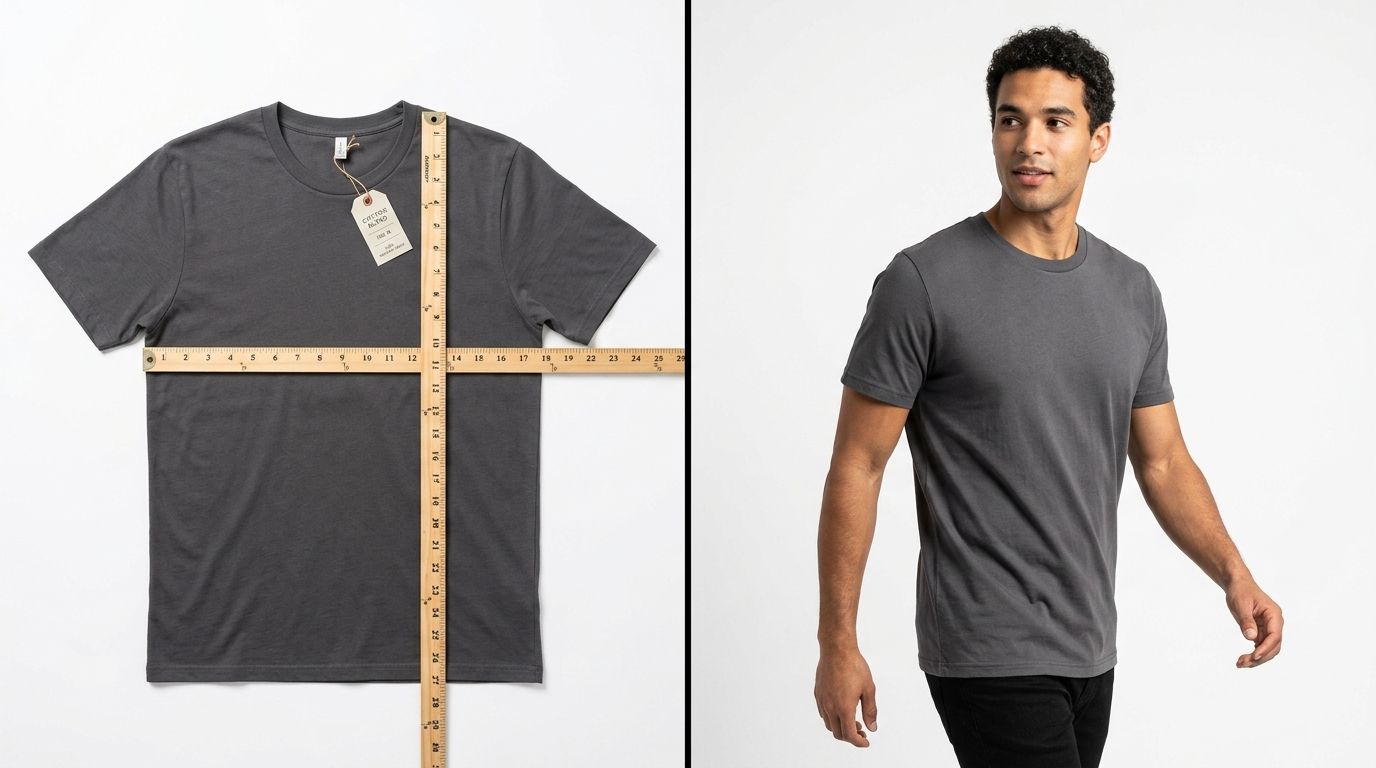
Consistent lighting and styling eliminate the guesswork for customers comparing multiple items in your catalog.
The Non-Negotiable 4-Shot List for Apparel
A customer cannot touch your fabric. They cannot try it on. Your image gallery has to serve as a digital fitting room. If you omit basic angles to save time, you simply shift the cost to your returns department. Every single garment on your site requires this exact four-shot sequence.
1. The Straight-On Front Shot
This is your primary catalog image. It dictates how your category page looks when a customer is scrolling through fifty different options. The front shot must clearly show the silhouette, the neckline, and the exact hemline length. The biggest mistake brands make here is inconsistent sizing in the frame. If your t-shirts appear massive on one row and tiny on the next, your catalog looks completely unmanaged.
2. The Full Back Shot
Buyers want to know what happens when they turn around. Is there a seam down the back? Is the shoulder yoke reinforced? Does the fabric bunch awkwardly at the waist? A clean back shot removes the hesitation that prevents a cart checkout. Never assume that the back of a basic garment is too boring to photograph. Boring means predictable, and predictable means safe to purchase.
3. The Macro Detail Shot
This is where you prove your price point. If you charge premium prices for a heavy knit sweater, you need a tight macro shot of that knit pattern. Show the texture of the denim. Show the quality of the stitching around the buttonhole. Show the brass zipper hardware. This shot bridges the gap between digital pixels and physical reality.
4. The Context or Lifestyle Shot
Clothing is meant to be worn, not stored on a pure white background forever. The context shot shows how the fabric moves and drapes. It provides an instant scale reference. A linen dress looks completely different on a hanger than it does catching the wind outdoors. If you are struggling with the logistical nightmare of setting up your studio properly, getting the logistics of photographing clothing for online stores correct from day one is mandatory before you even attempt lifestyle imagery.
Choosing Your Presentation Style: Flat Lay vs Mannequin vs On-Model
How you present the garment changes both the customer perception and your operational costs. You have three primary methods to choose from, and most mature brands end up using a combination of all three depending on where the image lives in the funnel.
| Style | Visual Focus | Complexity |
|---|---|---|
| Flat Lay | Clean grid layouts | Low |
| Mannequin | 3D garment shape | Medium |
| On-Model | Movement and scale | High |
Flat lay photography involves placing the item on a horizontal surface and shooting directly downward. It is fantastic for creating incredibly clean, grid-friendly images for category pages. However, flat lays completely strip the garment of its natural shape. An unstructured blazer shot as a flat lay looks like a square puddle of fabric.
This limitation is why many brands move toward understanding ghost mannequin photography. By shooting the garment on a specialized mannequin and editing out the plastic neck and limbs, you get a hollow 3D representation. It shows volume and fit without the massive expense of hiring models.
Worth noting, ghost mannequin imagery looks highly professional, but it lacks emotional resonance. Nobody aspires to look like an invisible plastic torso. You use mannequins for clarity, not for brand building.
The Bottleneck of Traditional Fashion Shoots
If you launch thirty new SKUs next month, capturing the four essential shots for each item using on-model photography requires a monumental logistical effort. The invoice is never just the photographer. It is the studio rental fee. It is the model day rate. It is the hair and makeup artist. It is the stylist who spends half the day hiding binder clips behind the model to make an ill-fitting sample look tailored.
Most founders I have talked to cannot name the actual per-image cost of their last fashion shoot. When they sit down and calculate the final number, it is usually somewhere between $80 and $200 per finished, edited image. And that is assuming the memory card did not corrupt, the model showed up on time, and the lighting equipment did not fail.
Furthermore, the turnaround time is a silent killer. Between booking the talent, executing the shoot day, and waiting for the retoucher to color-correct the shadows, three weeks have passed. That is three weeks of inventory sitting in a warehouse not making you any money because the website cannot go live without imagery.
Where AI Replaces the Catalog Shoot
This logistical nightmare is exactly why generative AI is taking over the catalog process. When you remove the studio dependency, your margin expands instantly. Upload a basic flat lay or mannequin shot of your new garment, select a visual mode, and CherryShot AI generates campaign-ready lifestyle photos in minutes.
The per-image cost drops from $150 to under $5. The turnaround time goes from three weeks to a Tuesday afternoon.
I will be the first to admit that AI has limitations. If you are selling a highly complex, multi-layered tulle gown and need a shot of it twirling in mid-air with perfect fabric physics, you absolutely need to book a physical studio. But for ninety percent of your catalog variations, basic t-shirts, structured outerwear, and seasonal colorways, traditional production is an anchor dragging down your profit margin.
Knowing the exact AI fashion photography capabilities allows you to deploy your budget strategically. You spend the big budget on your massive homepage hero campaign using a real model on location. Then, you use AI to scale out the hundreds of mandatory catalog shots and color variations required to fill out the actual product pages.
The brands winning in ecommerce right now are not the ones with the largest photography budgets. They are the ones with the fastest time to market. When you can generate professional, on-model imagery for a new seasonal launch in twenty minutes instead of booking another heavy studio day, the bottleneck permanently shifts from production logistics to creative ideas.
Key Takeaways
- Every clothing SKU requires a front, back, detail, and context shot to prevent unnecessary returns.
- Flat lays provide clean consistency, while on-model shots provide emotional resonance and scale.
- Traditional fashion shoots inflate per-image costs to over $100 due to hidden logistical fees.
- AI generation is rapidly replacing standard catalog shoots, dropping image costs under $5 and eliminating week-long delays.
Streamline your product page production
Review your current catalog and identify items that lack a full four-shot sequence. Using CherryShot AI to generate those missing angles or lifestyle variations ensures your product pages provide the clarity customers need to purchase immediately.
Try CherryShot AIFrequently Asked Questions
What shots do I need for fashion product photography?
A minimum of four standard angles converts a browser into a buyer. This includes a front shot, full back shot, macro detail shot of fabric, and a lifestyle shot showing garment scale on a body. Missing these details forces the customer to guess about fit and quality. High-quality imagery removes doubt by showing exactly how the product looks in real life conditions.
Should I use on-model or flat lay for clothing photography?
Combining both methods provides the best results for most apparel stores. Flat lays establish clean grids and precise proportions for your category pages. On-model photography shows natural drape and how the fabric moves during regular activity. Smart brands use flat lay for primary thumbnails and include on-model shots in the product gallery to provide comprehensive visual information to potential customers.
How do I photograph apparel for ecommerce?
Standardize your lighting and camera angles to maintain consistency across every product in your catalog. Steam every garment carefully before shooting to remove wrinkles that cheapen the final appearance. Shoot your items on a flat surface, mannequin, or model to highlight different characteristics. After the shoot, perform color correction to ensure the digital image matches the exact tone of the physical fabric.
What is the visual standard for fashion ecommerce photography?
The industry demands a neutral background for catalog images, perfect color accuracy, and high resolution for deep zooming. Consistency remains the most critical factor for a professional site layout. Every garment must occupy the exact same percentage of the frame to keep hemlines aligned when a customer scrolls through your collection. Uniformity builds brand trust and makes the shopping experience feel polished and deliberate.
Can AI create fashion product photography?
Generative tools now transform basic flat lay or mannequin shots into realistic on-model images in minutes. While traditional photography maintains a place for massive hero campaigns, AI has become the standard for scaling catalog volume without booking expensive models or studio time. This shift allows brands to keep inventory moving by generating high-quality assets on demand without the logistical delays inherent in traditional photoshoots.
Stop letting studio schedules dictate when your products go live. Establishing a visual standard secures customer trust, but executing that standard does not have to drain your bank account. By leaning into tools like CherryShot AI for volume and reserving your expensive shoots for hero campaigns, you get the absolute best of both margins.