Instagram Shopping Product Photos: The Visual Standards for Instagram's Commerce Features in 2026
In 2026, the standard for Instagram Shopping product photos is a hybrid visual model. The primary image must feel native to the social feed. The secondary images must deliver the clinical detail of a traditional product page. If you swap that order, you lose the click.
Definition
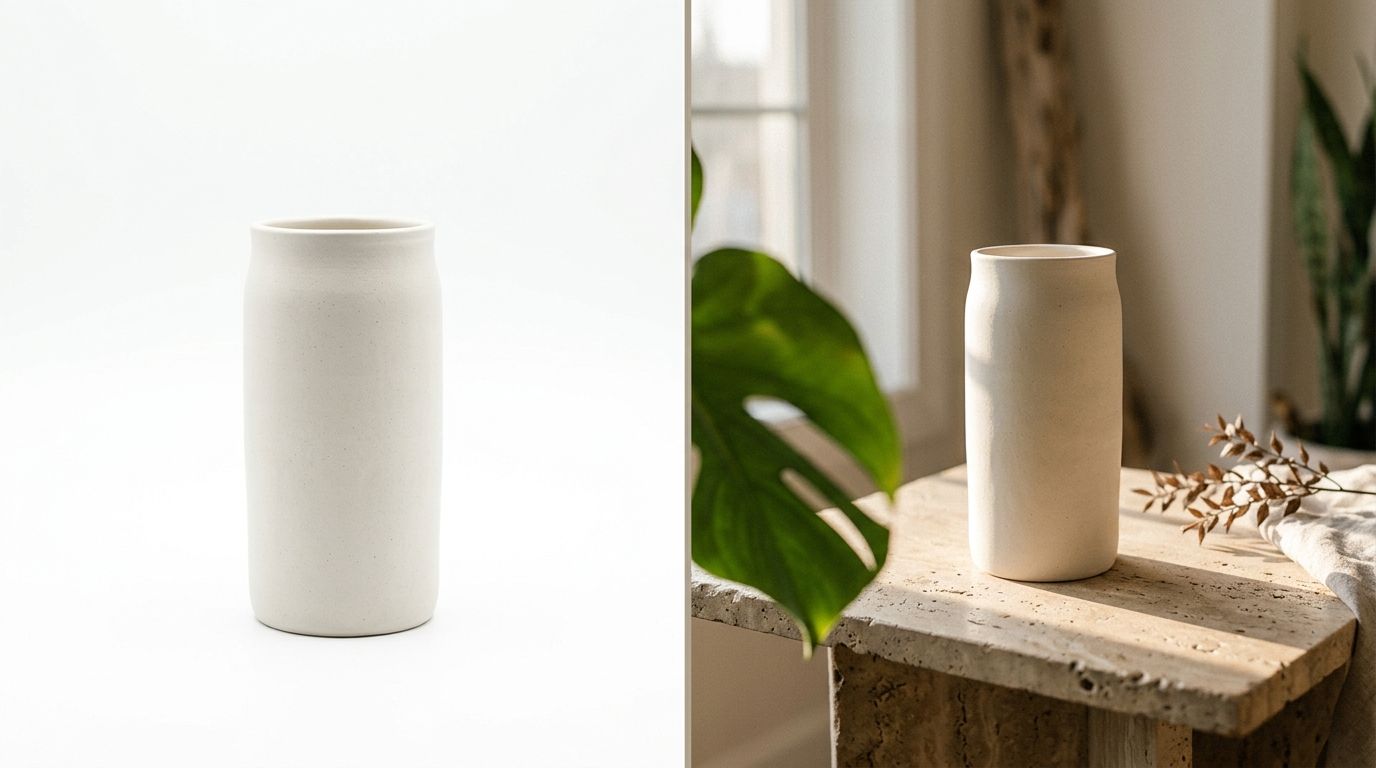
Instagram Shopping product photos are specialized visual assets designed to capture attention in social feeds while simultaneously driving commerce. They require a distinct blend of aspirational lifestyle styling to stop the scroll and clinical accuracy to validate purchasing decisions. Treating these images exactly like standard e-commerce website photography severely limits organic reach and conversion.
Most founders fail at social commerce because they treat their Meta catalog like a Shopify backend. They sync their pure white background shots directly to Instagram and wonder why their engagement rate flatlines. Nobody stops scrolling past their friends' vacation photos to double-tap a sterile bottle of shampoo floating in a white void.
You sacrifice some absolute visual clarity when you prioritize a lifestyle aesthetic over a traditional studio shot. A harsh shadow from natural sunlight might obscure a minor detail. But pure clarity does not matter if you never earn the initial tap.
Key Takeaways
- Your primary feed image must be lifestyle focused to stop the scroll.
- Catalog sync images should remain square to prevent awkward automated cropping in the native Shop tab.
- Always leave negative space in your composition so the shopping tag does not cover the product details.
- AI product photography allows brands to generate lifestyle context without organizing a multi-day studio shoot.
The Anatomy of Instagram Shopping Product Photos in 2026
Instagram is a visual entertainment platform first and a shopping engine second. Every piece of social commerce product photography you publish must respect that hierarchy. If you try to force a transaction before you provide visual value, the algorithm will bury your post.
If your goal is to create scroll-stopping social visuals, you have to understand context. A customer viewing your product on Shopify is already in a buying mindset. They searched for a specific item and clicked a specific link. A customer viewing your product on Instagram is looking for dopamine. They are swiping through stories or scrolling the explore page. Your product needs to interrupt that behavior beautifully.
This requires a shift in how you plan your visual assets. You cannot rely on a single silo of images to do all the work.
The Grid vs. The Shop Tab
You have two distinct environments to design for within the app. The main feed grid demands aspiration. This is where your Influencer or Lifestyle mode photos belong. The goal here is pure visual impact. You want the user to imagine themselves in the specific scenario you have constructed.
The Shop Tab is different. When a user clicks through to your native Instagram storefront, their mindset shifts closer to a traditional e-commerce browser. They need the effective e-commerce product photos that confirm material, scale, and exact colorways.
(I used to argue with photographers about getting the perfect shadowless studio shot, only to realize nobody clicks on a sterile product shot while scrolling past their friends' weekend photos.)
Technical Specs: Instagram Shop Image Specs You Cannot Ignore
A beautiful photo is useless if Meta crops it awkwardly or compresses the file into a pixelated mess. The platform has strict visual requirements that act as a gatekeeper for engagement.
The base requirement is that all catalog images must be at least 500 by 500 pixels. That is the floor. If you upload at that resolution in 2026, your brand will look amateur. The current visual standard requires uploading assets at a minimum of 1080 by 1080 pixels for square formats.
Framing and Aspect Ratios
Your aspect ratio dictates how much screen real estate you command. For feed posts and carousel ads, the 4:5 vertical format is non-negotiable. This translates to an image size of 1080 by 1350 pixels. A vertical image physically takes up more space on the user's phone. It forces them to look at your product longer before they can scroll past it.
However, your core backend catalog the files you actually sync through the Meta Commerce Manager needs to remain 1:1 square. Instagram automatically crops catalog images into squares for the Shop tab grid. If you upload vertical images to the backend catalog, the automated cropping tool will indiscriminately slice off the top and bottom of your photo. You will end up displaying decapitated models and cut-off logos.
You also need to plan for the shopping tag. When a user taps your post to reveal product details, a small black or white bubble appears over the image. If you frame your product dead center with zero negative space, that shopping tag will obscure the exact details you are trying to sell. Shoot slightly wider than you think you need to.
White Background vs. Lifestyle Product Photography
The most common debate in social commerce product photography is whether to prioritize clean studio shots or messy real-world contexts. The answer is that you need both to function at scale.
When you rely exclusively on white backgrounds, you train your audience to ignore your posts. They register as banner ads, and consumers have decades of practice tuning out banner ads. The brain categorizes the sterile image as an intrusion.
Striking the Balance for Conversion
The brands winning the conversion game use a specific sequence. They use a highly stylized lifestyle image to capture attention. Then they use clean studio shots in the subsequent carousel slides.
This strategy works because it aligns with user intent. First, you sell the feeling. Then, you prove the facts. By successfully leveraging lifestyle photography up front, you earn the right to show the boring technical details later.
Understanding exactly when product images lose conversion is critical here. A high click-through rate with zero sales usually means your lifestyle image wrote a check that your clean studio shots could not cash. The product looked totally different in reality than it did in the hyper-stylized feed post. You must ensure color accuracy remains consistent across both visual styles.
Producing Social Commerce Product Photography Without the Lag
Knowing what kinds of photos to post is only half the battle. The real problem is acquiring enough variations to feed the social algorithm without bankrupting your creative budget.
Any brand still running a full studio shoot to generate basic lifestyle content for an Instagram drop is paying for logistics instead of output. The invoice is not just the photographer. It is the location rental, the stylist's day rate, the prop sourcing, and the three weeks of waiting between the brief and the delivery folder.
Why the Old Studio Model Breaks Down
Social commerce moves too fast for traditional production timelines. If a specific trend spikes on TikTok or Instagram Reels on a Tuesday, you cannot wait until next month to get stylized photos of your relevant SKUs into your feed.
This is exactly where AI product photography becomes a mandatory utility. With CherryShot AI, you do not need to book a location to place your new skincare line on a marble vanity in morning sunlight. You upload a basic product image, select the Lifestyle or Influencer mode, and generate campaign-ready photos in minutes.
At a cost starting at $10 for 50 images, the financial risk of testing new visual angles drops to near zero. You can generate a dozen different lifestyle contexts for a single product, run them all as dynamic carousel ads, and let the Meta algorithm tell you which aesthetic actually drives the lowest cost per acquisition.
A good photographer is still required for your massive quarterly brand campaigns. But for the daily grind of social commerce product photography, the math on traditional shoots simply does not work anymore. You need speed. You need volume. You need high visual fidelity. You cannot get all three with a freelance camera crew.
Comparing Visual Requirements Across Instagram Features
Your visual strategy must adapt based on exactly where the image will be surfaced inside the Instagram ecosystem.
| Placement | Primary Goal | Ideal Style | Aspect Ratio |
|---|---|---|---|
| The Feed Post | Stop the scroll | Lifestyle / Influencer | 4:5 (1080x1350) |
| Shop Tab Catalog | Confirm details | Clean Studio / Classic | 1:1 (1080x1080) |
| Stories / Reels | Create urgency | UGC / Native Video | 9:16 (1080x1920) |
Frequently Asked Questions
What product photos work best on Instagram Shopping?
High-converting Instagram Shopping product photos combine a native lifestyle aesthetic for the main feed with clear studio details in the carousel. The primary image must capture attention by placing the item in an aspirational, real-world context that aligns with current social trends. Place brightly lit, multi-angle studio shots in the secondary carousel slots so buyers can confirm exact materials and colors before they tap checkout.
What size should Instagram Shopping product images be?
Instagram Shopping product images require a minimum upload resolution of 1080 by 1080 pixels for square catalog formats to prevent automated compression artifacts. Meta penalizes low-resolution uploads by burying them in the feed algorithm, making maximum clarity non-negotiable for organic reach. Format your primary feed posts vertically at 1080 by 1350 pixels to physically occupy the maximum amount of vertical mobile screen space and force longer view times.
Should I use white background or lifestyle for Instagram Shopping?
Place lifestyle photography in the primary image slot and reserve white background studio shots for the secondary carousel positions. Social media users require immediate contextual inspiration to stop scrolling through their feeds, while serious buyers need clinical visual data to validate their purchase decision. Shoot your aspirational feed imagery slightly wider than necessary so the native Instagram shopping tag does not physically cover critical product features.
How do I optimize product photos for Instagram Shopping?
Optimize Instagram product photos by framing with ample negative space and maintaining strict color consistency between your lifestyle assets and studio shots. Meta actively suppresses and occasionally rejects shopping tags on images containing heavy text overlays, watermarks, or aggressive promotional graphics. Compose the central focal point of your product slightly off-center to ensure the automated shopping bubble overlay does not obscure the primary details.
What aspect ratio is best for Instagram product photos?
The ideal aspect ratio for Instagram feed product photos is a vertical 4:5 format measuring exactly 1080 by 1350 pixels. Vertical framing captures the maximum available mobile screen space, which actively prevents the user from seeing the next post and scrolling past your product. Keep your backend Meta Commerce Manager catalog sync files cropped to a 1:1 square so the automated native shop grid does not amputate your subject.
Succeeding on Instagram Shopping comes down to matching your visual output to the behavior of the platform. You cannot force an e-commerce catalog aesthetic onto a social feed and expect a high conversion rate. You have to earn the attention with compelling lifestyle imagery first. With CherryShot AI, you can finally build that native social library in an afternoon rather than waiting a month for a studio gallery.
Audit your social commerce visuals for platform fit
Review your current Meta Commerce Manager catalog and identify which products are relying entirely on sterile white background images. You can rapidly replace those underperforming assets by dropping your existing photos into CherryShot AI. Generate dozens of native, scroll-stopping lifestyle contexts in minutes without booking a single studio session.
Try CherryShot AI