Macro Product Photography: Capturing Details That Sell
Most brands treat macro product photography as a creative indulgence reserved for expensive hero banners. They are entirely wrong. Capturing small product details is a direct defense against skyrocketing return rates. When a buyer cannot touch a machined watch dial or feel the heavy texture of a moisturizer, close up product photography bridges the physical gap. If your detail shots are blurry, improperly lit, or missing entirely, the customer is forced to guess about the quality of your goods. Guessing almost always leads to buyer remorse.
Definition
Macro product photography involves using specialized optics to capture extreme close-ups of small items at high magnification. It focuses on revealing surface textures, intricate parts, and physical build quality that standard photography cannot resolve.
A single crisp detail shot does more for your conversion rate than a dozen sprawling lifestyle images. Buyers want to see the stitching on a leather strap. They want to inspect the prongs holding a diamond. They want visual proof that the item they are paying a premium for actually possesses premium construction. Showing them a wide shot of a model wearing the product provides scale, but zooming in provides trust.
You cannot build that trust with a smartphone camera hovering two inches above a necklace. True macro product photography requires specific optical math, precise lighting, and a workflow that does not derail your entire launch schedule.
The Financial Case For Detail Shots Ecommerce
Look at your current product page. If a customer pinches to zoom on the main image and the texture immediately turns into a cluster of soft, blurry pixels, you have lost control of the sale. High-ticket items demand high-fidelity proof. When you sell precision goods, electronics, or cosmetics, the value is entirely locked inside the micro details.
| Feature | Standard Photography | Macro Photography |
|---|---|---|
| Primary Use | Catalog & Lifestyle | Texture & Detail |
| Focus Depth | Wide / Deep | Shallow / Precise |
| Complexity | Low / Moderate | High |
The sensory gap in ecommerce is a massive conversion killer. A buyer standing at a jewelry counter picks up a ring, rotates it under bright halogen lights, and naturally holds it close to their eye to inspect the setting. Online, they are entirely dependent on your visual assets to replicate that inspection. To truly understand converting product images, you have to realize that customers buy based on perceived quality, and quality lives in the extreme close-ups.
Bridging the tactile divide
Think about a luxury face cream. A wide shot shows the jar. A detail shot shows the rich, heavy viscosity of the cream itself. That texture is a proxy for the scent, the feel, and the efficacy of the formula. Product texture photography turns a passive viewing experience into an active sensory one. If you only provide wide, generic catalog shots, your customer assumes your product is generic too.
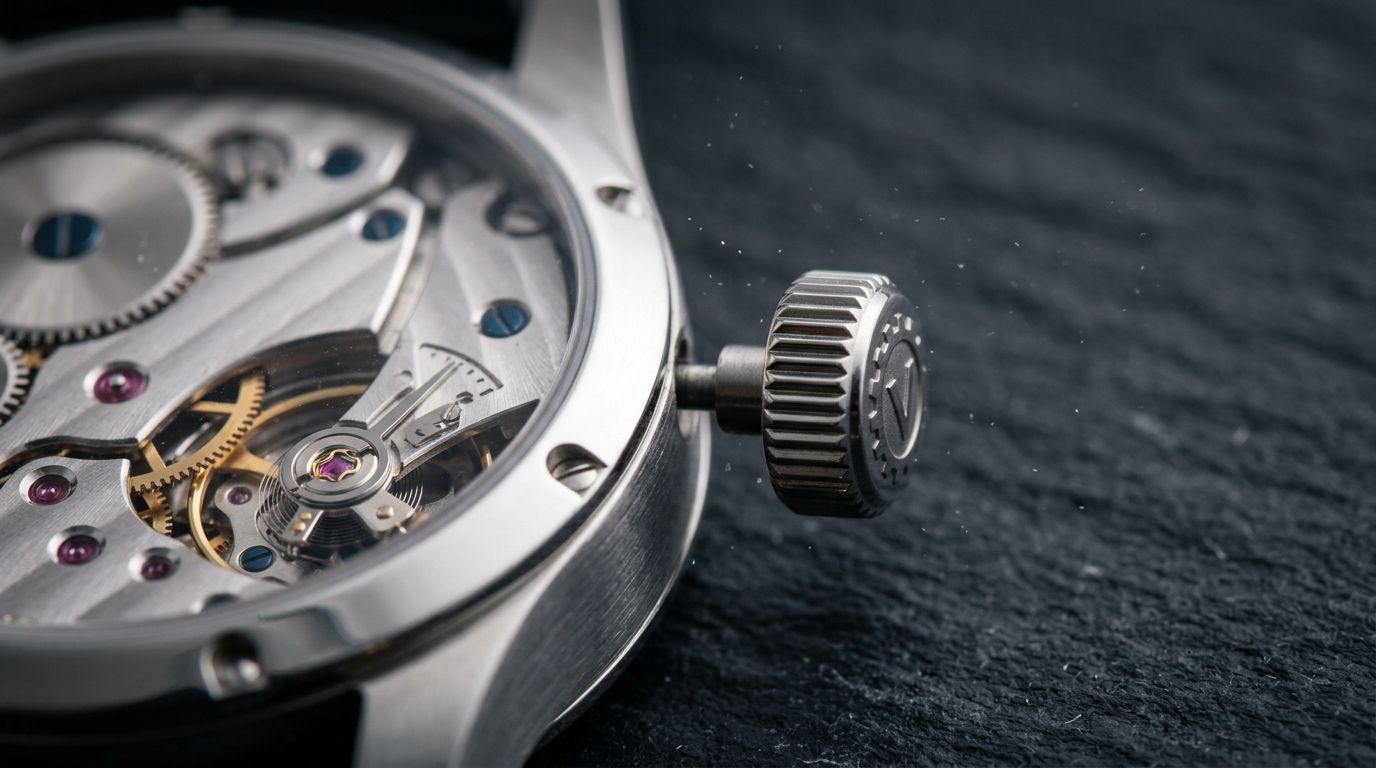
The Physics Of Macro Lens Ecommerce Operations
Getting extremely close to a product introduces harsh physical limitations. You cannot simply take a standard lens, push it three inches from a watch dial, and expect a sharp result. Every lens has a minimum focusing distance. If you cross that invisible line, the camera physically cannot lock focus.
True macro photography relies on a 1:1 magnification ratio. This means the subject is projected onto the camera sensor at its exact real-world size. Capturing micro product shots requires lenses built specifically for this purpose, usually in the 90mm to 105mm focal range. These lenses allow you to back away slightly so you do not block your own studio lights, while still filling the entire frame with a single earring or clasp.
The depth of field macro dilemma
The moment you achieve high magnification, depth of field shrinks to millimeters. If you focus on the front edge of a diamond ring, the back edge will completely disappear into a blur. To combat this, photographers close down the lens aperture to f/16 or f/22 to force more of the product into focus.
This creates a new problem called diffraction. When light squeezes through a tiny aperture opening, it scatters, making the entire image slightly soft. You are forced to choose between a photo where half the product is out of focus, or a photo where the entire product lacks ultimate crispness. This optical trap is why shooting small jewelry and watches is notoriously frustrating for in-house brand teams.
Building A Micro Product Shots Workflow
Solving the physics problem requires specific techniques and a willingness to modify your studio setup. Many founders attempt to brute-force their way through detail shots by hand-holding cameras under cheap desk lamps. The results are always muddy, inconsistent, and completely unusable for high-end catalog displays.
Extension tube product photography
If buying a dedicated $1,200 macro lens is not in your immediate budget, extension tubes are a practical alternative. These are hollow metal rings that snap between your camera body and a standard lens. They contain no glass, but they move the lens further away from the sensor. This dramatically reduces the minimum focusing distance, turning a standard 50mm lens into a capable macro tool.
The trade-off is light loss. Extension tubes eat up light, forcing you to use much stronger studio strobes or significantly longer shutter speeds. If you are shooting with longer shutter speeds, a heavy, unshakeable tripod is absolutely mandatory. Even the vibration of the mirror moving inside a DSLR is enough to ruin a close-up detail shot.
Mastering focus stacking product photography
The professional solution to the shallow depth of field problem is focus stacking. Instead of trying to capture the entire product in one shot, the camera takes a series of photos. The first shot focuses on the absolute front edge of the item. The focus ring is nudged a fraction of a millimeter, and another shot is taken. This repeats until the camera has captured ten to fifty images slicing through the entire depth of the product.
Those images are loaded into software that analyzes the sharpest parts of each frame and merges them into one perfectly crisp file. A full manual focus stacking rig gives you absolute millimeter control over the final file, but spending forty minutes on a single SKU completely destroys your launch schedule.
(Most founders do not realize their photographer is billing an extra half day just to process stacked macro files. You are paying for software processing time, not creative direction.)
Lighting For Product Texture Photography
Lighting a wide lifestyle scene requires soft, broad illumination. Lighting for extreme close-ups requires the exact opposite. If you blast a small, textured surface with flat, bright light, you erase all the shadows. Without shadows, texture disappears. A leather wallet will look like flat plastic. A textured watch dial will look like a printed sticker.
Skimming light techniques
To reveal the physical reality of an object, you must use side lighting. By placing a harsh, narrow light source at a severe angle to the product, the light skims across the surface. Every tiny ridge catches a highlight, and every tiny valley drops into shadow. This micro-contrast is what makes the material look real to the human eye.
Mastering this technique takes significant trial and error. If you are trying to capture the subtle viscosity of a beauty formula, reviewing skincare product details provides a blueprint for making liquid textures look premium rather than messy. You have to sculpt the light precisely for every new angle, which extends traditional studio time drastically.
Replacing The Studio With AI For Macro Scenarios
Any brand still running a full studio shoot for standard catalog detail images in 2026 is paying for logistics, not quality. The invoice is not just the photographer. It is studio rental, the stylist's half-day, the art director's back-and-forth, and the three weeks between brief and delivery. When you calculate the actual per-image cost of focus stacking and retouching, the number is usually well over $100 per finished image.
AI product photography changes that math completely. Upload a standard, sharp product image, select a visual mode like Minimalist or Luxury, and CherryShot AI generates campaign-ready detail scenes in minutes. The per-image cost drops to under $5. The turnaround goes from weeks to an afternoon.
Speeding up product detail photography
General-purpose AI image tools fail spectacularly at macro work. They hallucinate extra prongs on rings, smudge watch hands, and warp geometric textures. CherryShot AI is built specifically for product imagery. It preserves the structural integrity of your upload while wrapping it in high-resolution, photorealistic environments that look identical to a high-end macro studio shoot.
You bypass the nightmare of focus stacking entirely. You do not have to buy macro rails or calculate diffraction limits. If you need to generate fifty detail shots for a new jewelry collection by Friday, relying on traditional editing product photos pipelines will guarantee you miss your deadline. Shifting that volume to CherryShot AI allows your team to experiment with dozens of lighting scenarios instantly, finding the perfect angle that highlights the product's premium finish.
The brands getting the most out of this workflow are not the ones with the biggest budgets. They are the ones launching the most SKUs per quarter. When you can generate hyper-realistic detail imagery for a new colorway in twenty minutes instead of booking another shoot day, the bottleneck permanently shifts from production to ideas.
Audit your product page detail images
Review your top five selling products today and check if the zoom functionality reveals texture or just pixelated blur. If the detail is missing, upload your base assets to generate crisp macro shots that prove your quality to the customer.
Try CherryShot AIFrequently Asked Questions
Do I need a macro lens for product photography?
A dedicated macro lens provides the necessary 1:1 magnification for tiny details like watch dials. Extension tubes on a standard lens serve as a cheaper alternative for most studio needs. You should prioritize sharp base imagery to ensure your final results look professional and clear on all device screens.
How do I get sharp close-up product photos?
Use a heavy tripod and a remote shutter release to eliminate micro-vibrations during the capture process. Set your lens aperture between f/8 and f/11 to maintain optimal sharpness across the focal plane. Focus stacking helps solve issues where depth of field remains too shallow for your specific item.
What is focus stacking in product photography?
Focus stacking involves taking multiple photos of one product while shifting the focus point slightly in each frame. Software then merges these images to produce one final file that is sharp from front to back. This method addresses the physical limitation of shallow depth of field inherent in high-magnification macro photography.
What products benefit most from macro photography?
Jewelry, watches, electronics, and cosmetics require detail shots to show quality and build precision. Potential buyers inspect clasps, stone cuts, and material texture before making high-value purchasing decisions. Providing clear visuals of these specific elements helps build the trust required to convert browsers into paying customers.
Can AI generate detailed product close-ups?
Specialized AI platforms generate high-quality environments for your products without requiring complex physical studio setups. You simply upload a standard sharp image, and the system renders it in close-up modes for ecommerce use. This workflow saves time compared to manual lighting adjustments and tedious post-production stacking.
Failing to show the fine details of your product tells your customer that you have something to hide. When you invest in capturing exactly how a material looks and feels, you remove the friction of uncertainty from the buying process. Stop waiting weeks for complex studio deliveries and start building high-converting detail pages today with CherryShot AI.