What Product Photo Mistakes Are Costing Me Sales? The 12 Errors Ecommerce Brands Make Every Day
Any brand pushing paid traffic to a product page with mediocre imagery is setting fire to their ad spend. Your product photos are the only proof a customer has that your item actually exists and looks like what you claim. When those images fail to answer basic visual questions, the buyer simply leaves. They do not email you for clarification. They just close the tab.
Definition
Product photo errors are visual inconsistencies, technical failures, or information gaps in your imagery that prevent a customer from understanding what they are buying. These mistakes range from inaccurate colors to poor mobile optimization, ultimately breaking buyer trust and leading to lost sales or increased returns.
I have personally sat through studio shoots where we spent hours adjusting a single light stand, only to receive final assets that completely misrepresented the color of the product. The result was an immediate spike in returns the moment those items shipped. Identifying product photography mistakes early is not about chasing artistic perfection. It is about protecting your profit margins from easily avoidable logistical nightmares.
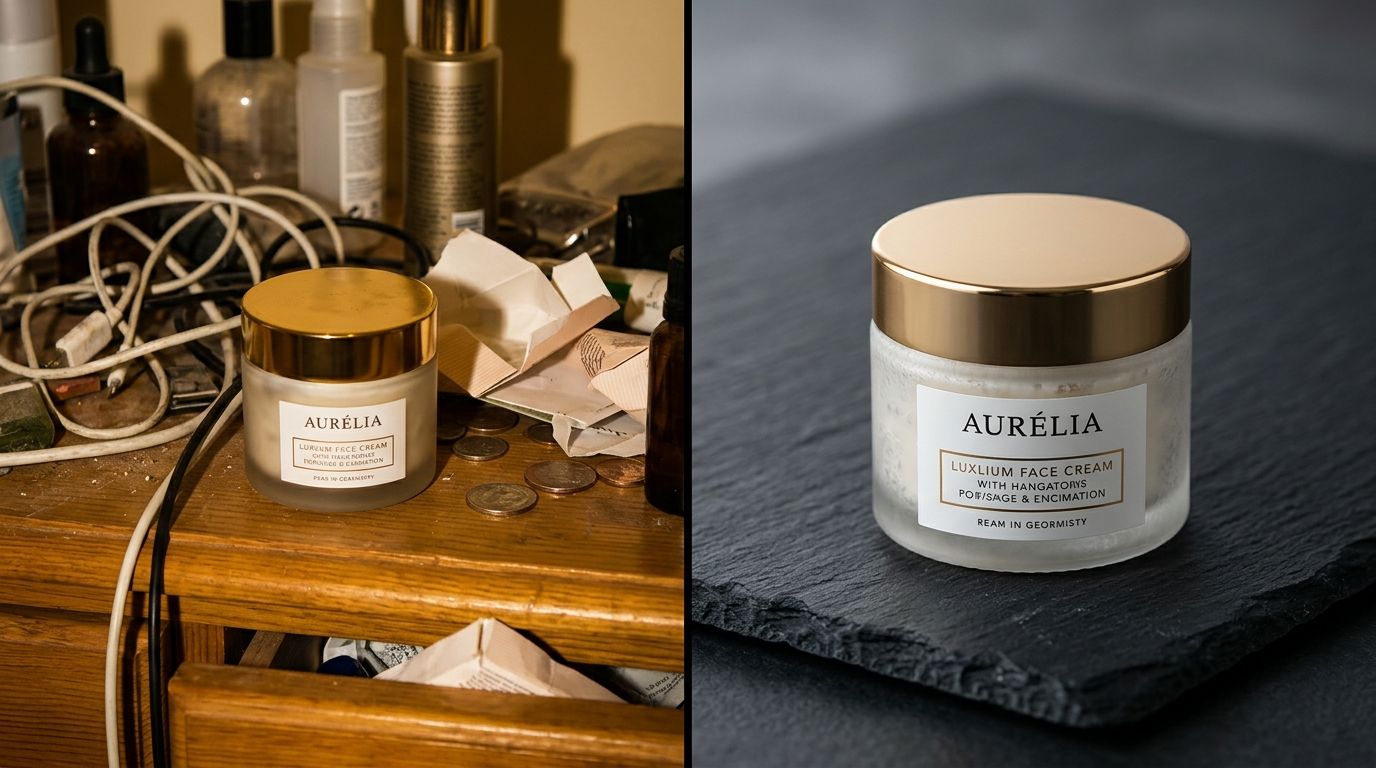
If you are getting high traffic but low conversions, your copy is likely doing its job while your imagery drops the ball. Let us look at the exact product photo errors ecommerce brands make every day and the data behind why they destroy sales.
The 12 Product Photo Errors Killing Your Margins
An audit of your visual assets is usually the fastest way to find hidden revenue. We have isolated the twelve specific product image problems that directly correlate to lost sales, higher bounce rates, and inflated return logistics.
| Mistake Type | Impact | Fix Difficulty |
|---|---|---|
| Technical | Slow Page Load | Easy |
| Visual | Color Mismatch | Medium |
| Layout | Inconsistent Grids | Medium |
| Strategic | Missing Scale | Simple |
1. Color distortion from bad white balance
You sell a navy blue sweater. The customer receives a charcoal gray sweater. The resulting return eats the profit margin of three other successful orders. Poor white balance happens when a photographer corrects a scene for the model's skin tone rather than strictly protecting the hex code of your product. Data consistently shows that over 20 percent of ecommerce returns are driven by products looking different in person than they did on the screen. If your colors are slightly off, you are paying for return shipping.
2. Missing the texture macro shot
Buyers cannot touch your product. If you sell leather goods, intricate knitwear, or premium skincare, the physical texture is the main selling point. Without an extreme close-up shot that lets the user see the grain or the consistency, you are asking them to trust you blindly. Industry benchmarks indicate that 54 percent of online shoppers actively look for a zoom feature or a close-up texture shot before making a luxury purchase. If you skip this, you leave money on the table.
3. Inconsistent category grid scaling
When a user scrolls your category page, the grid should look uniform. If one bottle takes up 80 percent of the thumbnail frame and the next bottle takes up 40 percent, your presentation fails. It is one of the easiest ways of making your entire brand feel cheap without even realizing it. Roughly 90 percent of snap judgments made about a brand online are based purely on visual symmetry and color coordination. A messy grid looks like a messy business.
4. Loading the page with massive file sizes
Uploading a raw 12MB image file straight from the photographer is a technical death sentence for a product page. Visual quality matters, but a customer will not wait around to see it. A one second delay in page load time reduces mobile conversions by 7 percent. If your hero image takes three seconds to render over a cellular connection, the shopper has already hit the back button. You must compress your images without destroying the clarity.
5. Forgetting the mobile aspect ratio
I see brands sign off on incredibly wide, cinematic hero shots that look brilliant on a 27-inch desktop monitor. Then those same images get pushed to a Shopify template viewed on an iPhone. The cinematic shot scales down so far that the product becomes a tiny, unrecognizable dot in the center of the screen. Mobile commerce drives over 60 percent of total ecommerce sales. If your images are not cropped square or vertical for mobile dominance, your product photo quality mistakes are actively pushing buyers away.
6. Failing to establish proper scale
A brilliant photo of a handbag on a blank white background tells the customer nothing about its actual size. Is it an overnight duffel or a tiny clutch? When size and fit issues drive over 40 percent of all apparel and accessory returns, ignoring scale is a critical error. You must provide a reference point. Whether that is a model holding the item or a recognizable prop placed nearby, shoppers need context to feel confident adding an item to their cart.
7. Cluttering the frame with distracting props
The opposite of failing to provide context is drowning the product in useless styling. Eye-tracking studies show that cluttered backgrounds and unnecessary props steal up to 25 percent of a viewer's visual attention away from the product you are actually trying to sell. If you are selling a coffee mug, you do not need an entire breakfast spread surrounding it. The props should support the product, never compete with it.
8. Relying entirely on flat lays
Flat lays are great for showing an outfit layout on Instagram. They are terrible for showing the drape, fit, and movement of a garment on a real human body. When you only use flat lays, the customer has to guess how the fabric will behave when worn. Shoppers expect multidimensional views. If they cannot understand the geometry of the product from your imagery, they will find a competitor who makes it easier to understand.
9. Having too few images per SKU
Uploading a front shot and a back shot is no longer enough. The average modern shopper expects between five and eight images per product before they feel comfortable making a purchase. They want the front, the back, the side profile, the macro texture, the lifestyle context, and the packaging. A sparse gallery signals low effort. If you do not bother to show the product fully, the customer assumes the product itself is not worth their money.
10. Leaving reflections and dust in glossy shots
Selling anything metallic, glossy, or glass requires immaculate attention to detail. If a customer zooms in on a luxury watch and sees a reflection of the studio umbrella light or a speck of dust on the bezel, the perceived value drops instantly. Around 93 percent of consumers consider visual appearance the key deciding factor in a purchase. Sloppy retouching makes expensive products look like cheap knockoffs.
11. Using inconsistent lighting across the catalog
When you shoot half your catalog in natural daylight in July, and the other half with strobes in November, your product pages look completely disjointed. Shoppers notice when the shadows fall differently from one item to the next. It breaks the illusion of a cohesive brand. You can learn exactly how bad photos inflate return rates when consistency goes out the window.
12. Waiting weeks for a studio shoot
The final mistake is logistical. Accepting a three-week delay to get fresh photos for a new colorway means you are missing out on weeks of potential revenue. A three-week delay costs an average of 8 percent in lost quarterly revenue opportunities for fast-moving consumer goods. The longer your product sits in a warehouse waiting for a photographer, the more money you lose.
This is exactly why high-volume brands move to AI product photography. Instead of begging a studio for an opening next Tuesday, you upload a flat image to CherryShot AI. You select the Minimalist mode, and three minutes later, you have campaign-ready assets for your new SKU. The lighting is mathematically perfect. The shadows are consistent. The turnaround time drops from a month to the time it takes you to drink a coffee.
Key Takeaways
- Inaccurate color representation is the primary visual driver of ecommerce returns.
- Missing context and scale leaves customers confused, directly lowering add-to-cart rates.
- Large, unoptimized image files hurt your conversion rates more than any aesthetic flaw.
- Replacing slow studio workflows with AI generation eliminates logistical delays for new product launches.
Update your product imagery for your next campaign
Review your top-performing products to see if they suffer from any of the twelve mistakes listed here. Use CherryShot AI to generate consistent, high-quality replacements that align with your brand standards before your next marketing push.
Try CherryShot AIFrequently Asked Questions
What product photo mistakes hurt sales the most?
Color inaccuracy and lack of scale are the most damaging errors. Customers return items immediately when the product looks fundamentally different from the photo. This costs you the initial sale, incurs heavy shipping penalties, and destroys long-term customer trust. Failing to show the true dimensions leads to massive return rates because the buyer cannot visualize the product in their own environment. You must ensure images match reality to maintain your bottom line.
How do I know if my product photography has errors?
Your return reasons and customer support tickets are your primary diagnostic tools. Customers frequently select item not as described or color differs from photo in your return portal when your imagery fails. Look at your add-to-cart rates as well. High page traffic with low cart additions usually indicates that your visual presentation is not convincing the buyer. Use this internal data to identify where your imagery is currently failing your brand.
Which product photo mistake has the biggest conversion impact?
Uploading massive, unoptimized image files has the most immediate negative impact on your conversion rate. Shoppers have zero patience for a page that takes three seconds to load. Every fraction of a second a customer spends waiting for a hero image to render correlates to an abandoned session. Visual quality matters, but if the image never loads, that quality is irrelevant. Optimize every single file to ensure your pages load instantly for mobile users.
How do I audit my product photography for mistakes?
Start by looking at your category grid view on a mobile device. Check for consistent cropping, uniform background lighting, and clear subject focus. Click into individual product pages to verify you have at least five distinct angles. Ensure there is a macro shot showing texture and a lifestyle shot showing scale. Run your image URLs through a page speed tool to confirm your file sizes are under 200kb. Constant vigilance is the only way to succeed.
Can AI photography prevent common product photo mistakes?
Using a tool like CherryShot AI eliminates the human errors associated with lighting inconsistency, bad cropping, and messy backgrounds. AI applies a standardized visual mode to every upload so your entire catalog remains completely cohesive. This bypasses the traditional challenges of trying to perfectly match studio lighting setups from a shoot you did six months ago to a shoot you are doing today. You gain perfect control over your brand identity without manual studio labor.
Fixing your product photography mistakes is not an exercise in vanity. It is a strict operational requirement for keeping your profit margins intact. Stop letting easily preventable visual errors drive up your customer acquisition costs and inflate your return logistics. Take back control of your visual production timeline. Try your own product images in CherryShot AI today and see what your catalog looks like without the compromises.