Product Photography to Video: How to Transform Your Existing Product Images Into Video Content
The fastest way to get product video in 2026 is not to shoot product video. It is to animate the catalog of still images you already own. Brands waste tens of thousands of dollars booking new film crews just to get fifteen seconds of motion for Instagram. You can bypass that entire production cycle by turning your existing product photography into video content.
Definition
Static-to-video conversion is the process of taking existing still product photographs and using editing software or artificial intelligence to animate them. This technique generates moving visual assets for digital marketing channels without the logistical costs of a dedicated film shoot.
(To be clear, static-to-video conversion is not going to replace a dedicated brand anthem film with actors and dialogue, but for high-volume paid social and product pages, it does the exact job you need it to do.)
The primary limitation here is movement complexity. You cannot fake a model physically walking down a street from a static flat lay. You can, however, create dynamic motion that commands attention in a feed. This approach shifts video creation from a logistical nightmare into a simple desk exercise. You no longer have to wait three weeks for a production company to send back a rough cut.
Why converting product photos to video is the smartest margin play right now
Video production introduces a massive variable cost to every product launch. When you book a studio for stills, you pay for the photographer and the space. When you add video to that same brief, the invoice doubles. You need a director of photography, specialized lighting grids, a grip to move the camera smoothly, and an editor to stitch it all together.
Ecommerce margins cannot support that level of bloat for every new colorway or minor seasonal update. Yet the algorithmic demand for motion is non-negotiable. Platforms like TikTok and Instagram prioritize dynamic movement over static images. You have to feed the machine, but you cannot afford to bankrupt your marketing budget doing it.
By learning how to convert product photos to video, you decouple your asset output from your production budget. A strong folder of JPEGs becomes an infinite source of raw material. You can build five different ad creatives from one studio photoshoot by simply changing the transition style and audio track. This drastically increases the return on investment for your initial photography budget.
The math behind static to dynamic product content
Consider the timeline difference. Planning a new video shoot takes two weeks of pre-production. The shoot takes a full day. Editing takes another two weeks. That is a full month before your media buyer can launch a campaign.
When you turn product photos into video, the timeline shrinks to an afternoon. If a specific trend emerges on TikTok at 9 AM, you can have a responsive video asset exported by lunch. This speed allows you to test creative angles faster than your competitors. It enables you to prove out video's conversion power on a specific SKU before ever committing to a massive physical production budget.
The product photography video workflow
Transitioning from still files to MP4s requires a specific process. You cannot just drop a single image into an editor, stretch it out for ten seconds, and expect a high-performing asset. A video requires narrative and visual progression.
Audit and expand your static assets
The first step is gathering your source material. A strong product video requires visual variety. If you only have three identical photos of a bottle on a white background, your resulting video will feel incredibly repetitive.
You need establishing shots, tight macro crops, and lifestyle context. This is where most brands stall because their initial shoot only captured a few basic angles. Instead of organizing a reshoot, you can use CherryShot AI. You upload your basic product image, select a visual mode like Lifestyle or Loud Luxury, and generate dozens of new, campaign-ready angles in minutes. The per-image cost drops to under $5. Now you have a comprehensive storyboard of high-quality static assets ready to be animated.
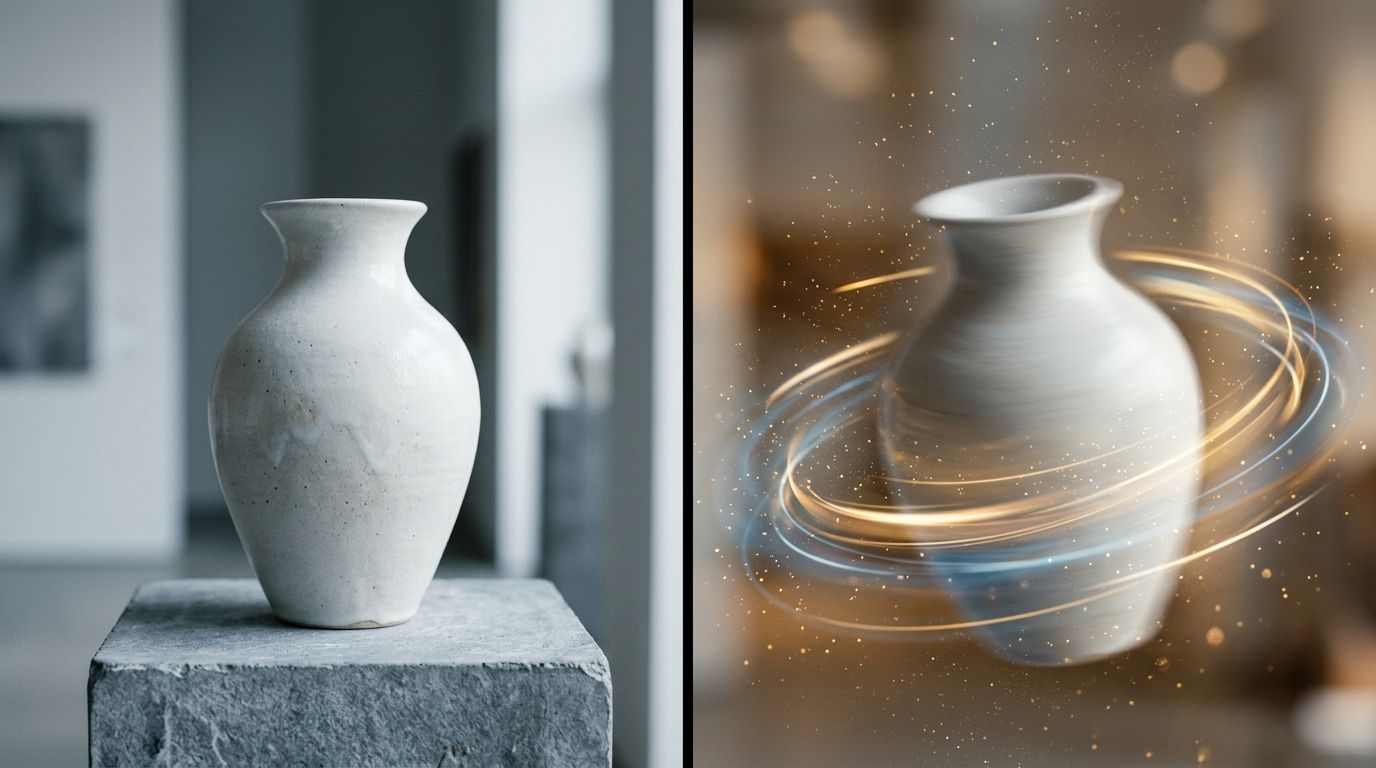
High-contrast product images provide the best base layer for digital motion and visual separation.
Choose your motion path
Once you have your folder of images, you have to decide how they will move. There are two primary techniques for animating product photos.
The first is the rhythmic slideshow. Do not let the word "slideshow" make you think of a boring corporate presentation. Modern slideshow video product images rely on aggressive, fast cuts timed perfectly to the beat of an audio track. You might flash twelve different product environments in the span of four seconds. This barrage of imagery works incredibly well for top-of-funnel awareness. It is the easiest way to generate scroll-stopping video ads because the rapid movement prevents the viewer from swiping away.
The second technique is artificial camera movement. This involves taking a single image and applying digital movement to simulate a physical camera operator. You use software to separate the product from the background, creating a depth map. You then program the software to slowly push the camera forward, causing the background to shift at a different speed than the product. This parallax effect instantly elevates a flat JPEG into premium motion content.
Tools to convert product images to video content
The software ecosystem for product photo video creation has fragmented into distinct categories. You do not need to master all of them, but you do need to pick the tool that matches your desired output.
| Software Category | Primary Tools | Best Motion Application |
|---|---|---|
| Timeline Editors | CapCut, Adobe Premiere | Beat-synced slideshows and manual keyframing |
| AI Image-to-Video | Runway Gen-2, Luma | Synthesizing artificial camera movement |
| Asset Expansion | CherryShot AI | Creating diverse starting angles for sequences |
Timeline and template editors
If you are building fast-paced, beat-synced videos, timeline editors are your best option. CapCut has entirely commoditized this process. You can select an existing template, dump ten product photos into the application, and let the software automatically sync the transitions to the music. It requires zero technical skill and outputs perfectly formatted social content.
For more granular control over keyframes and parallax effects, Adobe Premiere Pro or After Effects remains the industry standard. These tools have a steeper learning curve, but they give you the precision needed to create subtle, luxurious motion that looks native to a high-end product page.
AI video generation from product images
The most significant shift in static to dynamic product content is the rise of generative video models. Tools like Runway Gen-2 or Luma Dream Machine operate differently than traditional editors. You upload a single image of your product and type a text prompt describing the motion you want to see.
You might prompt the system to "slowly pan across the bottle as sunlight flickers through a nearby window." The AI analyzes the static pixels, calculates the geometry of the scene, and literally generates the missing frames. It creates completely new motion based entirely on your still photograph. This technology drastically lowers the barrier for scaling visual content creation because a single image can yield five distinct video clips.
What type of product images make the best video content?
Not every photo is a good candidate for animation. The success of your video output depends heavily on the structural quality of your input image.
First, resolution is critical. When you animate a still frame, the software often needs to punch in and crop the image to create movement. If you start with a low-resolution file, that digital zoom will immediately reveal pixelation and artifacting. You must always start with the highest quality raw files you have available.
Second, background separation matters immensely. AI video models and depth-mapping tools work by identifying what is in the foreground and what is in the background. If your product is the exact same color as the table it sits on, the software will struggle to cleanly separate the two. Images with strong contrast and shallow depth of field translate into motion much more fluidly. The software can easily grab the sharp product and move it independently of the blurred background environment.
Frequently Asked Questions
How do I turn product photos into a video?
You turn product photos into a video by importing assets into timeline editors for beat-synced sequences or processing static frames through AI video generators. This approach removes the need for physical production shoots while satisfying the algorithmic demand for motion across social platforms. To execute a dynamic slideshow, sequence five to ten distinct high-resolution images of your product in CapCut to match the pacing of a trending audio track.
What tools can convert product images to video?
CapCut handles template-driven slideshows for mobile-first social content, while Adobe Premiere Pro allows for manual keyframing. These distinct software categories serve different operational needs, offering either rapid template execution or granular control over complex transitions. If you need to generate moving pixels from a single static image, platforms like Runway Gen-2 analyze your photograph to calculate depth and render three to four seconds of artificial camera motion.
Are slideshow videos from product images effective?
Slideshow videos built from static product images drive high conversions across paid social and organic feeds when paced correctly. Social media algorithms heavily favor rapid visual changes that are tightly synchronized to popular audio tracks. Flashing a new product angle every half-second trains the viewer's eye to anticipate the next frame, effectively retaining attention longer than a slow pan while lowering your overall cost per click.
What type of product images make the best video content?
High-contrast product images with clean background separation and distinct focal points perform best during video conversion. The animation software must clearly distinguish the foreground item from the background environment to calculate parallax motion accurately and prevent visual artifacting. Provide the generative tool with a raw, high-resolution file featuring a shallow depth of field so the model can easily isolate the product for artificial camera movements.
Can AI convert product photos into videos?
Artificial intelligence converts product photos into videos by generating predictive motion between static frames. Image-to-video models analyze the lighting and geometry of your starting photograph to synthesize new frames that simulate realistic camera movement or environmental shifts. You can input a single flat image into these platforms and extract a fluid video clip featuring subtle atmospheric effects or smooth tracking shots without setting up physical camera equipment.
Key Takeaways
- Converting static photos to video bypasses the massive logistical costs of a physical film shoot.
- You need a diverse portfolio of images to create a compelling video narrative without repetitive looping.
- Fast-paced slideshows synced to trending audio remain the most efficient format for paid social ads.
- AI video generators can synthesize realistic camera movements from a single high-contrast still image.
Shooting raw video will always have its place for massive brand campaigns. For the relentless daily grind of ecommerce marketing, animating your existing product photography is the only sustainable path forward. Start treating your image library not just as a final destination, but as the raw material for your video pipeline. If you need more source assets to make those videos compelling, CherryShot AI can generate endless variations of your product in minutes to feed your editing tools.
Generate the base images for your next video
A strong slideshow requires multiple high-contrast product angles to maintain viewer attention. You can expand a single static product photo into a massive library of campaign-ready assets in minutes.
Try CherryShot AI