Seasonal Product Photography: Update Catalogs Without Reshooting
Booking a holiday product shoot in August feels terrible. You are dragging fake snow into a stuffy studio while it is ninety degrees outside. The photographer is arguing with the stylist about whether the pinecones look authentic enough. The invoice will run into the five figures. The turnaround time pushes right up against your Q4 launch date, meaning if any of the final shots miss the mark, you have no runway to fix them.
Definition
Seasonal product photography refers to the practice of styling and photographing items to align with specific calendar events or weather patterns. In modern ecommerce, this process increasingly involves using digital tools to place a static product image into multiple relevant backgrounds without reshooting the item.
Planning seasonal product photography used to mean accepting this ridiculous timeline. Brands that wanted dedicated summer, back-to-school, and holiday assets simply paid for three separate studio sessions. They rented the props. They hired the set decorators. They absorbed the daily rates of the entire crew just to change the background behind the exact same physical product they photographed six months earlier.
This logistical model is obsolete. Any ecommerce brand still organizing a full physical reshoot just to place a handbag on a snowy backdrop is throwing margin away. You can update your visual catalog for seasonal campaigns without ever picking up a camera again. When you stop treating seasonal ecommerce photography as a physical production problem, you realize it is just a digital rendering problem. The smartest operators simply reuse their core assets and alter the environment.
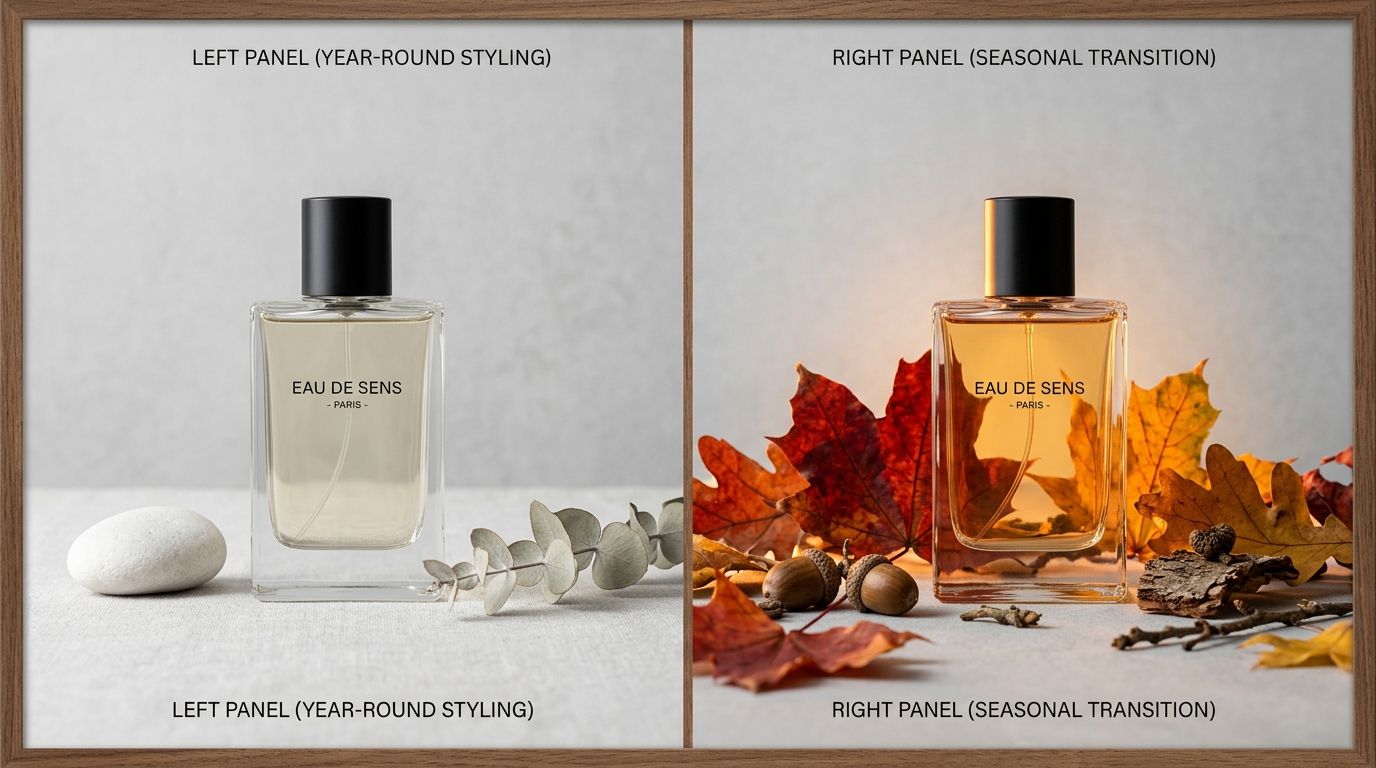
Updating a single base product image into multiple seasonal environments eliminates the need to ship physical inventory back to a studio.
The old math of seasonal catalog photography
To understand why a new approach is necessary, you have to look at the actual cost of traditional seasonal campaigns. The invoice you receive from a freelance photographer is only part of the expense. The real cost hides in the organizational friction.
Imagine your brand sells a core line of insulated coffee mugs. The product itself does not change throughout the year. But to sell it effectively in July, you need imagery of the mug sitting next to a pool with harsh, bright sunlight reflecting off the metal. To sell it effectively in December, you need soft, warm lighting with the mug resting on a wooden table near a fireplace.
If you want to cut photography costs, you have to eliminate the logistical dependencies of this process. Historically, achieving those two completely different looks required two separate physical setups. You had to ship the mugs. You had to rent the pool location. You had to build the faux fireplace in the studio. You paid the day rate of the photographer, the assistant, and the stylist both times.
Most founders I have talked to cannot name the actual per-image cost of their last seasonal shoot. When they sit down and calculate the location fees, the prop sourcing, and the post-production retouching, the number is usually somewhere between $80 and $200 per finished image. If you have fifty core products in your catalog, doing a full seasonal update costs tens of thousands of dollars.
How to update product photos for seasons without a studio
AI product photography changes the math of seasonal campaigns completely. You do not need to reshoot the physical product. You only need to update the environment surrounding it.
The process starts with your existing assets. Every brand has standard photos of their products on a pure white background or transparent layer. These base images are the only physical photography you actually need. By using a specialized platform, you can feed that single transparent asset into an AI engine and prompt it to build a seasonal world around the item.
Upload a product image, pick a visual mode, and CherryShot AI generates campaign-ready photos in minutes. If you are prepping for a summer campaign, you select the Lifestyle mode and generate bright, high-contrast beach scenes. If you are building out your holiday catalog, you use the Create Custom mode to specify wrapped gifts and soft bokeh lighting. The per-image cost drops to under $5. The turnaround goes from weeks to an afternoon.
Some hero shots still benefit from the specific art direction of a physical set. If you are doing a massive billboard campaign, hire the agency. But building out a hundred seasonal catalog SKUs that way is financial malpractice.
Evaluating seasonal refresh strategies requires looking at the speed of execution. When you can generate imagery for a new holiday bundle in twenty minutes instead of booking another shoot day, the bottleneck shifts from production to ideas. You can test a Valentine's Day angle. If the images do not look right, you generate new ones. You are no longer trapped by the photos you captured on set.
Building your seasonal visual calendar
When the cost of creating new imagery approaches zero, the way you plan your marketing calendar changes. You no longer have to batch all your seasonal concepts into one massive summer shoot.
The major seasonal beats
Retail revolves around four major visual shifts. Spring requires fresh, clean lighting and pastel integration. Summer demands hard light, sharp shadows, and outdoor environments. Fall pivots to warm tones, textured backgrounds, and back-to-school themes. Winter is dominated by holiday gifting, deep colors, and cozy staging.
You should aim to update the primary gallery image and the secondary lifestyle image for your top twenty percent of products during each of these shifts. The remaining catalog images can stay consistent year-round. Shoppers do not need to see the back angle of a product covered in fake snow. They just need the hero image to establish the seasonal mood.
The minor promotional windows
This is where agile visual updates shine. Valentine's Day, Mother's Day, Father's Day, and specific flash sales are usually too small to justify a dedicated physical photoshoot. Brands historically relied on text overlays and graphic design to make their existing photos feel relevant to these minor holidays.
With an AI workflow, you simply generate ten specific Valentine's Day assets for your top-selling giftable items. You run the campaign for two weeks, and then revert your product pages back to their standard appearance. You gain the conversion benefits of highly relevant visual merchandising without any of the logistical debt.
Traditional studio shoots versus AI generation
There are clear trade-offs between the two approaches. High-end lifestyle shoots provide complete control over every physical detail in the room. AI generation provides infinite scalability and massive cost reduction. The choice depends entirely on the volume of your catalog and the frequency of your seasonal updates.
| Feature | Traditional Studio Shoot | AI Generated Approach |
|---|---|---|
| Turnaround Time | 3 to 6 weeks | Under 1 hour |
| Cost Per Image | $80 to $200 | Under $5 |
| Logistics | High (shipping, props, studio) | Low (base image only) |
| Scalability | Limited by set time | Infinite updates |
Generating AI backgrounds will sometimes struggle with highly complex transparent materials like etched glass. In those specific edge cases, a physical photographer who understands complex lighting refraction is still the best tool for the job. But for opaque goods, apparel, cosmetics, and packaged items, the digital output is indistinguishable from a physical set.
Maintaining brand consistency across updates
The biggest risk of updating your visual catalog frequently is losing your brand identity. If your summer photos look like they belong to a completely different company than your winter photos, you break trust with the consumer.
Maintaining consistent product visuals across multiple campaign launches is usually where standard agencies fail. A different retoucher works on the summer batch than the winter batch, and suddenly your brand colors shift subtly. The shadows look heavier. The lighting angle changes from the left side to the right side.
Using a centralized AI platform solves this consistency problem. You can lock in specific visual modes. If your brand identity relies on the Minimalist mode, you simply prompt for minimalist seasonal elements. A single pine branch casting a shadow in winter. A single palm frond shadow in summer. The base lighting on your physical product never changes because you are using the exact same source file every time.
The brands getting the most out of this workflow are not the ones with massive creative teams. They are the lean operators who launch dozens of SKUs per quarter. They recognize that a seasonal product photography update is a marketing lever, not an art project.
Key Takeaways
- Traditional seasonal reshoots introduce massive logistical friction and hidden post-production costs.
- You can update your entire catalog for seasonal campaigns by generating new environments around existing product photos.
- Focus your seasonal visual updates on the top twenty percent of your SKUs that drive campaign revenue.
- Reusing a single base image ensures the lighting on the product remains perfectly consistent year-round.
Audit your product page images before your next campaign
Review your top twenty percent of products and identify which ones need a visual update to match upcoming seasonal trends. You can apply high-quality seasonal backgrounds to those specific items using your existing files right now. Using CherryShot AI allows you to maintain brand consistency while reacting to the retail calendar without the overhead of a traditional studio session.
Try CherryShot AIFrequently Asked Questions
How do I create seasonal product photography?
Produce seasonal imagery by combining your existing high-quality product assets with AI-generated environments. Instead of scheduling a physical shoot, you upload a clean base image, select a seasonal theme, and generate new scenes. This process places your original product into diverse contexts like summer beaches or winter snowscapes. You gain high-quality promotional materials without the logistical burden of coordinating photographers, hiring models, or renting studio space for every minor campaign update.
How often should I update product photography for seasonal campaigns?
Standardize your visual updates around the four major retail periods of Spring, Summer, Fall, and the Winter holidays. These quarterly shifts ensure your brand feels current and relevant to seasonal buyer interests. For smaller promotional windows like Valentine's Day or specific flash sales, refresh only your top-performing products. Keeping these updates frequent allows your storefront to reflect current consumer moods while maintaining visual consistency across your primary catalog throughout the year.
Do I need to reshoot products for each season?
Physical reshoots are unnecessary when you possess high-resolution, well-lit base images of your products. AI tools handle the environment, meaning you only photograph the physical item once during its product development lifecycle. Every subsequent seasonal background change is a digital task rather than a physical production event. This shift removes the need for recurring studio rentals and prop management, saving significant time and resources while keeping your brand imagery fresh.
Can AI create seasonal product photography backgrounds?
Purpose-built AI tools effectively generate realistic backgrounds that integrate with your original product photography. These systems analyze the lighting and perspective of your base image to ensure the new environment feels natural and cohesive. You can produce varied aesthetics, from cool winter bokeh to sharp, high-contrast summer sunlight. This technology bridges the gap between static product shots and dynamic lifestyle imagery without requiring complex set design or professional post-production retouching.
How do I plan a seasonal photography campaign?
Plan your campaign by identifying the top twenty percent of SKUs responsible for the majority of your seasonal sales volume. Focus your primary visual efforts on these high-traffic items to maximize conversion rates across your homepage and social ads. Generate environments specifically for these items using AI, compressing your production timeline to just a few days. This targeted approach ensures your most important products get the visual attention they require during peak retail seasons.
Stop letting seasonal campaign schedules dictate your marketing speed. When you decouple your visual merchandising from physical studio constraints, you get to launch faster and test more ideas.
If you are ready to update your catalog for the next major retail event without paying another massive invoice, upload your best core product image to CherryShot AI and generate your new campaign assets this afternoon.