Clothing Photography for Ecommerce: A Guide to Reducing Returns
If your apparel brand is processing return rates between 25 and 40 percent, you do not have a shipping problem. You have a visual expectation gap. Customers are pulling garments out of poly mailers and realizing the item in their hands looks nothing like the image on their screen. Clothing photography for ecommerce has exactly one job. It must tell the visual truth. If a heavy wool sweater looks like lightweight cotton on your product page, the customer will send it back and ask for a refund.
Definition
Clothing photography for ecommerce is the precise digital documentation of apparel designed to communicate accurate fit, color, and texture to online shoppers. This specialized commercial discipline replaces the physical fitting room experience using high-resolution visual data. Studios rely on strict lighting standards and structural styling to build trust and convert browsers into buyers.
Most fashion brands treat photography purely as an aesthetic exercise. They prioritize dramatic lighting and complex editorial styling over basic factual accuracy. This is a massive operational mistake. When shoppers cannot touch the fabric, try on the garment, or see how the material catches the light, they rely entirely on your images to make assumptions. Every time your photography forces a customer to guess, your return risk spikes.
Fixing your margin means changing how you shoot, light, and display your inventory. You must shift your mindset from creating pretty pictures to creating accurate visual data.
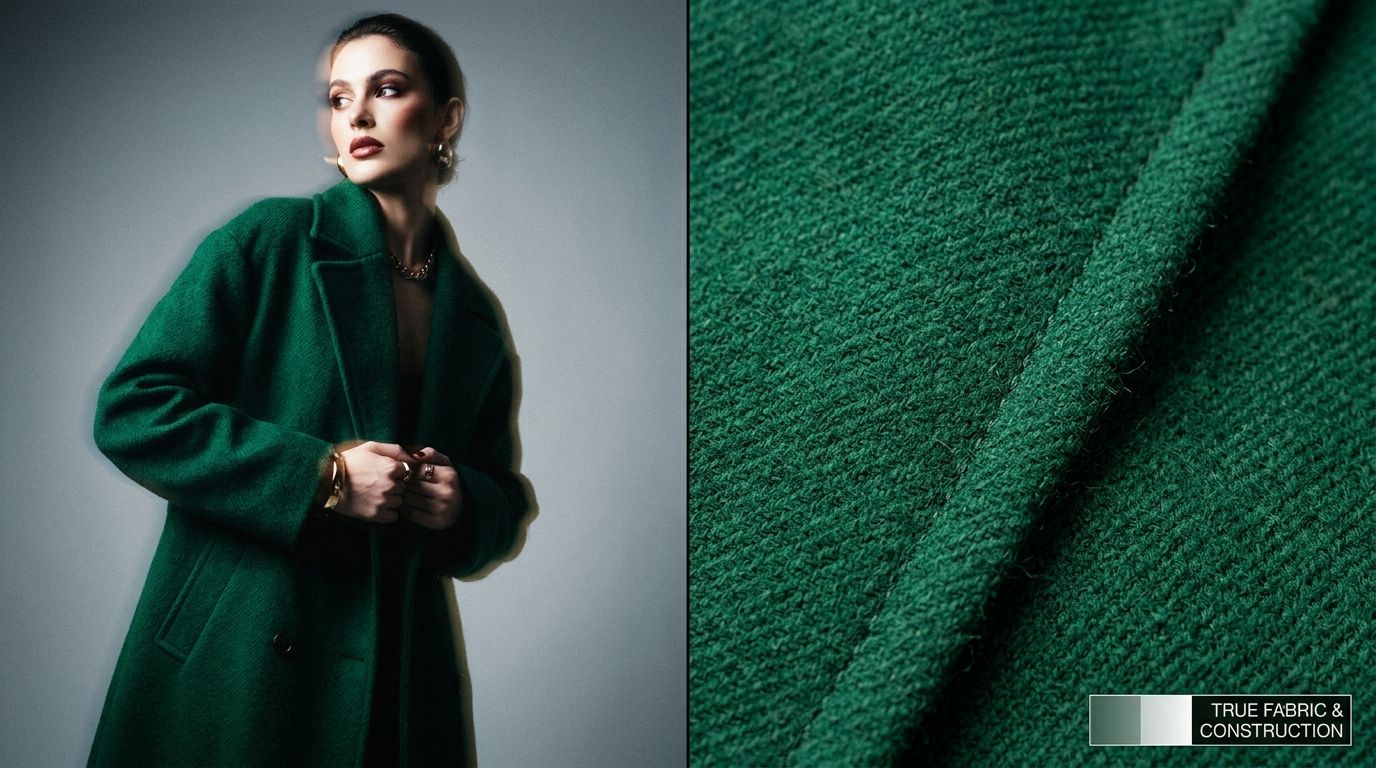
Why fashion product photography ecommerce relies on visual truth
Poor imagery is the leading driver of preventable returns in the apparel category. Grasping the exact impact of product photos on returns forces you to evaluate your catalog with extreme scrutiny. A shopper clicks "add to cart" based on a promise. Your product photos make that promise. If the color is slightly off, the fit looks different, or the fabric feels cheaper than expected, that promise is broken.
The requirement for strict clothing colour accuracy
Color shifts happen constantly during a studio shoot. A camera interprets the color temperature of your strobe lights. Your computer monitor displays that image using its own color profile. The customer views the final image on an uncalibrated smartphone screen with the brightness turned down. By the time the image reaches the buyer, a dark navy dress might look completely black.
You cannot control the customer device, but you must control your studio environment. Use a gray card during your shoot to set a custom white balance. Shoot in RAW format so you have maximum data for color correction. Never apply heavy Instagram style filters to product page photos. Editorial color grading belongs in top of funnel social media ads. Your product page images must represent the exact dye lot of the physical garment.
Fabric texture photography and communicating weight
A camera flash flattening the texture of a garment is a common technical failure. If you hit a corduroy jacket with blast of flat front lighting, the ridges disappear. The customer receives the jacket, realizes it has heavy ribbing, and returns it. You have to light for texture.
Place your key light at an angle to the garment. This technique creates micro shadows across the weave of the fabric. Those tiny shadows tell the human brain whether a material is thick wool, smooth silk, or heavy denim. Always include at least one macro detail shot in your carousel showing the weave up close. Let the shopper virtually touch the fabric through the screen.
How to photograph clothing for online store catalogs
The presentation method you choose dictates your production timeline and your final look. Brands typically choose between three core methods. Each comes with specific logistical requirements and varying degrees of return reduction power.
The logistics of on-model clothing photography
Showing clothes on a human body provides the absolute best context for drape, fit, and scale. Shoppers instantly understand where a hemline falls and how a sleeve bunches at the wrist. The massive downside is the logistics. Booking models, hair, makeup, stylists, and studio time takes weeks of planning. The invoice grows rapidly.
(Worth noting: some luxury brands still need bespoke lifestyle shoots to sell a specific high fashion mood, but for high volume catalog work, the scheduling friction is rarely worth the margin hit.)
If you launch dozens of styles a month, waiting on a traditional modeling shoot will throttle your entire business. Many brands are now exploring displaying clothing without a photoshoot by leveraging AI technology. This bridges the gap perfectly. You get the conversion benefits of a human figure without the three week wait time.
Executing flat lay and invisible mannequin approaches
If you sell basics, athletic wear, or simple graphic tees, mastering a basic flat lay photography guide might be the most efficient path for your operation. You arrange the clothing neatly on a flat surface, shoot from directly overhead, and cut out the background. It is fast, highly repeatable, and cheap.
Ghost mannequins provide a step up from flat lays. You dress a specialized modular mannequin, photograph the garment, remove the mannequin pieces, and shoot the inside collar. In post production, a retoucher stitches the images together to create a hollow 3D shape. This method shows the natural volume of a jacket or dress without the expense of a model. The trade off here is the massive amount of tedious Photoshop work required for every single SKU.
| Presentation Method | Logistics Required | Best For |
|---|---|---|
| Flat Lay | Flat surface and overhead camera | Basic graphic tees and athletic wear |
| Ghost Mannequin | Modular mannequin and intensive retouching | Showing hollow 3D shape and natural volume |
| On-Model | Live models, hair, makeup, and stylists | High-end fashion and tailored suits |
| AI Generation | Clean base photo and generative software | High-volume catalogs needing scale |
Using AI to scale apparel photography ecommerce
Any brand still running a full studio shoot for standard catalog images is paying for logistics rather than quality. When you calculate the actual per image cost of a traditional shoot, the number is usually somewhere between $80 and $200 per finished photo. AI product photography changes that math completely.
Bridging the gap between speed and visual quality
With tools like CherryShot AI, you upload a basic flat lay or mannequin shot of your garment. You select a visual mode like Minimalist or Influencer. Within minutes, the system generates campaign ready photos featuring your clothing in real environments or on generated figures. The per image cost drops to under $5. Turnaround time goes from three weeks to an afternoon.
AI is not a magic fix for terrible source files. If your base photo is out of focus, badly lit, or horribly wrinkled, the AI cannot invent crisp fabric details that the camera failed to capture. You still need a sharp baseline photo. But once you have that clean baseline, the variations are infinite.
Sizing photography clothing and managing scale
Returns frequently happen because a shopper misunderstood the proportions of an item. An oversized sweater looks like a standard fit if it is styled poorly. Using AI generation allows you to place the exact same garment onto different generated body types or into distinct lifestyle environments. This gives shoppers a much better sense of scale.
Instead of hoping the customer reads the sizing chart, you show them exactly how the item drapes. You replace assumptions with visual proof.
Building a bulletproof fashion ecommerce photography guide
The difference between an amateur clothing store and a professional fashion brand comes down to consistency. You need a strict set of rules for every item that enters your studio. This ensures your grid pages look uniform and professional.
Strict styling and preparation
A camera will capture every single flaw. If a shirt is wrinkled, the lighting will cast harsh shadows across the creases. If a black pair of jeans has lint on it, the high resolution lens will make the pants look dirty. Invest heavily in commercial steamers and sticky lint rollers. Spend ten minutes prepping a garment before it ever touches a hanger or a flat surface. Time spent steaming saves hours of expensive retouching work later.
Standardize your angles
Every product page needs a minimum of four standard shots. You need a clean front shot showing the entire silhouette. You need a back shot. You need a detail shot zooming in on the fabric grain. Finally, you need a lifestyle shot showing the garment in action or styled as part of a complete outfit. Do not skip angles to save time. Missing visual data creates doubt in the mind of the buyer. Doubt either kills the conversion or guarantees a return.
Frequently Asked Questions
How do I photograph clothing for ecommerce?
Prep the garment aggressively using commercial steamers and sticky lint rollers before placing it on a hanger or flat surface. Capturing multiple angles with strictly calibrated white balance eliminates the visual expectation gap that drives costly return rates. Shoot a wide front silhouette, a full back view, and a macro detail shot that clearly reveals the specific weave of the fabric.
Should I use a model or flat lay for clothing photography?
Choose flat lays for basic graphic tees and athletic wear, but cast human models for high-end fashion and tailored suits. Demonstrating drape and fit on an actual body provides the exact contextual scale shoppers need to understand a complex silhouette. Generate artificial on-model imagery using base mannequin shots if scheduling live talent creates an unacceptable production bottleneck for your studio.
How do I reduce returns with better clothing photography?
Eliminate visual guesswork by calibrating your camera and studio lighting to capture the exact color dye lot of the physical item. Shoppers abandon items when the heavy wool sweater they ordered arrives looking completely different from the bright imagery displayed online. Introduce directional lighting to reveal material weight, and always publish the exact physical measurements of the model wearing the item to prevent sizing surprises.
What camera settings are best for clothing photography?
Lock your ISO at 100 or 200 to prevent digital grain from distorting fine material details during the catalog shoot. Maintaining maximum image clarity ensures your final product page files handle the compression applied by standard ecommerce hosting platforms. Set the aperture between f/8 and f/11 while keeping the shutter speed strictly above 1/125th of a second to guarantee sharp focus across the entire item.
Can AI create on-model clothing images?
Generative software easily maps flat lay or ghost mannequin photographs onto realistic human figures in specific lifestyle environments. Removing the logistical friction of booking models allows fashion brands to scale their visual content production without inflating overhead budgets. Upload a crisp baseline photo of the garment into the system and select a target body type to instantly generate campaign assets.
Key Takeaways
- Ecommerce returns are fundamentally caused by visual expectation gaps.
- Strict color accuracy and detailed fabric shots eliminate customer guesswork.
- On-model photography converts best but brings massive logistical bottlenecks.
- AI tools eliminate studio scheduling constraints while delivering contextual apparel shots.
Stop paying for massive studio overhead when the technology exists to bypass the bottleneck completely. When your photography tells the truth visually, your return rate drops. To see how fast you can turn a basic flat lay into campaign ready fashion imagery, start generating with CherryShot AI today.
Audit your product page images before your next campaign
Review your top ten highest returning items and check the product photography for color accuracy. If the studio lighting flattened the texture, generate new contextual lifestyle shots to clarify the material weight. You can test your existing flat lays on human models using CherryShot AI without booking another studio day.
Try CherryShot AI