Google Shopping Product Images: Specs & Standards
You cannot outbid a bad product image in Google Shopping. I have watched media buyers waste weeks tweaking ROAS targets and restructuring campaigns when the actual problem was sitting right inside Google Merchant Center. Your products are either racking up silent disapprovals for tiny policy violations, or they are technically compliant but look so cheap that shoppers click right past them.
Definition
Google Shopping image requirements are the strict visual and technical specifications enforced by Google Merchant Center to ensure product photos appear uniform across search results. These rules dictate everything from background color to minimum file resolution, and failing to meet them results in automatic product listing disapprovals.
Every day a SKU sits in the "Disapproved" column of your Diagnostics tab, you are bleeding potential revenue. Google relies heavily on image recognition to police its shopping ecosystem. If the algorithm detects a watermark, a promotional badge, or a cluttered background, your product is pulled from the auction instantly. Fixing these issues manually is a nightmare of logistics.
We need to treat google shopping product images as a primary performance lever. You do not just want an image that passes the basic policy checks. You want an image that commands the click on a crowded search engine results page. When you understand exactly what the machines are looking for, you stop fighting the platform and start scaling your spend.
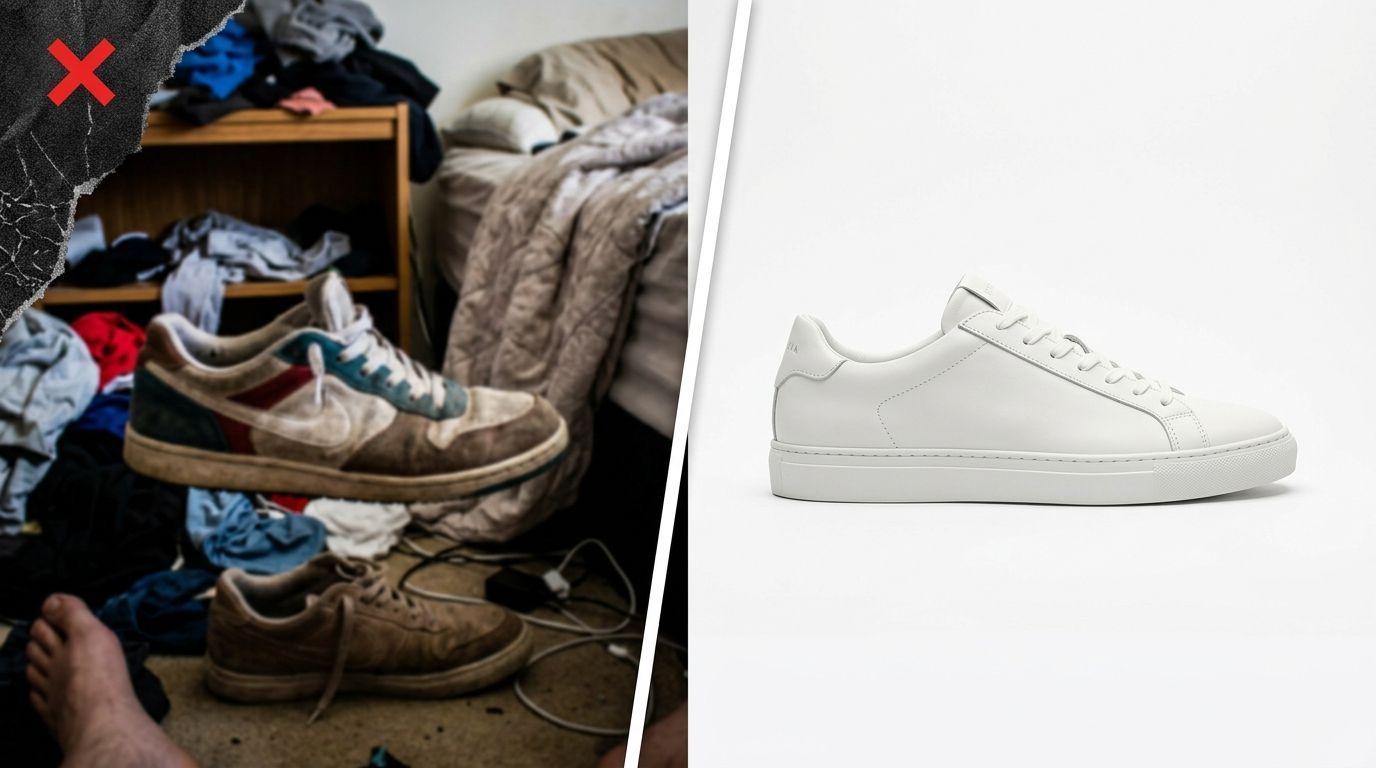
A compliant feed image guarantees entry to the auction, but visual quality determines whether you win the click.
The Non-Negotiable Google Shopping Image Requirements
The rules for your primary feed image are rigid. Google wants a frictionless, unified experience for the shopper. This means your main image must show the entire product clearly against a clean, uncluttered background. No exceptions.
The exact Google shopping photo specs
Your files must be under 64MB and saved as JPEG, WebP, PNG, GIF, or BMP. The absolute minimum resolution Google accepts is 100x100 pixels for general products and 250x250 pixels for apparel. Do not ever upload an image that small. If you upload a 100-pixel image in 2026, it will look blurry on modern screens and shoppers will assume your brand is untrustworthy.
Aim for 1080x1080 pixels. A square crop ensures the image displays perfectly across mobile and desktop without awkward letterboxing. The product itself should take up no less than 75% and no more than 90% of the full image area. Give the product room to breathe, but do not make it a tiny speck in the center of a massive white canvas.
Navigating the google merchant center image policy
The most frustrating part of managing a large catalog is dealing with automated rejections. Google prohibits any promotional elements over the image. You cannot include "Free Shipping" text, sale banners, or brand logos floating in the corner. If you want to communicate a sale, you use feed attributes, not image text.
If you sell on other channels, you already know this headache. The strictness here is nearly identical to what you face when navigating main image policies on major marketplaces. They all want the product isolated and distraction-free. Keep the background purely white. (Worth noting: you can occasionally get away with a very subtle, realistic drop shadow, but pure hex code #FFFFFF is the only way to guarantee zero automated flags from the bot.)
Why Google Shopping Disapproved Images Kill Your ROAS
When Google disapproves an item for an image violation, it stops serving immediately. You do not get an email warning you that impressions are dropping. You just wake up, check your campaign metrics, and wonder why your top-selling SKU has flatlined. By the time you spot the issue in the Diagnostics tab, you have already lost days of sales.
The watermark and border trap
Many brands use automated tools to resize images or add seasonal borders. If your resizing script accidentally leaves a thin black line around the edge of the jpeg, Google will flag it as a border. If your manufacturer provided photos with a faint copyright watermark across the bottom, the image will be rejected. You have to scrub everything. The focus must remain entirely on the physical product.
A highly customized studio shoot is undeniably better for a massive brand relaunch. I will never argue that AI should replace your creative director for hero homepage visuals. But for populating a 500-SKU Google Merchant Center feed with perfectly compliant images, the math simply does not work to rely on traditional production. When a product is disapproved, you need a new image in ten minutes, not next Thursday.
The difference between approved and profitable
An approved image is not necessarily a profitable one. You can upload a dimly lit photo of a shoe taken on a piece of white poster board. Google will approve it because it meets the technical criteria. But when that shoe appears next to four competitors who invested in proper lighting and contrast, nobody is clicking your listing.
High impression share combined with terrible click-through rates tells the algorithm your product is irrelevant. You end up fixing product image conversion issues on your landing page while paying unnecessarily high CPCs just to maintain visibility. Your product images for google shopping must pop off the screen. Brightness, sharpness, and accurate color representation are mandatory if you want to win the auction economically.
Google PMax Product Images: The Dual Asset Strategy
Performance Max campaigns changed how we handle visual assets. PMax does not just pull from your Merchant Center feed. It actively constructs display ads, YouTube placements, and Discover feed units using the photos you upload to your Asset Groups. This requires a completely different approach to photography.
Feed compliance versus asset group context
Your primary feed requires stark white backgrounds. Your PMax asset groups require context. If you only upload isolated white-background products into your asset groups, your display ads will look like generic catalog clippings floating in the middle of publisher websites. They look awful and they convert poorly.
| Visual Strategy Focus | Primary Feed Image | PMax Asset Group Image |
|---|---|---|
| Background Style | Solid pure white or transparent | Engaging contextual lifestyle settings |
| Primary Purpose | Passing Merchant Center compliance checks | Populating dynamic display and discovery network ads |
| Submission Method | Main image_link feed attribute | Direct upload into specific PMax Asset Groups |
You need lifestyle imagery. You need photos showing the product in use, styled beautifully, with real human context. This is where the bottleneck usually chokes ecommerce teams. Booking a lifestyle shoot for every variation of every product takes weeks. If you are stuck shooting white background product images in a makeshift office studio, generating high-end lifestyle context for PMax feels impossible.
This is exactly the problem CherryShot AI was built to solve. Instead of waiting three weeks for a freelance photographer to return retouched files, you upload a basic product photo. You pick a visual mode like Lifestyle or Influencer, and CherryShot AI generates campaign-ready assets in minutes. You get the crisp, compliant cutouts for your Merchant Center feed and the engaging, contextual shots for your PMax asset groups all in one session. The per-image cost is under $5.
Fixing Disapprovals Quickly
When you see a policy violation, speed matters. Navigate to the Diagnostics tab in Merchant Center. Filter by item issues and locate the image policy flags. You have to fix the image file, update the URL or re-upload the asset, and request a review.
Using the additional image link
Many brands forget about the `additional_image_link` attribute. While your main `image_link` must be strictly compliant, you can feed up to 10 additional images per SKU. These show up when a user clicks your Shopping ad and expands the product details within Google. Use these slots for alternate angles, close-ups of fabric textures, or packaging shots. The more visual information you provide right inside the Shopping interface, the more qualified the click becomes.
Do not let bad images drain your ad budget. Standardize your production process. Make sure every primary image is perfectly isolated, properly scaled, and completely free of promotional text. Get your lifestyle assets dialed in for PMax. When you feed the algorithm exactly what it wants, your impression share climbs and your acquisition costs drop.
Key Takeaways
- Primary Google Shopping images must have a solid white or transparent background to avoid automated disapproval.
- Never include promotional text, watermarks, or borders on your feed images.
- Upload square images measuring at least 1080x1080 pixels for maximum cross-device clarity.
- Performance Max campaigns require both compliant white-background feed images and contextual lifestyle shots for asset groups.
Frequently Asked Questions
What are Google Shopping product image requirements?
Google mandates a clear, accurate photograph of the entire product placed on a solid white or transparent background. Automated algorithms routinely reject files containing promotional text, visible watermarks, or decorative borders, leading to immediate campaign suspension. You must upload square images measuring at least 1080x1080 pixels with file sizes under 64MB to satisfy both technical constraints and high-resolution display standards across mobile devices.
Why are my Google Shopping product images disapproved?
Promotional overlays, watermarks, visible borders, or generic placeholders trigger immediate disapproval within the Merchant Center ecosystem. Automated image recognition systems constantly scan your product feed for any visual element that distracts from the physical item itself, meaning even a tiny stylized logo causes an instant suspension. You must remove every trace of text, brand badges, or graphic elements from the primary product image before successfully requesting a manual review.
What size should Google Shopping images be?
Primary feed images must measure at least 1080x1080 pixels, even though technical guidelines accept 100x100 pixels for hardware and 250x250 pixels for apparel. High-resolution, square assets prevent blurry displays and awkward letterboxing across modern mobile and desktop interfaces. Format your final product photography to fill exactly 75% to 90% of the available square canvas to maximize visibility and click-through rates.
Do Google Shopping images need a white background?
Primary image links require a pure solid white or transparent background to pass strict compliance checks and enter the bidding auction. Gray, heavily textured, or lightly colored backdrops frequently cause automated algorithmic flags and drastically lower overall engagement from potential shoppers. Keep the main feed item completely isolated, and reserve all heavily styled lifestyle photography specifically for the additional image link attributes to build necessary context.
Can I use lifestyle images in Google Shopping?
Lifestyle imagery must be submitted exclusively through the additional image link attribute rather than the primary feed link. Performance Max campaigns depend heavily on these contextual photographs to populate dynamic display ads and discovery network placements across the ecosystem. Upload high-quality styled shots showing the product in actual use to your asset groups to achieve maximum reach and conversion potential.
Getting your feed images compliant is step one. Keeping them fresh and visually competitive is how you actually scale. If you are tired of losing days to photo production logistics, it is time to upgrade your workflow. Check out CherryShot AI to see how fast campaign-ready imagery can be.
Audit your Merchant Center feed before increasing ad spend
Stop paying for clicks on poorly optimized product listings by checking your diagnostics tab for silent disapprovals. Run a visual audit on your top-performing SKUs to ensure they meet Google’s strict white-background policies. Use CherryShot AI to instantly correct non-compliant catalog imagery and generate the necessary lifestyle assets for your Performance Max campaigns.
Try CherryShot AI