How to Take Product Photos with Your Phone in 2026
You can absolutely learn how to take product photos with your phone that look like they came from a professional studio. A modern 2026 smartphone has a vastly superior sensor compared to the entry-level digital cameras founders were buying a decade ago. If your mobile product photography looks amateur, the phone hardware is almost certainly not the culprit.
Definition
Mobile product photography is the practice of using a smartphone camera to capture commercial-grade images of retail items for digital catalogs. It relies heavily on controlled lighting and stable framing rather than advanced camera hardware to achieve professional results.
Bad product photography is almost always a symptom of bad light and sloppy staging. Too many brand owners point their phone at a product on their kitchen counter under a yellow ceiling bulb and wonder why the result looks terrible. You do not need a three thousand dollar camera rig. You simply need to learn how to control the environment.
Your camera is just a tool that records light. If the light hitting your product is harsh and inconsistent, the most expensive lens in the world will accurately record a harsh and inconsistent scene. By mastering a few basic principles of lighting and learning which mobile camera settings to lock down, you can generate ecommerce assets that rival traditional studio output.
(Worth noting: phones still struggle with extreme close-up macro shots of fine jewelry where a dedicated, expensive macro lens is a necessity. For almost everything else, like apparel, cosmetics, packaged goods, and home decor, your phone is more than enough.)
The obvious trade-off with phone photography is that you lose the organic optical depth of field a heavy glass lens provides. Phones compensate for this with software, which often makes edges look blurry or synthetic. That means you have to rely heavily on your actual lighting setup to separate your product from its background.
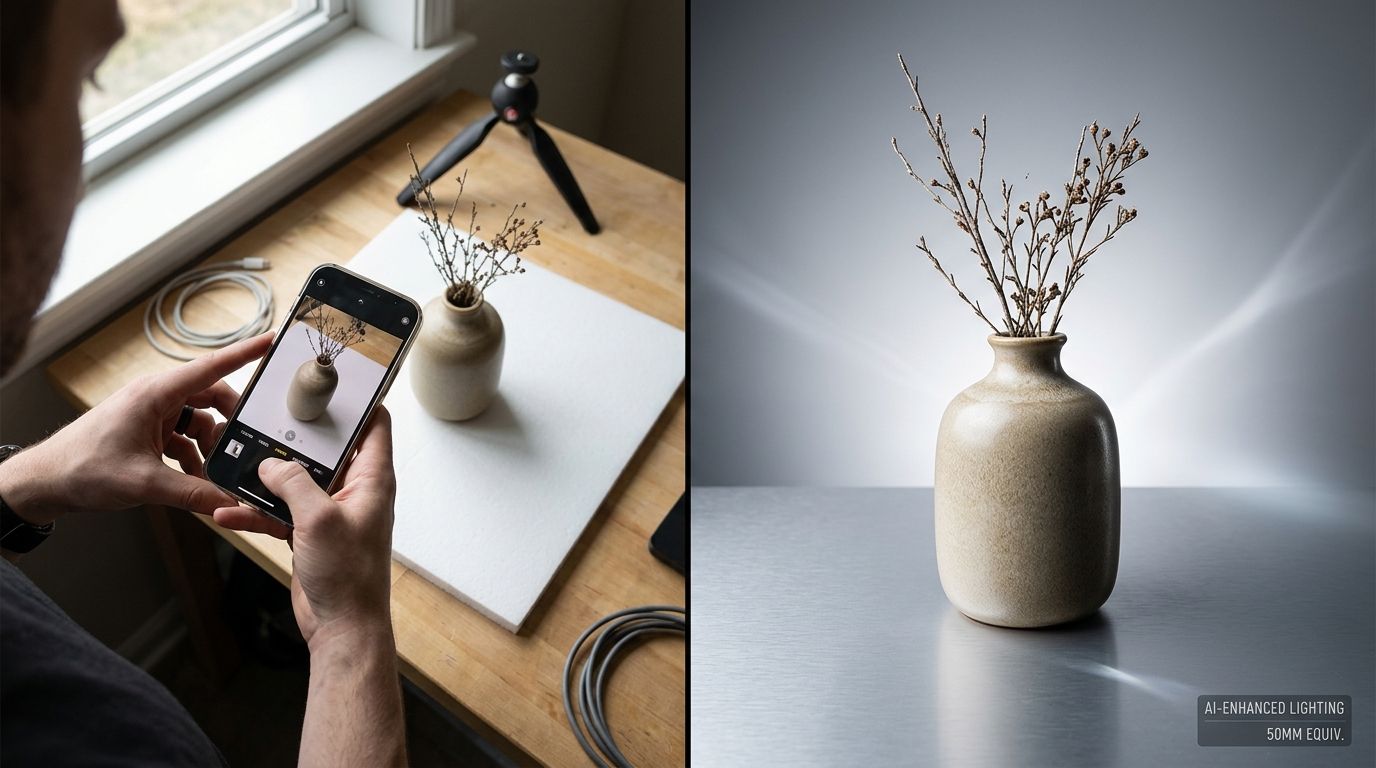
The smartphone product photography setup
If you want to know how to photograph products with a phone, you must first build a staging area. You do not need to rent a studio space for this. A clear table near a window is all you need to get started.
Building your endless background
You cannot shoot products against a wall and expect them to look professional. A wall meets a table at a hard ninety-degree angle. That hard horizontal line running directly behind your product instantly screams amateur.
You need to create a seamless sweep. Buy a large piece of flexible white poster board or heavy matte paper. Tape the top edge of the paper to the wall and let it drape naturally down onto your table. Place your product on the flat section of the paper on the table. The curve of the paper behind the product eliminates that hard shadow line. Creating an infinite white background is the foundational step of building an essential product photography setup.
The one-window lighting strategy
Turn off every light in the room. Ceiling lights, desk lamps, and hallway lights all have different color temperatures. Some are yellow. Some are blue. When these light sources mix, they create a muddy color cast on your product that is incredibly frustrating to fix later.
Set your table next to a large window. You want bright, indirect sunlight. If the sun is beaming a sharp, hot square of light directly onto your table, wait a few hours or move to a different window. Direct sunlight creates harsh, ugly black shadows. You want soft, diffused daylight.
Place your product on the paper sweep with the window light hitting it from one side. You will immediately notice that the window side of your product looks great, but the opposite side is buried in dark shadow.
The five dollar bounce card
Do not attempt to fix that dark shadow by turning on a room light. Instead, buy a piece of stiff white foam board from an art supply store. Stand this board vertically on the dark side of your product, directly opposite the window.
The window light will hit the product, travel past it, hit the white board, and bounce directly back into the shadows. Move the board closer to the product to lighten the shadows, or pull it further away to darken them. You now have a professional two-light setup using exactly zero electricity.
Mobile camera settings for product photography
Most brand owners simply open their camera app and press the button. The native camera app is designed to make faces look good at a birthday party. It is not optimized out of the box for ecommerce catalog work. You have to take control of the software.
Clean the physical lens
This sounds insultingly basic, but it ruins more shoots than bad lighting. Your phone spends its life in your pocket or your hands. The lens is covered in microscopic layers of fingerprint oil. When light hits an oily lens, it scatters, creating a soft, hazy glow around bright objects. Wipe your lens firmly with a clean microfiber cloth before you frame your first shot.
Turn off portrait mode
Portrait mode uses artificial intelligence to guess the depth of a scene and blur the background to simulate a massive DSLR lens. When you use it on objects with complex edges, the software often guesses wrong. It will blur the rim of a glass bottle or chop off the corner of a box. For pure ecommerce catalog shots where you want crisp edges, use the standard photo mode.
Lock your focus and exposure
If you leave your phone on its automatic settings, it will constantly evaluate the scene. If a cloud passes outside your window, the phone will dramatically alter the brightness of the screen. If you move your hand, it will lose focus.
Frame your product. Tap exactly on the part of the product you want in sharpest focus. Hold your finger there for three seconds. A small lock icon or an "AE/AF Lock" banner will appear on your screen. This tells the phone to stop guessing. The focus is locked. The brightness is locked. Now you can use the small slider icon next to the focus box to subtly lower or raise the overall brightness.
| Camera Setting | Visual Result | Impact on Catalog |
|---|---|---|
| Auto-Exposure Enabled | Brightness constantly shifts | Inconsistent catalog grid |
| Auto-Focus Enabled | Focus hunts between depth planes | Blurry edges on zoom |
| Locked AE/AF | Exposure and focus remain fixed | Uniform and professional assets |
Use a physical tripod
You cannot handhold your phone for product photography. Even the slightest tremor in your hands will result in a microscopic loss of sharpness. It might look fine on your small phone screen, but when a customer pinches to zoom in on your Shopify store, the image will look muddy. Mount your phone in a simple spring-loaded clamp on a cheap tripod. Use the volume buttons on a wired pair of headphones or a bluetooth remote to trigger the shutter, so you never have to tap the screen and shake the camera.
Scaling mobile product photos with AI
Getting a clean, well-lit photo of your product against a white background is an excellent achievement. For many basic catalog listings, that single image is enough to get the product live.
However, consumers expect more than just isolated products on white backgrounds. They want lifestyle images. They want to see the product in context. Paying a photographer to shoot a coffee bag in a modern kitchen or a skincare bottle on a marble vanity can cost thousands of dollars a day in location fees alone. Knowing what makes an ecommerce product photo convert means understanding the value of context.
Turning the clay into a campaign
This is where AI product photography bridges the gap between a DIY phone shot and a massive studio production. Your clean phone photo on a seamless white background is the perfect input file. It is the raw clay.
You can upload that phone photo directly into CherryShot AI. The software automatically maps the edges of your product and removes your white paper background entirely. From there, you select a visual mode. If you need clean editorial assets, you choose the Minimalist mode. If you are launching a high-end beauty line, you select the Luxury mode. CherryShot AI takes the realistic lighting and sharp focus of your original phone image and generates entirely new, campaign-ready lifestyle backgrounds around it.
You go from a table next to a window in your office to an architectural concrete pedestal flooded with afternoon sunlight, or a glossy mirrored surface in a high-end studio.
The lighting shadows map perfectly to the new environment. The reflections are mathematically accurate. Instead of booking a three-day location shoot to get six different context angles, you generate them all in twenty minutes. The per-image cost drops to under $5. You get the speed of mobile photography with the visual weight of an agency production.
When you master the fundamentals of bouncing light and locking exposure on your phone, you are no longer limited by your camera gear. You capture the essential truth of your product in minutes. Then, you let AI build the world around it.
Frequently Asked Questions
Can I take good product photos with my phone?
Modern smartphone sensors easily capture the high-resolution images required for commercial product catalogs. The difference between an amateur snapshot and a professional ecommerce asset depends entirely on your controlled lighting setup and post-production workflow rather than camera hardware. Mount your phone on a sturdy tripod and shape indirect window light with a foam board reflector to achieve sharp, studio-quality results immediately.
What phone settings should I use for product photos?
Turn off Portrait mode because its artificial depth of field often blurs complex product edges and creates synthetic results. Your camera app constantly evaluates room brightness, so you must override the automatic adjustments to maintain consistent catalog images. Tap and hold the specific part of your product on the screen to lock both auto-focus and auto-exposure before triggering the shutter.
How do I set up product photography with a phone?
Position a table next to a large window that provides bright, indirect sunlight to avoid harsh shadows. A continuous piece of white poster board draped down from the wall eliminates distracting horizontal lines behind your item. Stand a cheap white foam board vertically on the unlit side of the product to bounce the window light directly back into the dark shadows.
Is phone product photography good enough for Amazon or Shopify?
Modern smartphone cameras easily meet the technical resolution and clarity requirements enforced by major platforms like Amazon and Shopify. These marketplaces prioritize clean visibility on pure white backgrounds, which depends almost entirely on proper lighting rather than expensive camera hardware. Shoot your products near a diffused window light source to ensure crisp details that easily pass strict seller image guidelines.
How do I upgrade phone product photos with AI?
Upload your sharply focused mobile image shot on a plain background directly into specialized background generation software. The software maps your product edges to strip away the original white paper before rendering complex lifestyle scenes with mathematically accurate shadows and reflections. Choose a specific visual mode like minimalist or luxury to instantly turn a basic table shot into a campaign asset.
Key Takeaways
- Your phone camera sensor is highly capable. Amateur results are caused by poor lighting and unmanaged background environments.
- Indirect window light and a cheap white foam board bounce card create a professional two-light setup.
- Locking your phone camera focus and exposure prevents the software from constantly guessing and altering your image.
- A clean phone photo on a white background is the ideal starting point to generate high-end lifestyle scenes using AI photography tools.
Stop letting hardware anxiety delay your product launches. The device in your pocket is perfectly capable of capturing your entire catalog. If you control your lighting and lock your settings, you can shoot dozens of SKUs in an afternoon. From there, CherryShot AI gives you the leverage to turn those simple captures into premium lifestyle assets that actually convert.
Generate premium lifestyle backgrounds from your phone
Take your sharply focused phone photos and drop them directly into professional studio environments. Skip the expensive location rentals and instantly generate campaign-ready images with mathematically accurate shadows.
Try CherryShot AI