Instagram Post Size 2026: Every Dimension You Need
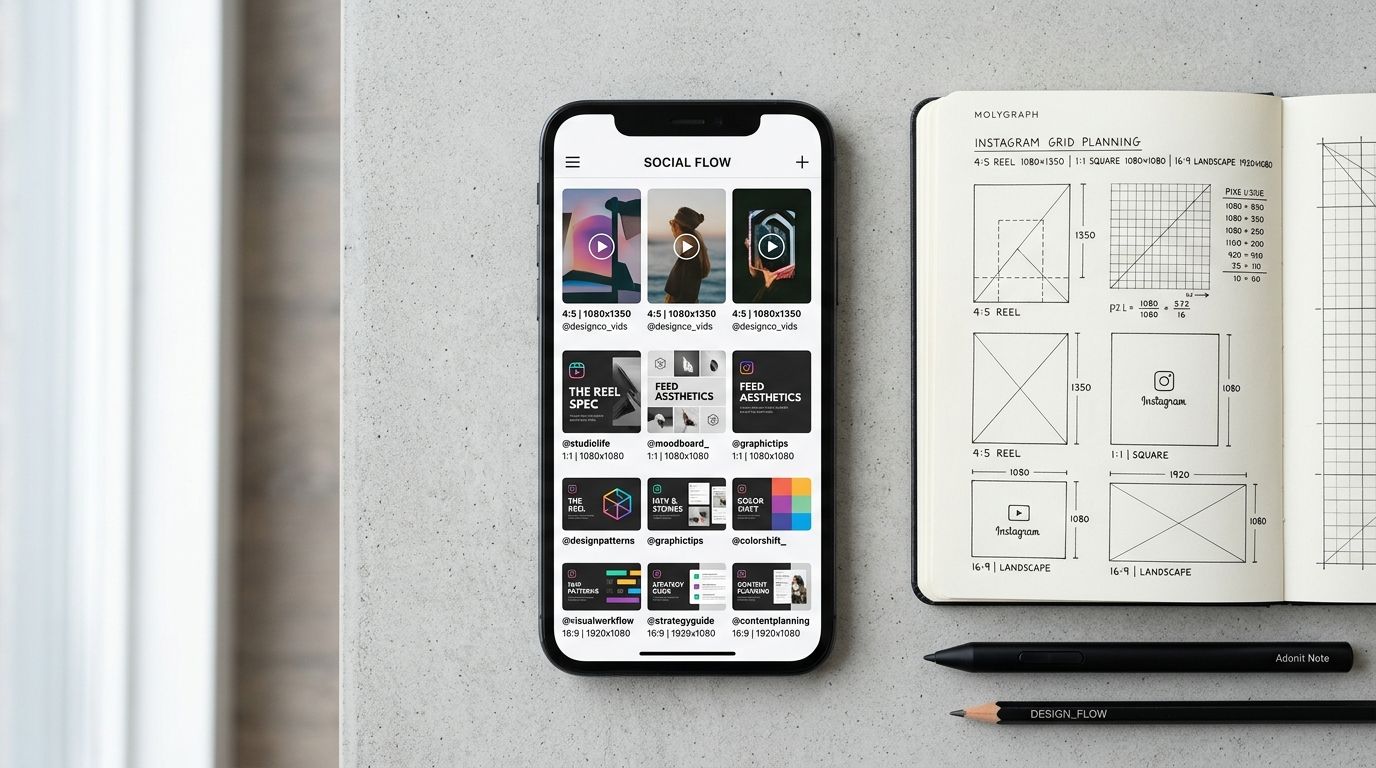
The best instagram post size in 2026 is 1080 by 1350 pixels. This 4:5 portrait ratio claims the absolute maximum vertical real estate on a mobile screen without getting cropped. For traditional squares, you need 1080 by 1080 pixels. For Stories and Reels, target 1080 by 1920 pixels.
Definition
Instagram post dimensions refer to the specific pixel width and height required to ensure an image displays correctly without unwanted cropping or quality loss. These settings determine how much screen space your product occupies in a user's feed. Proper sizing is the primary factor in preventing automated compression from blurring your photos.
Most brands mess this up by uploading raw photography files directly from their camera roll. Instagram compresses heavy files violently. That simple mistake turns expensive studio product shots into pixelated messes.
When I ran my first ecommerce brand, we spent days formatting the same catalog images for different social platforms. We paid freelance designers hourly just to crop photos. Automation exists now, but you still need to know your target dimensions before you export. There is a genuine trade-off here. Shooting natively in tight vertical formats means you cannot easily crop to a perfect square later without losing product details. You have to plan the output before you ever capture the image.
The Core Instagram Post Dimensions for 2026
Every pixel matters when a potential customer is scrolling at high speed. If your image does not fill their screen completely, a competitor's content will peek through at the bottom. That visual distraction costs you clicks. Understanding the exact instagram post size dimensions prevents that leakage.
Portrait Dimensions (1080 x 1350 px)
The 4:5 aspect ratio is the undisputed champion for product brands. When a user stops on a portrait image, it occupies their entire feed window. You get complete, undivided focus. For apparel, cosmetics, and homeware brands, this format is mandatory. You want your product to look as large and detailed as possible.
The profile grid crop is the only complication. Instagram displays all feed posts as 1:1 squares on your profile page. You must center your product perfectly within the 4:5 frame so the automated top and bottom crops do not ruin the thumbnail. If you frame an apparel shot too high, the grid will chop off the model's head.
Square Dimensions (1080 x 1080 px)
The original instagram square size is still highly effective for specific catalog needs. Flat lays and macro jewelry shots often frame better in a balanced 1:1 ratio.
Squares are completely foolproof. What you see in the upload draft is exactly what appears on your profile grid. There are no surprise crops. If you are recycling content from an older catalog, or generating standard white-background assets, squares remain the safest structural bet.
Landscape Dimensions (1080 x 566 px)
Stop using landscape photos for physical products. The 1.91:1 ratio takes up less than half the screen on modern smartphones. Your caption gets pushed up immediately. The user's eye is inevitably drawn to whatever post is loading beneath yours. Unless you are selling wide panoramic landscape art or horizontal architectural installations, this ratio will hurt your conversion rate.
Formats That Actually Sell Products
| Placement Type | Aspect Ratio | Resolution |
|---|---|---|
| Instagram Feed | 4:5 Portrait | 1080 x 1350 px |
| Instagram Stories | 9:16 Vertical | 1080 x 1920 px |
| Profile Grid | 1:1 Square | 1080 x 1080 px |
You do not just need to know the instagram photo size 2026 demands. You need to know how to apply those dimensions to formats that drive actual revenue. Staring at pixel charts is useless if you pick the wrong format for your campaign.
Why Your Instagram Carousel Size Matters
Carousels generate massive engagement because the algorithm gives them a second chance. If a user scrolls past the first slide, Instagram often shows them the second slide later in the day.
Your instagram carousel size is dictated entirely by the very first image you select. If your first upload is a 1080 by 1080 pixel square, the app forces every subsequent image into that exact 1:1 box. If your next image was a carefully cropped 4:5 portrait, Instagram will blindly chop off the top and bottom. Always standardize your entire batch before you hit upload.
This strict consistency requirement is exactly why creating scroll-stopping social ad images can be so tedious if you handle production manually. You have to verify every single slide matches the master dimension. If one slide breaks the rule, the entire ad looks amateur.
Stories and Reels (1080 x 1920 px)
The 9:16 ratio dominates the modern app experience. You want a master resolution of 1080 by 1920 pixels. But knowing the size is only half the battle. You must respect the visual safe zones.
Instagram overlays its own interface on top of your video content. The top 250 pixels are covered by your profile icon and brand handle. The bottom 250 pixels are completely obscured by the caption, audio track, and engagement buttons. The right side holds the interaction icons. If you put your product's key feature or a massive discount code in these blind spots, no one will ever see them. Keep the focal point dead center.
The hardest dimension to master belongs to the Reels cover photo. Your cover photo has a triple identity. When a user watches the Reel in the dedicated tab, the cover is a full 9:16 vertical image. When it appears in the home feed, Instagram crops that cover to a 4:5 portrait. Finally, when someone views your main profile grid, that exact same image is hacked down to a 1:1 square. You have to design a cover photo with a central focal point that survives all three presentation formats.
Managing Instagram Photo Resolution and Compression
Bad resolution ruins good photography. Understanding instagram image size pixels is about working with the app's compression algorithm instead of fighting it.
The 1080 Pixel Rule
Instagram wants to load images instantly over spotty cellular networks. To accomplish this, it aggressively compresses heavy files. If you upload a massive 4K studio image that is 4000 pixels wide, Instagram will crush it down to 1080 pixels automatically. This blunt process destroys sharpness. Fine details like fabric textures or small typography disappear entirely.
You must upload images that are exactly 1080 pixels wide. When you match this specification, the platform leaves your resolution alone. You retain complete control over the final edge sharpness. This is a crucial step to master, much like learning how to optimize product page images for fast loading on your main website.
Do not upload tiny files either. If your image is under 320 pixels wide, the app stretches it to fit the standard feed window. This causes immediate, highly visible pixelation.
Why Color Profiles Matter
Always export your images in the sRGB color profile. If you export files in Adobe RGB or ProPhoto RGB, Instagram will strip that profile out during the upload process. The resulting image will look flat, desaturated, and completely different from what you saw on your editing monitor.
Product photography relies on highly accurate color representation. If your cherry red lipstick looks like muddy brown clay on the feed, you will lose the sale and increase your customer return rate simultaneously.
Consistency Across Social Ecosystems
Instagram does not live in a vacuum. Your team is likely cross-posting across multiple networks simultaneously. Knowing the correct ig post size is great, but you also have to consider how those files translate to other ecosystems.
Meta's ad manager often prefers 1:1 squares for specific right-column or audience network placements. Reviewing Facebook ad image sizes alongside your organic Instagram strategy ensures you are not duplicating work. A well-framed 1080 by 1080 pixel image works seamlessly across organic grids and paid placements on both platforms, saving your creative team hours of tedious resizing.
The Speed of AI Content Generation
Any brand still running a full studio shoot for standard catalog images in 2026 is paying for logistics, not quality. The invoice is not just the photographer. It is studio rental, the stylist's half-day, the art director's endless email threads, and the three weeks between brief and delivery. Most founders I have talked to cannot name the actual per-image cost of their last shoot.
AI product photography changes that math completely. Upload a product image, pick a visual mode, and CherryShot AI generates campaign-ready photos in minutes. The per-image cost drops drastically. The turnaround goes from weeks to an afternoon. More importantly, you can generate imagery in the exact aspect ratios you need immediately.
When you can generate imagery for a new seasonal colorway in twenty minutes instead of booking another massive shoot day, the bottleneck shifts from production to ideas. You stop worrying about cropping a single master file into five different formats and start focusing on the actual creative direction.
Generate social assets with the correct dimensions
Stop cropping and resizing images manually. Use CherryShot AI to automatically output your product shots in the 4:5 and 9:16 aspect ratios required for your next campaign.
Try CherryShot AIFrequently Asked Questions
What is the best size for an Instagram post?
Standard feed posts perform best at 1080 by 1350 pixels. This dimension establishes a 4:5 aspect ratio that claims the maximum possible vertical screen space. You minimize the visual noise from competing posts when your image dominates the mobile display. High vertical presence naturally draws more attention to your product details while keeping the composition clean and professional for the user.
Has Instagram changed its post dimensions in 2026?
The core dimensions remain consistent despite platform updates. You should still prioritize the 4:5 portrait ratio for feed posts and the 9:16 vertical ratio for Reels and Stories. Platform algorithms increasingly penalize landscape images that fail to utilize the vertical screen area. Maintaining these specific ratios ensures your content renders correctly across every device type and user feed interface.
What resolution should Instagram product photos be?
Export your product photos at exactly 1080 pixels wide for the best results. Large files trigger aggressive platform compression that degrades sharpness and destroys fine product textures. Uploading images smaller than 320 pixels forces the app to scale them up, which results in significant pixelation. Finding that 1080-pixel sweet spot prevents the automated compression engine from ruining your final output quality.
What size is an Instagram carousel post?
Carousel dimensions are defined by the aspect ratio of the very first image you upload. Every subsequent slide will be forced into the container size of that first frame. If your opening slide is a 1080 by 1080 pixel square, the remaining images will be cropped to match. Batch your assets carefully to ensure every image shares the same orientation before you begin the upload process.
What's the difference between Instagram feed and Reels dimensions?
Feed posts function best at 1080 by 1350 pixels, while Reels require 1080 by 1920 pixels. The primary difference is the safe zone requirement for video content. Reels force you to keep essential visual elements away from the top and bottom edges where the platform interface icons reside. Placing your product in the center prevents the player controls from obstructing your visuals during playback.
Knowing the exact dimensions is the technical foundation of good social commerce. Once you stop fighting the compression algorithms and automated crops, your product finally speaks for itself. Stop paying for expensive studio time just to get the right aspect ratios. Upload your core catalog to CherryShot AI and generate perfect 4:5 and 1:1 campaign assets in minutes.