Product Image Zoom for Ecommerce
I have watched brands spend tens of thousands of dollars driving highly qualified traffic to a product page, only to lose the sale at the very end of the funnel. The customer clicks the image gallery, attempts to zoom in on the stitching of a leather bag, and is met with a blurry, artifact-heavy mess.
Definition
Product image zoom is an ecommerce interface feature that allows shoppers to magnify product photography to inspect material, texture, and manufacturing details. It replaces the physical inspection process of a retail store by letting users verify the quality of an item before purchasing.
Product image zoom for ecommerce is not a minor visual flair you add to make your site look modern. It is a critical conversion tool that answers the tactile questions a flat screen cannot communicate. If you execute it poorly, you will lose the sale faster than if you had no zoom functionality at all.
The trade-off here is strictly technical. Delivering the massive, high-resolution files required for a crisp zoom puts immense pressure on your page load speeds, forcing you to balance visual clarity against server performance. (Worth noting: compressing images too aggressively to please performance testing tools often costs more in lost sales than you save in server load times.)
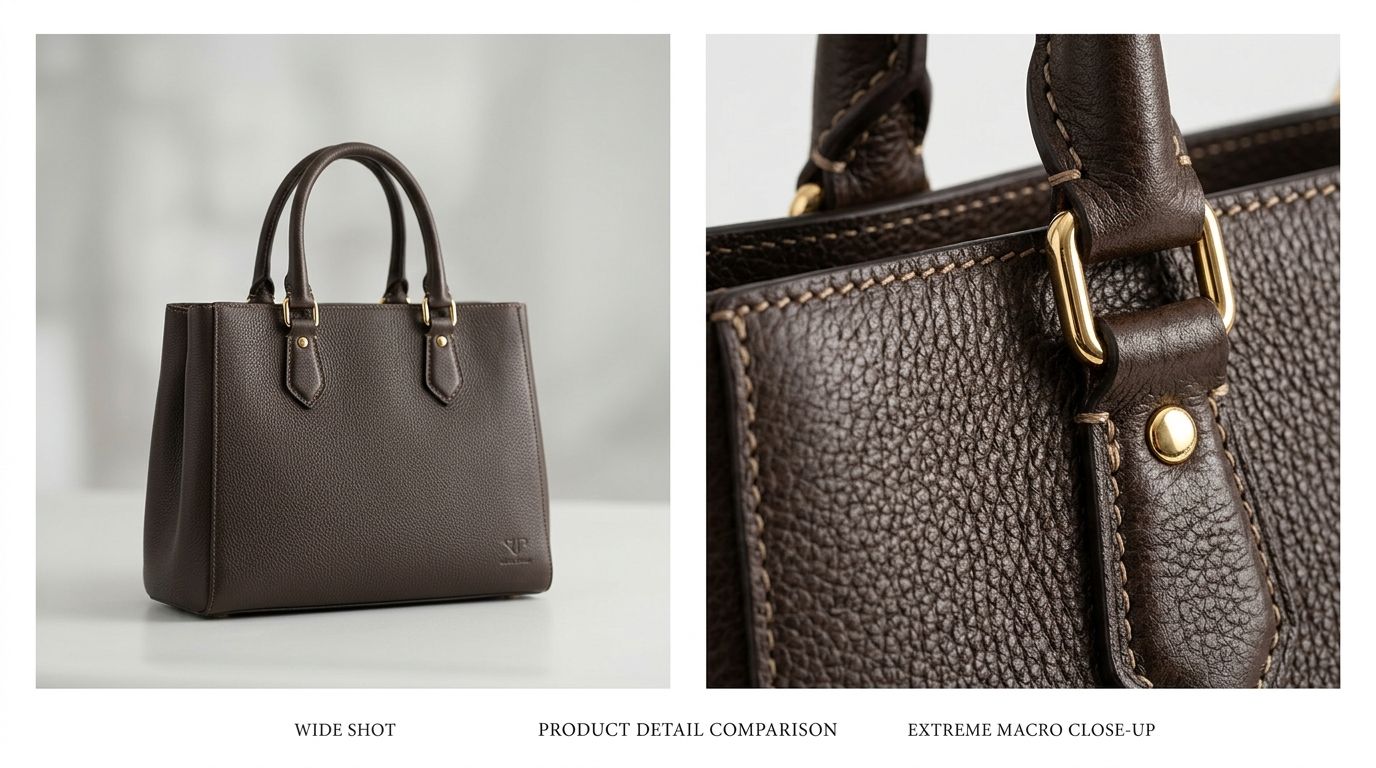
Product detail inspection drives conversion when the resolution supports the zoom.
The psychology of the zoom
When a shopper lands on your site, they cannot physically pick up your product. They cannot run their thumb over the fabric, test the weight of the hardware, or hold the item up to the light to see the finish. The product image zoom feature is the digital equivalent of picking an item off the store rack and holding it directly up to your face.
Replacing the physical touch
A user who engages with your zoom functionality is demonstrating massive purchase intent. They have moved past browsing the catalog and are now actively validating their decision. They want to justify the price tag. They are looking for specific reasons to trust your craftsmanship.
Understanding what makes a product photo convert requires looking past the overall composition of the image. The beautifully styled hero shot gets them to click, but the macro details actually close the sale. If the zoomed-in crop shows tight stitching, rich material texture, and clean manufacturing edges, the customer feels confident enough to buy.
Why detail builds pricing power
Shoppers use zoom tools specifically to hunt for flaws. They want to know if the plastic components look cheap or if the dye job is uneven. Providing a flawless inspection layer tells the customer you have absolutely nothing to hide.
If the zoom reveals nothing but digital compression, that confidence evaporates instantly. We instinctively associate digital blur with cheap manufacturing. The logic is simple. If the brand cannot afford a clear photograph, the customer assumes they also cut corners on the product itself.
Mechanics of ecommerce product zoom features
Not all zoom functionalities behave the same way. The specific interface method you choose must align perfectly with the device your customer is currently holding.
| Zoom Interface Method | Primary Device Environment | User Experience Impact |
|---|---|---|
| Hover to Magnify | Desktop Browsers | Requires zero clicks, keeping the main page layout fully visible |
| Click for Lightbox | Desktop & Tablet | Provides a full-screen, isolated environment for deep detail inspection |
| Pinch to Expand | Mobile Touchscreens | Relies on universal physical gestures instead of small interface buttons |
Zoom on hover for desktop power users
Zoom on hover is the gold standard for desktop navigation. The user simply moves their mouse over the primary image, and a magnified section appears adjacent to the main frame or directly inside it. This requires absolutely zero friction. There are no clicks required, and the user never loses context of the overall page layout.
However, this mechanic is entirely useless for the vast majority of consumer brands today because desktop traffic is shrinking rapidly. It only functions when a physical mouse pointer exists to hover over the screen.
Click to zoom and full-screen inspection
The click to zoom approach usually triggers a lightbox overlay. The primary image expands to fill the entire screen, completely blocking out the add to cart button, the product reviews, and the item description. This creates a highly immersive environment where the user can isolate the product and study it intensely.
The danger here lies in poor implementation. If the lightbox takes too long to load, or if the exit button to close the overlay is hard to find, the user feels trapped. You must ensure the exit path out of the full-screen zoom is obvious.
Mobile pinch zoom is the universal standard
Mobile shoppers do not look for small magnifying glass icons on their screens. They rely completely on muscle memory. When they want to see a detail, they physically pinch the screen outward.
If your ecommerce platform or custom theme blocks this native gesture, you are actively fighting human instinct. Many developers disable the native browser pinch zoom to keep their custom mobile layouts from looking broken. This is a massive mistake. Focusing on optimizing product page images means nothing if the user cannot actually inspect those images on their phone. You must either allow the native pinch gesture or build a flawless double-tap functionality that mimics the exact behavior the user expects.
Photography requirements for a flawless zoom
You cannot simply turn on a Shopify image zoom setting and expect magic to happen. The software only magnifies the pixels you provide it.
Image resolution for zoom clarity
To support a standard two-times magnification without breaking down, your base product photo needs serious resolution. The industry baseline for a crisp zoom experience is 2000 pixels by 2000 pixels. If you provide a smaller file, the zoom script will physically stretch the available image data, creating a blurry experience that damages your overall brand perception.
Capturing texture through intelligent lighting
Resolution alone is never enough. Flat lighting absolutely destroys texture. If you hit a black leather boot with a massive front light, you will wash out all the grain. When the user zooms in to look for quality, they will just see a flat black surface.
We used to spend hours in the studio adjusting fill lights by a few inches just to cast enough shadow to highlight a specific fabric weave. It was a tedious, incredibly expensive process. Photographers would argue about the exact angle needed just to make one square inch of leather visible.
This is exactly why modern brands are shifting their workflows. With CherryShot AI, you simply upload a basic product image, pick your desired visual mode, and generate campaign-ready photos in minutes. The tool handles the intricate lighting required to make textures pop, giving you zoom-ready detail without the massive studio invoice.
How product zoom affects conversion and returns
A well-executed zoom feature does more than just push the initial sale across the finish line. It protects your bottom line margin by significantly reducing the volume of preventable product returns.
Preventing the mismatched expectation return
A high conversion rate means absolutely nothing if the product comes right back to your warehouse two weeks later. Poor imagery is the leading driver of preventable returns. When shoppers cannot clearly see the texture of the fabric or the exact color variance of the material, their brain naturally fills in the visual gaps. They build a specific expectation in their head.
When the physical item finally arrives and fails to match that mental image, they initiate a return. By offering a crystal-clear product detail zoom, you align the customer expectation perfectly with reality. They know the leather has a pebble grain before they even reach the checkout screen. They know the hardware is brushed nickel, not polished chrome.
The technical setup versus execution reality
I frequently talk to founders who genuinely think their job is done because they checked a box in their theme settings. They turn on the native zoom feature and assume the problem is solved. But the execution is entirely dependent on your asset pipeline.
If your social media manager is uploading compressed JPEGs directly from their phone, the built-in zoom feature will just magnify compression artifacts. A massive visual gap costing sales often happens exactly here. Your top-of-funnel ads feature sharp, highly produced visuals. The user clicks through expecting a premium experience. They hit the product page, try to inspect the item details, and get a blurry mess instead.
You must compress your 2000-pixel images using modern formats like WebP. If you upload massive JPEG files, your page load speed will inevitably plummet. Every single second of delay on a product page heavily penalizes your conversion rate. It requires a strict balancing act between visual clarity and technical performance.
Frequently Asked Questions
Does product image zoom increase ecommerce conversion rate?
High-quality product image zoom directly increases conversion rates by allowing shoppers to inspect material quality, stitching, and hardware details just as they would in a physical retail environment. Customers build trust when they can verify the exact texture and finish of an item through crisp, high-resolution magnification. Sites that fail to offer this feature or present blurry crops suffer from significantly higher checkout abandonment because they cannot resolve visual doubts.
What resolution do product images need for zoom to work effectively?
Your base image must be at least 2000 pixels by 2000 pixels to maintain visual clarity on modern high-definition displays. This specific dimension ensures a standard two-times magnification reveals fine textures without exposing visible pixelation or compression artifacts to the buyer. Pushing files to 3000 pixels provides superior full-screen inspection, but you must compress these larger files using modern formats like WebP to protect your page load speeds.
How do I set up product zoom on Shopify?
Most modern Shopify themes include built-in magnification functionality that you can activate directly through the visual theme editor under the product information media settings. Selecting the zoom-on-hover or click-to-open lightbox option allows you to match the inspection interface with your specific brand aesthetic. If your active theme lacks native support, installing a dedicated image zoom application from the official Shopify app store will instantly add this required technical capability.
What happens to conversion when product zoom shows pixelated images?
Conversion rates drop dramatically when product zoom shows pixelated images because shoppers interpret digital blur as a direct indicator of cheap manufacturing or poor material quality. Presenting heavily compressed magnification destroys the exact trust you are trying to build by highlighting visual flaws instead of resolving buyer hesitation. Removing the zoom feature entirely is statistically safer than forcing a potential customer to look at an unreadable, artifact-heavy catalog photo.
Key Takeaways
- Blurry zoomed images hurt conversion worse than having no zoom feature at all.
- Your base product photos must be at least 2000px by 2000px to maintain crisp details.
- Mobile pinch functionality is a universal gesture that you should never block or override.
- High-resolution files must be properly compressed to prevent destructive page load delays.
The era of getting away with low-resolution catalog photography is completely over. Shoppers demand the ability to inspect the physical details of a product before they hand over their credit card. Provide them the clarity they need, and the conversion rate will naturally follow.
Audit your product image resolution today
Open your highest-traffic product page on your phone right now and pinch to zoom in on the main image. If the fabric or hardware looks blurry, you are actively losing sales. Upload your raw photos to CherryShot AI to generate crisp, zoom-ready images with lighting that highlights every physical texture.
Try CherryShot AI