How Many Product Photos Do I Need Per Listing? The Platform-by-Platform Guide
If you are wondering how many product photos you need per listing, the baseline for decent conversion today is six. Uploading two angles on a white background and hoping for the best is no longer a viable ecommerce strategy. It is an active leak in your conversion funnel.
Definition
A product gallery represents the collection of visual assets displayed on a sales page. It serves as the primary substitute for physical product inspection by providing multiple angles, scale references, and usage context to help buyers make informed decisions.
Shoppers cannot touch the fabric, feel the weight, or test the scale of what you are selling. Your image gallery is the only proxy they have for physical interaction. Learning what makes product photos convert comes down to answering unspoken buyer questions, and doing that effectively takes multiple angles and contexts.
Adding more images does not automatically equal more sales. Every additional photo must earn its place. After a certain point, endless galleries just slow down your site and create decision fatigue. Your goal is delivering comprehensive visual data, not overwhelming the user.
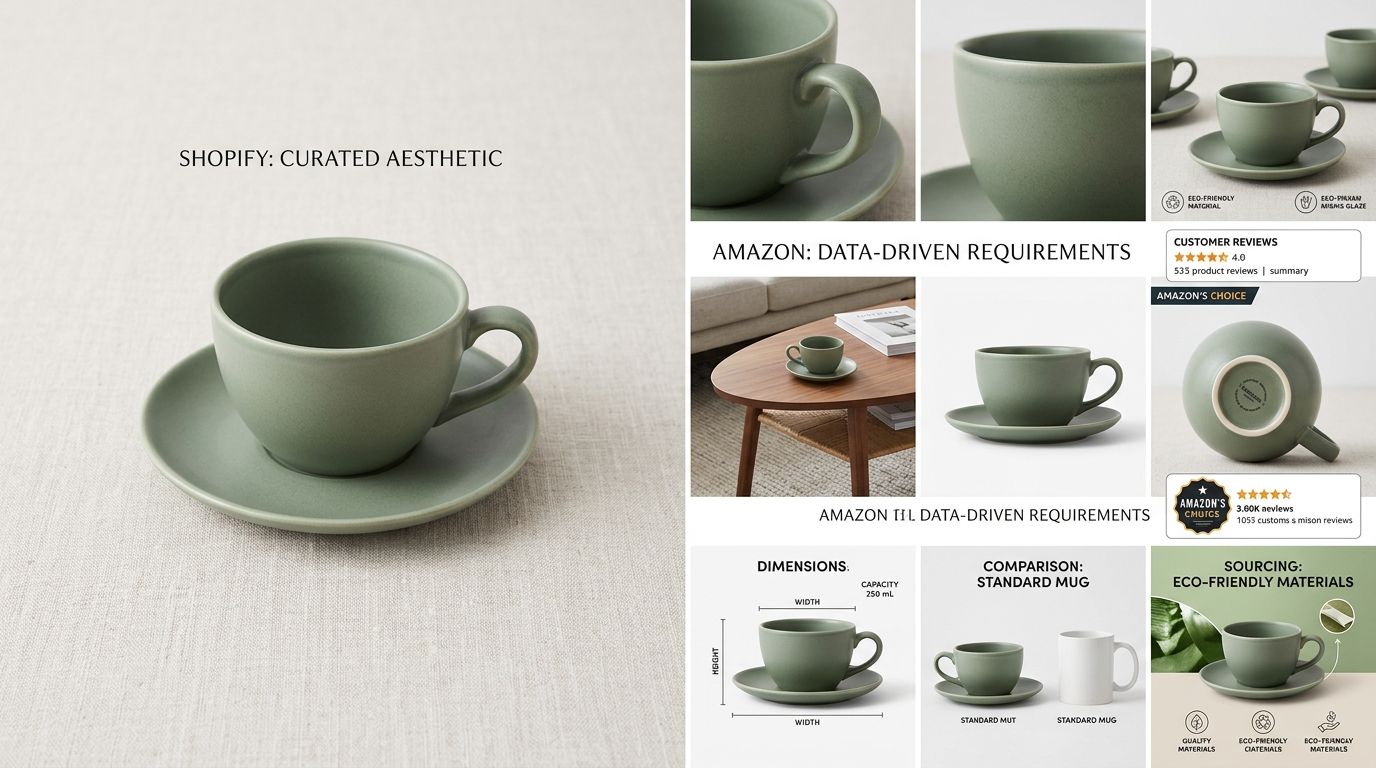
A standard six-image product gallery ensures shoppers have the visual data they need to add to cart without overwhelming mobile browsers.
| Platform | Optimal Count | Strategic Note |
|---|---|---|
| Amazon | 7 Images | All images must be visible on the main page for high conversion. |
| Shopify | 6–8 Images | Balance visual detail with fast mobile page load speeds. |
| Social Ads | 1–3 Images | Use a high-impact hero or lifestyle shot for immediate stopping power. |
The core six image slots every listing requires
A random assortment of six photos is useless. A highly converting product listing treats the image gallery like a structured argument. Each slot has a specific job to do in pushing the buyer toward checkout.
1. The primary hero shot
This is the initial image on a pure white or neutral background. It handles the hardest job in ecommerce, which is getting a user to stop scrolling and click. The hero shot must be perfectly lit, sharply in focus, and cropped to fill at least eighty percent of the image frame. There is no room for creative clutter here. The product must stand completely on its own.
2. The alternate angle
If your hero shot is a straight-on front view, your second image needs to show the back, the side, or an isometric three-quarter view. This builds spatial understanding. For a shoe, if the hero is the outer profile, the alternate angle should show the sole or the heel. Buyers want to rotate the item in their heads.
3. The macro detail
Shoppers want proof of quality. A close-up shot that reveals the stitching on a leather bag, the texture of a face cream, or the brushed metal finish on electronics provides that proof. This image says you have nothing to hide. It replaces the physical act of bringing a product up to your eyes in a retail store.
4. The scale reference
Poorly judged scale is one of the leading causes of preventable returns. A customer looking at an isolated photo of a backpack cannot tell if it holds a laptop or just a wallet. You need an image that anchors the product to a known entity. This could be a hand holding the item, or a graphic overlay indicating dimensions.
5. The contextual lifestyle shot
You have proven what the product is. Now you must prove how it fits into the buyer's world. You need to incorporate lifestyle product photography to show the item in use. If you sell a coffee mug, show it on a rustic desk next to an open notebook. This shifts the buyer from analyzing the product to desiring the aesthetic.
6. The fit or packaging shot
For apparel, this is where ghost mannequin photography shines, showing exactly how a garment drapes without the distraction of a model. For supplements or cosmetics, this is a clear shot of the ingredient label or the premium unboxing experience. This final image answers lingering practical concerns.
Platform guidelines for product image count
While six is your baseline, the exact number you deploy depends heavily on the platform where the transaction takes place. Selling on your own site gives you control, but selling on a marketplace means playing by their interface rules.
Amazon image allowances and strategy
Amazon allows you to upload nine total images for a standard product listing. Do not upload nine. The Amazon interface only displays the first seven images on the main product page. To see images eight and nine, the shopper has to proactively click into the expanded gallery. Conversion data shows that very few people take that extra step.
Your strategy here is strict compliance mixed with maximum utilization. You want exactly seven images. Your lead image must follow the platform's pure white background rule flawlessly. If you fail to meet Amazon image requirements, your listing will be suppressed immediately. Use slots two through seven for infographics, lifestyle settings, and comparison charts. Amazon shoppers read images before they read bullet points.
Shopify and direct-to-consumer storefronts
Shopify sets a massive technical limit of two hundred and fifty images per product. Just because you have the storage does not mean you should use it. When you optimise Shopify product images, the focus shifts from platform compliance to mobile user experience.
On a custom storefront, aim for six to eight images. If you have color variants, tie those variant images directly to the color swatch selectors rather than dumping twenty different colored shirts into one massive carousel. A clean, targeted gallery of six images loads faster on cellular networks and keeps the add-to-cart button easily accessible.
The risk of over-uploading
There is a dangerous assumption that if six photos are good, twelve must be better. For standard ecommerce, visual bloat is real.
If you find your store is getting heavy traffic but nobody is buying, you might have a problem with visual clarity. Overwhelming a buyer with fourteen slightly different angles of the same shoe does not build confidence. It builds irritation. When you see product images losing conversions, it is frequently because the gallery takes too long to scroll through, burying the key details the buyer actually cares about.
The financial reality of generating six images per SKU
I have sat through enough four-hour studio overruns to know exactly why most brands settle for two or three photos per product. The math of traditional photography breaks when you scale. If you are launching fifty new SKUs and need six photos per listing, you are suddenly looking at three hundred finished images.
A traditional studio setup charges for the space, the photographer, the stylist, the prop rentals, and the retouching. That easily pushes the per-image cost north of eighty dollars. Paying twenty-four thousand dollars just to populate a product gallery is an unacceptable hit to your margin. That is why corners get cut and galleries launch half-empty.
This bottleneck is precisely what CherryShot AI solves. You upload a single base photo of your product, select the visual modes you need, and generate campaign-ready lifestyle shots, studio angles, and flat lays in minutes. You get your core six images for under five dollars total. You stop paying for the logistics of a photo shoot and start paying strictly for the output.
Refresh your store gallery with high-converting imagery
Audit your existing product pages to see where you are missing key visual slots like scale references or lifestyle context. Use CherryShot AI to generate those missing shots today and see how quickly a complete, professional gallery moves the needle on your conversion rates.
Try CherryShot AIFrequently Asked Questions
How many product images does Shopify recommend?
Six to eight images create a balanced gallery for most products. You should avoid exceeding ten files to keep mobile load times fast for your customers. Aim for this specific range to provide enough visual information without slowing down your store performance.
Do more product photos always mean higher conversion?
No, extra photos often lead to diminished returns after the sixth or seventh image. Shoppers experience friction if they are forced to swipe through endless redundant angles to find details. Every image you add must justify its presence by answering a specific question about the item.
What are the most important product photo slots?
Your primary hero shot is essential for driving the initial click. Include a secondary angle for perspective, a macro detail shot for quality assurance, and a lifestyle image for context. These four specific slots do the heavy lifting for your conversion rate by providing the foundational information customers need.
How many images does Amazon allow per listing?
Amazon permits nine total images, but only seven appear on the primary gallery view. Most shoppers rarely click to see the remaining two hidden files. Treat your listing as having a seven-slot limit to ensure your most important visual assets are viewed by every visitor.
Can having too many product photos hurt conversion?
Yes, excess imagery causes decision fatigue and slows down page load speeds. A cluttered gallery buries the most relevant details under redundant content. Keep your visual presentation concise so users can quickly find the information required to move forward with their purchase.
The days of starving your product pages of visual context are over. A fully optimized image gallery is the fastest way to build trust and push a buyer to checkout. When you can generate those six vital shots in an afternoon using CherryShot AI, there is no longer any excuse for empty listings.