T-Shirt Photoshoot Guide: 5 Setups Every Apparel Brand Needs in 2026
T-shirts are the highest volume product in the apparel industry. Yet most founders treat a simple t shirt photoshoot like a bespoke editorial campaign. If you are paying a traditional studio $150 per finished image for a basic crewneck catalog shot, you are lighting your gross margin on fire. You do not need to reinvent the wheel every time a new colorway drops. You just need to match the right photography setup to your product lifecycle.
Definition
A t-shirt photoshoot is the production of professional imagery for apparel retail. It involves various staging techniques, from flat lay arrangements to on-model lifestyle sessions, designed to present garment details, fit, and texture accurately to online shoppers.
Any brand still running a full studio production just to get basic e-commerce assets online is paying for logistics rather than quality. The invoice includes studio rental time, the stylist smoothing out wrinkles, the photographer adjusting the C-stands, and the massive scheduling delays. You can cut all of this out if you understand the five actual methods available to clothing brands today.
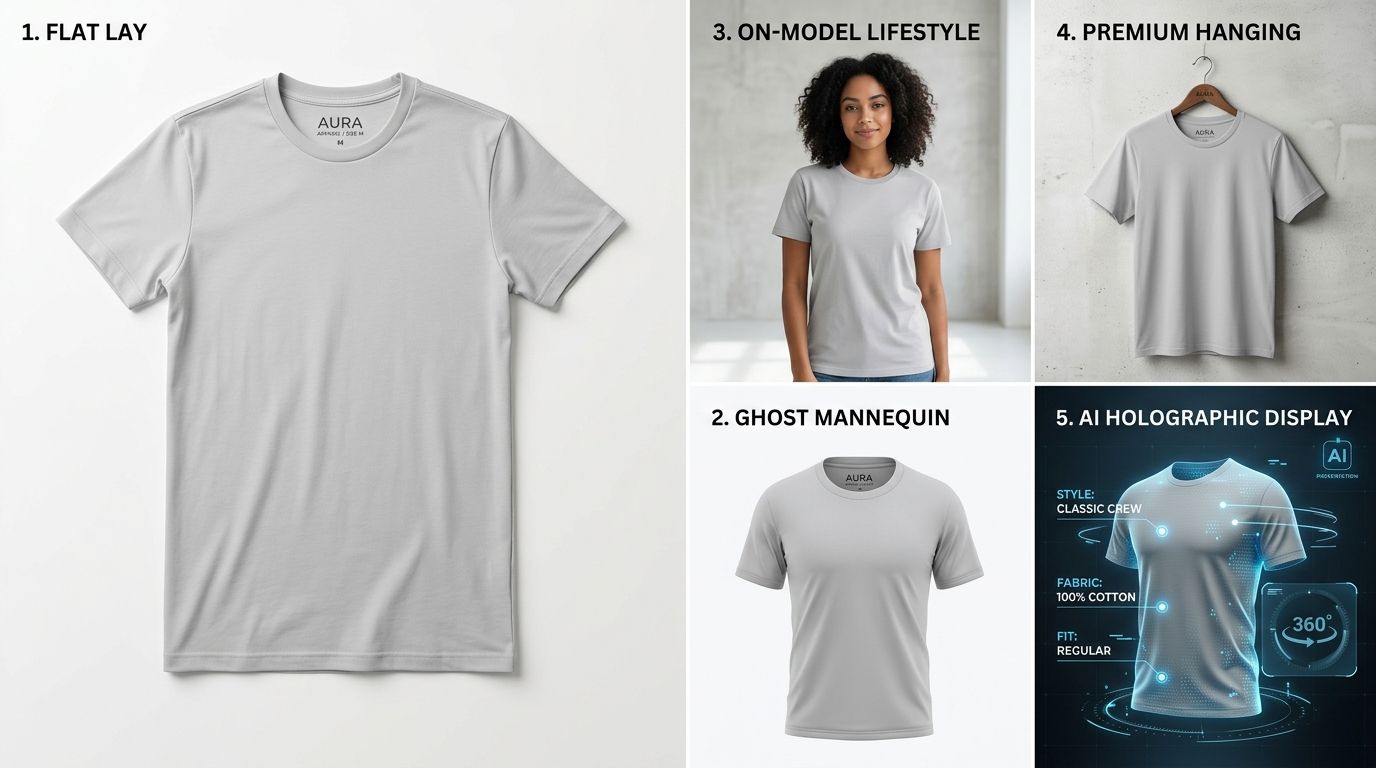
The jump from a basic flat lay to an on-model context changes how shoppers perceive fit and value.
The Math Behind a T-Shirt Photoshoot
Before looking at specific camera angles, we need to look at buyer psychology. Shoppers cannot touch the fabric of your clothing product shots. They cannot stretch the collar or check the drape of the hem. Your photos have to do all that heavy lifting.
If your visual presentation is flat, the perceived value of the item drops. This is why high intent photographing clothing for online stores focuses heavily on generating dimension. You want the fabric to look like it has a body inside it.
When shoppers see a shirt on a body, their brain instantly processes the fit, the sleeve length, and the overall silhouette. When they look at a shirt on a hanger, they have to guess. Guessing creates friction. Friction kills sales. The five methods below scale from the lowest friction to the highest impact.
5 T-Shirt Photography Setups Compared
Every successful apparel brand uses a mix of these five setups depending on where the image will live. Your product page needs clarity. Your Instagram feed needs lifestyle context. Here is exactly how to execute each method.
1. The Flat Lay Shirt Photography Method
The flat lay is the entry level setup for apparel product photography. You lay the t-shirt flat on a white surface, position your camera directly overhead, and snap the shot.
Getting this right is harder than it looks. You cannot just drop the shirt on the floor. You need to steam every single wrinkle out of the fabric. You need double sided tape tucked inside the seams to create a flattering taper at the waist. Some stylists shove tissue paper inside the chest area to mimic pectoral muscles or bust lines so the shirt does not look like a deflated balloon.
It is a labor intensive process that yields a perfectly adequate, slightly boring image. It works great for showing the exact placement of a graphic print, but it does nothing to sell the lifestyle of the brand.
2. The Basic Hanger Shot
If you browse fast fashion websites, you will see thousands of hanger shots. You hang the shirt on a premium wooden or matte black hanger against a white wall. The photographer sets up two softbox lights at forty five degree angles and blasts the garment with bright, even lighting.
This is the fastest manual setup available. A skilled team can shoot hundreds of SKUs in a single afternoon. The massive downside is the complete lack of shape. Hanger shots look cheap because the shoulders inevitably droop and the bottom hem flares out in unnatural ways. It is a utility setup purely designed for speed.
3. The Ghost Mannequin T-Shirt Setup
This has been the industry standard for ecommerce catalog imagery for over a decade. A ghost mannequin photography guide usually reveals the trick behind the magic. You dress a modular mannequin in the t-shirt and take a photo. Then, you remove the shirt, turn it inside out, and take a photo of the back collar tag area.
An editor takes those two photos into Photoshop. They cut out the mannequin limbs and splice the inside back collar onto the front shot. The final result is a crisp, three dimensional shirt that appears to be floating in mid air. It gives the shopper a perfect understanding of the fit without the distraction of a human model.
The problem here is the bottleneck. You have to pay someone to physically dress and undress a dummy all day, and then you pay an editor to execute clipping paths on every single image.
4. The Live On-Model Apparel Shoot
This is the gold standard for conversion rates. You hire a professional model, a makeup artist, a wardrobe stylist, and a seasoned photographer. You rent a cyc wall studio or a lifestyle location. The resulting imagery breathes life into your brand.
AI is not going to replace a highly stylized editorial campaign in the desert. If you are launching a flagship seasonal collection with a deep narrative focus, you should hire the human team. The art direction and spontaneous human movement matter there.
But for standard catalog volume, the math simply does not work anymore. Booking models takes weeks of lead time. If your factory sends a sample a week late, your entire shoot day is blown. The hard costs easily push past thousands of dollars before a single camera shutter clicks.
5. AI Generated Apparel Photography
The newest setup does not require a camera at all. Brands take a basic, poorly lit flat lay or a factory sample photo. They upload that rough image into CherryShot AI, select a visual mode like Lifestyle or Influencer, and the software generates a photorealistic model wearing the exact shirt in a specific environment.
This completely alters the production timeline. When you can review an AI model photography for apparel workflow, the time from sample receipt to live product page drops from three weeks to twenty minutes. CherryShot AI preserves the precise fabric texture, graphic placement, and seam details of your original upload while building a rich contextual background around it.
The per image cost drops to under five dollars. You get the conversion lift of an on-model shoot without the agency fees or catering invoices.
Evaluating the Methods: A Cost and Impact Breakdown
| Setup Method | Cost Per Image | Primary Benefit |
|---|---|---|
| Flat Lay | Low | Simple Setup |
| Ghost Mannequin | Medium | Fit Accuracy |
| On-Model Shoot | High | Highest Conversion |
| AI Generation | Minimal | Fastest Workflow |
The comparison reveals a massive gap in the middle of the market. Brands used to be forced to choose between cheap flat lays that hurt sales or expensive studio shoots that drained cash. AI image generation bridges that exact gap.
Refresh your catalog with modern lifestyle imagery
Take your existing flat lay product shots and generate professional lifestyle models in minutes. This approach saves thousands in studio costs while significantly boosting your store's visual appeal.
Try CherryShot AIFrequently Asked Questions
Do I need a mannequin to photograph t-shirts?
A mannequin is not strictly necessary for every brand. Simple hanger setups or flat lay photography often suffice for basic catalog imagery. Using a physical mannequin adds dimension, but it is not the only way to display fit. Modern AI tools can take a standard flat lay image and render an on-model presentation, providing that essential three dimensional shape without the logistical burden of renting or storing a mannequin.
What's the best background for t-shirt product photos?
Pure white backgrounds remain the industry standard for main product pages because they eliminate visual distractions and meet marketplace technical requirements. White backgrounds allow the fabric colors to stand out clearly for the customer. For secondary gallery images or social media content, using contextual environments like urban streetscapes or minimalist studio settings helps drive significantly higher engagement by showing the product in a realistic, relatable context.
How do I make a shirt look 3D without a model?
Ghost mannequin photography is the traditional method used to create an invisible body effect by splicing two separate images in post-production. You can also add volume to flat lays by strategically placing tissue paper under the chest and shoulder areas. If those methods feel too slow, using AI fashion generation software allows you to transform a basic flat product photo into a professional, dimensional on-model shot instantly.
Is AI generated t-shirt photography allowed on Amazon?
Amazon permits AI generated lifestyle imagery provided the product remains completely accurate to what the customer receives. The primary hero image must still feature a compliant pure white background. You can confidently use AI to create supplementary gallery photos that show the t-shirt in various environments or on diverse virtual models, adding value to your product page without violating any platform policies regarding product accuracy.
How much does a t-shirt photoshoot cost?
Traditional studio shoots typically cost between forty and two hundred dollars per finished image, depending on hiring models and studio space. Ghost mannequin and flat lay setups usually fall at the lower end of that range. Using AI product photography software reduces the cost to under five dollars per image. This approach removes the need for recurring studio rentals, professional stylists, and expensive model casting sessions entirely.
Stop letting slow production schedules dictate your product launches. The tools exist today to bypass the studio entirely without sacrificing the visual quality your customers demand. If you want to see exactly how fast this process can be, try running one of your flat lay images through CherryShot AI and watch the on-model results generate in minutes.