Facebook Ad Image Size 2026: Every Ad Format with Exact Pixel Specs
Updated August 2026. The two Facebook ad image sizes that matter most in 2026 are 1080x1350 pixels (4:5) for Feed placements and 1080x1920 pixels (9:16) for Stories and Reels. Meta's own aspect ratio guidance recommends 4:5 for single-image Facebook Feed ads and 9:16 for Stories, Status, and Reels. A 1080x1080 square (1:1) is the safest fallback if you only have budget for one asset.
At-A-Glance Dimension Reference
| Placement Type | Dimensions | Ratio | Source |
|---|---|---|---|
| Standard Feed (fallback) | 1080 x 1080 | 1:1 | Meta aspect ratio guide |
| Mobile Feed (recommended) | 1080 x 1350 | 4:5 | Meta aspect ratio guide |
| Stories/Reels | 1080 x 1920 | 9:16 | Meta aspect ratio guide |
| Carousel Ad | 1080 x 1080 | 1:1 | Meta aspect ratio guide |
Meta's own minimum pixel size page lists slightly different numbers than the ratio guide above: it recommends a 1440x1800 minimum for 4:5 Feed images and treats Stories and Reels as 1080x1080 minimum before cropping to the vertical frame. Both sets of numbers hit the same aspect ratios; the 1440x1800 figure is simply a higher-resolution floor. See the full breakdown on Meta's help center.
Definition
Facebook ad image size refers to the specific pixel dimensions and aspect ratios required by Meta's advertising platform to display creative content correctly across different mobile and desktop placements. Choosing the right size ensures your product images are not cropped or distorted by the platform's automated system.
If you are still letting Meta automatically crop your wide desktop images for mobile ads, you are actively burning your media budget.
I have personally sat next to media buyers who could not understand why their conversion rates tanked over the weekend. The targeting was identical. The copy was sharp. But when we previewed the ad on a physical iPhone, we saw the problem instantly. The horizontal lifestyle photo they uploaded was shrunk to a tiny sliver on the screen.
Producing a correctly sized asset for every placement is tedious, and it usually means shooting the same product from multiple distances or paying a designer to hack a crop into shape. Creating three different variations of the same product shot requires genuine effort. But when you are competing in a mobile feed, visual real estate dictates your click-through rate.
Key Takeaways
- Feed ads perform best at 1080 by 1350 pixels (4:5); 1080 by 1080 (1:1) is the safe fallback across more placements.
- Story and Reel placements need 1080 by 1920 pixel vertical assets to avoid awkward blurred borders.
- Carousel ads default to a strict 1:1 ratio; 4:5 is only supported inside Advantage+ catalog carousels.
- Shooting wide desktop images and cropping them for mobile is the fastest way to ruin product resolution.
The Core Facebook Ad Dimensions for 2026
The era of the landscape image is over. Years ago, you hired a photographer, handed over a shot list, and received a Dropbox folder full of horizontal images. They looked stunning on a big desktop monitor. You uploaded those 16:9 images directly into Facebook Ads Manager.
Today, that workflow is broken.
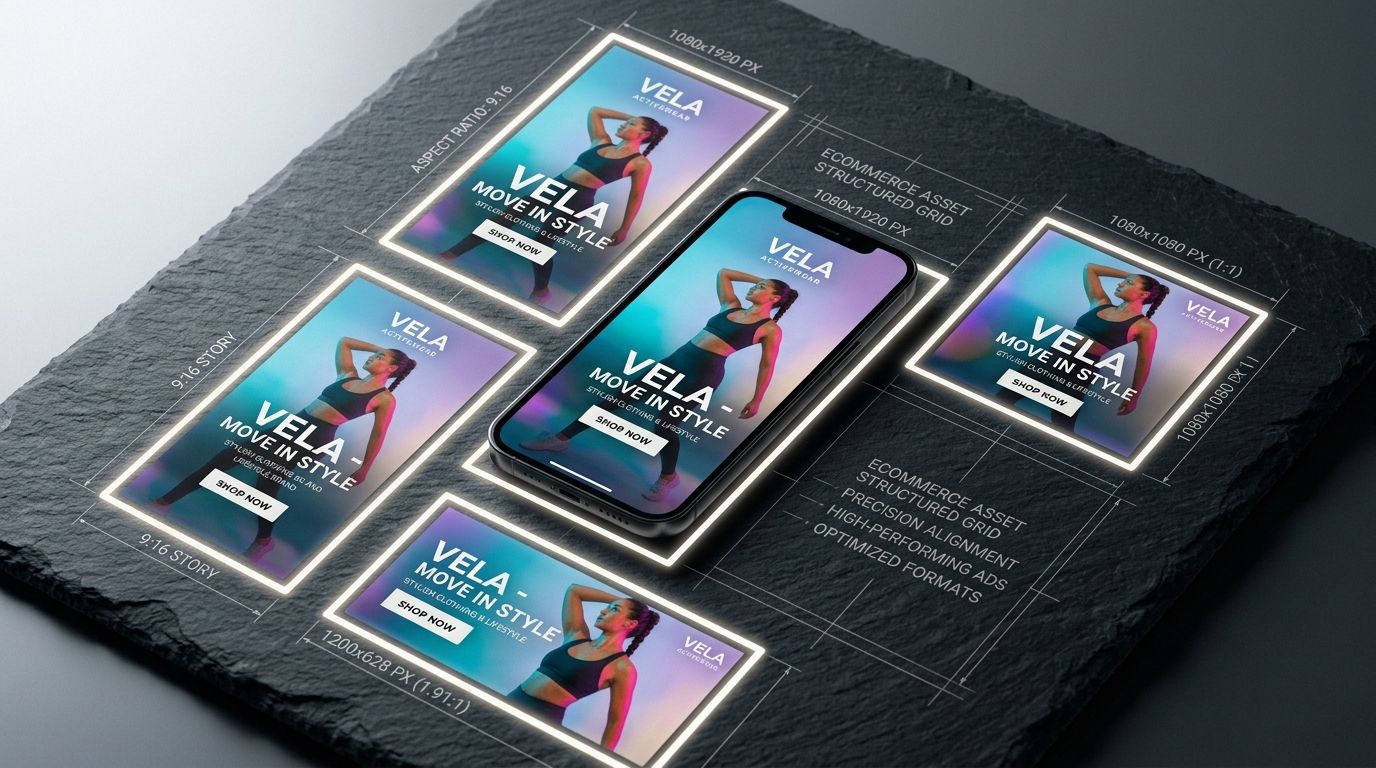
The vast majority of your traffic is scrolling with their thumbs. They are holding their phones vertically. When you push a 16:9 landscape image into a mobile feed, it occupies less than a third of the screen. The user can see the organic post above your ad and the organic post below your ad. You are quite literally paying Meta to give attention away to other content.
Why the Square is the Safest Bet
A square image (1080 by 1080 pixels) is the most versatile asset you can create. Meta's aspect ratio support table shows 1:1 supported across Facebook Feed, Instagram Feed, Marketplace, the right column, and Carousel. If your creative team only has bandwidth to deliver a single asset per product variation, demand that it be a high-resolution square.
Facebook Feed Ad Size Explained
The standard Facebook feed is the most competitive real estate on the platform. Your image size dictates how well you can interrupt a user scrolling at warp speed.
Standard Square vs Vertical 4:5
While 1080 by 1080 is universally accepted, Meta's own guidance names 4:5 as the recommended ratio for a single-image Facebook Feed ad, per its aspect ratio best practices page. That translates to 1080 pixels wide by 1350 pixels tall in the resolution most third-party spec guides use. Meta's minimum-pixel-size page lists a higher floor of 1440 by 1800 pixels for the same 4:5 ratio, so either resolution is correct as long as the crop stays 4:5.
A 4:5 image physically stretches further down the mobile screen than a square image. When a user scrolls to a 4:5 ad, it dominates their viewport and leaves less room for organic content to distract from your product. This simple shift in pixel height consistently improves conversion rates.
If your campaigns are falling flat despite great targeting, bad cropping is often the culprit. Boost Underperforming Ad Creative explores exactly why brands blame the Meta algorithm when they should be blaming their own asset dimensions.
Facebook Story Ad Size and Reels Dimensions
Stories and Reels are full-screen, immersive experiences. Do not treat them like standard feed placements. If you upload a square image into a Story ad, Meta will automatically fill the empty space at the top and bottom with a blurred background pulled from the colors of your image. It looks cheap. It looks like an afterthought. Users skip past it immediately.
The 9:16 Full Screen Requirement
To win in these placements, you need a 9:16 aspect ratio. That is 1080 pixels wide by 1920 pixels tall, the resolution most spec guides converge on for this ratio. Meta's aspect ratio guide states plainly that "most people hold their phones vertically so 9:16 is recommended" for Stories, Status, and Reels placements.
The most critical concept to understand with Story and Reel dimensions is the "safe zone." Meta places its own interface elements over your creative. Your brand profile picture sits near the top. The call to action button sits at the bottom. The engagement icons sit on the right edge.
If you place key product features or text graphics in the bottom several hundred pixels of your image, the "Shop Now" button will cover them entirely. You have to design vertical assets with a clear buffer zone at the top and bottom. Keep the core product dead center.
Facebook Carousel Ad Size: The Full 2026 Spec
What size images do you need for a Facebook carousel ad in 2026? Every card should be 1080 by 1080 pixels at a strict 1:1 ratio. Meta's aspect ratio guide also permits 4:5 carousel cards, but only for Advantage+ catalog carousels built from your product feed, not standard manually-uploaded carousels. Keep every card in a single carousel the same ratio to avoid Meta forcing an automated crop.
Carousel ads are exceptional for telling a sequential story or showcasing multiple products from a single collection. They are also unforgiving when it comes to aspect ratios.
Strict 1:1 Uniformity, With One Exception
Outside of Advantage+ catalog carousels, Meta's guidance is unambiguous: "It's best to keep the aspect ratios of your product images consistent, such as all 1:1 or 4:5, to prevent automated adjustments," per the official aspect ratio page. If you attempt to upload a mix of square and vertical images into a standard carousel, Meta forces everything into a square crop. This is how product photography gets ruined. The top of a model's head vanishes. The heel of a shoe gets sliced off. The context of a beautiful lifestyle scene is entirely lost.
Before you launch a carousel, verify that the primary focal point of every image fits securely inside a square frame. If you want to dive deeper into what makes a user interact with these multi-image formats, Craft Scroll-Stopping Ad Images breaks down the visual elements that actually work.
Facebook Collection Ad Dimensions
Collection ads are hybrid formats. They feature one large hero image or video sitting above a grid of smaller product images pulled directly from your ecommerce catalog.
Hero Images and Catalog Syncing
For the main hero image, stick to the 1080 by 1080 square. The real challenge with Collection ads is not the hero asset. The challenge is the product grid beneath it.
Those grid images are pulled automatically from your Shopify or WooCommerce product feed. Meta crops them into squares. If your ecommerce store uses tall, vertical images for its primary product shots, Meta will butcher them when assembling the collection ad grid. A beautiful dress shot vertically will turn into a zoomed-in square of fabric where the neckline and hem are entirely missing.
This is why your core ecommerce catalog images should always be formatted as squares.
File Size and Format Limits
Meta's technical requirements haven't shifted much in 2026: images should be JPG or PNG, capped at 30MB per file. Videos accept MP4, MOV, or GIF, capped at 4GB. These limits apply across Feed, Stories, Reels, Carousel, and Collection placements alike, so the constraint you'll actually hit is aspect ratio, not file weight.
Solving the Sizing Problem Without a Studio
I have personally watched a designer spend three hours in Photoshop trying to artificially extend the background of a horizontal lifestyle shot just so it would fit into a vertical Instagram Story. They cloned textures, stitched edges together, and blurred the background. The final result still looked slightly unnatural.
That friction used to be the unavoidable cost of running omni-channel campaigns. You either paid for extra studio days to shoot every possible dimension, or you paid your design team to hack the imagery into shape.
AI product photography changes that workflow entirely. Founders are moving past studio bottlenecks by running an AI photoshoot instead of reshooting. Using tools like CherryShot AI, you can generate campaign-ready photos in whatever aspect ratio you need. You upload your core product image, select a visual mode like Minimalist or Lifestyle, and generate native 4:5 assets for your feed right alongside native 9:16 assets for your Stories.
There is no awkward cropping. There is no artificial background stretching. The product scene is naturally rendered in the exact pixel dimensions the placement demands. The per-image cost drops to under five dollars, and the turnaround goes from weeks to an afternoon.
Audit your image assets before your next campaign launch
Review your current ads and ensure you have high-resolution square, vertical, and full-screen versions of every hero shot. Using CherryShot AI allows you to generate these required formats from a single source image, ensuring consistency across all placements.
Try CherryShot AIFrequently Asked Questions
What size images work best for Facebook ads?
The optimal image size changes based on the specific ad placement. Using a 1080 by 1080 pixel square offers the most flexibility across Meta platforms. Vertical ads at 1080 by 1350 pixels provide a better mobile experience by consuming more screen space. Stories and Reels strictly require 1080 by 1920 pixels to ensure full screen coverage. Generating assets in all three dimensions yields higher engagement than using a single master image.
What is the recommended Facebook ad image size?
A 1080 by 1080 pixel image with a 1:1 aspect ratio serves as the standard recommendation for most campaigns. This dimension functions safely across the Feed, Right Column, and Audience Network without unpredictable cropping errors. Relying on this single size simplifies production for small teams. However, vertical placements often perform better when provided with specific 9:16 assets that avoid the common issues caused by forced aspect ratio scaling.
Can I use vertical images for Facebook ads?
Vertical images are highly effective for capturing attention on modern mobile devices. Using a 4:5 aspect ratio at 1080 by 1350 pixels fits perfectly within the main feed. For Facebook Stories and Reels, a 9:16 aspect ratio at 1080 by 1920 pixels creates an immersive experience. These tall formats dominate the mobile screen, preventing users from scrolling past your content as easily as they would with smaller landscape images.
What size images for Facebook carousel ads?
Carousel ads run best at 1080 by 1080 pixels to maintain a consistent 1:1 aspect ratio. Meta's own aspect ratio guidance also allows 4:5 for carousel cards, but only inside Advantage+ catalog carousels built from your product feed. Uploading non-square images into a standard carousel forces the system to center-crop them, which frequently cuts off the top of a product or the edge of a lifestyle scene. Keep every card in a carousel the same ratio.
Does image size affect Facebook ad performance?
Image size represents a primary factor in overall ad performance metrics. Small or improperly scaled images appear pixelated, which reduces consumer trust in your brand immediately. Landscape images shown in mobile feeds occupy too little vertical space and allow competitors to distract users from your offer. Ads that match the native dimensions of their respective placements retain viewer attention significantly longer, which drives down your total cost per acquisition.
What is the optimal Facebook ad size for 2026?
There is no single optimal size because Meta scores creative by placement. For a single-image Feed ad, use 4:5 at 1080x1350 pixels. If you need one asset to cover the most placements safely, use a 1:1 square at 1080x1080 pixels. For Stories and Reels, use 9:16 at 1080x1920 pixels. Running all three alongside each other in the same ad set is the closest thing to a universal answer.
What is the best image size for Facebook posts in 2026?
For organic Facebook posts, not paid ads, 1080x1080 pixels (1:1) stays the safest default because it displays cleanly in both feed and profile grids. If you want the post to take up more vertical space on mobile, 1080x1350 pixels (4:5) performs better in the scroll. Avoid uploading landscape 16:9 photos for standalone posts, since Facebook will shrink them and leave dead space above and below.
What is the recommended size for a Facebook ad image?
Meta's own minimum pixel size guidance lists 1080x1080 for a 1:1 Feed image and 1440x1800 as its recommended minimum for a 4:5 Feed image. In practice, most advertisers and third-party spec guides use 1080x1350 for 4:5, which is lower resolution but still hits the same 4:5 ratio Meta recommends for single-image Feed ads. Either resolution works as long as the ratio is exact.
How to scale Facebook ads in 2026?
Scaling comes down to creative volume more than budget increases. Meta's delivery system tests multiple images and copy variants per ad set, so accounts running five or more correctly-sized creative variations per product typically get more stable delivery than accounts running one hero image. The bottleneck is almost always producing enough native 1:1, 4:5, and 9:16 assets fast enough, which is why AI generation tools have replaced reshoots for many ecommerce teams.
Correctly sizing your ad creative is the absolute baseline for performance marketing in 2026. Do not let bad cropping ruin a spectacular product. If your studio process makes it too expensive to generate custom dimensions for every placement, it is time to rethink your workflow. Explore CherryShot AI to generate campaign-ready product photos in minutes.