Etsy Listing Photo Size 2026: Dimensions, Rules, and Tips
The ideal Etsy listing photo size in 2026 is 2000 pixels on the shortest side, with a resolution of 72 PPI and an aspect ratio of 4:3. If you get those three numbers right, your images will load quickly and look sharp on every device. If you ignore them, Etsy will crop your photos automatically and often cut off the edges of your product in the search results.
Definition
Etsy listing photo size refers to the specific pixel dimensions and aspect ratio settings required for images to display correctly on the platform's search and product pages. These specifications are designed to ensure consistent thumbnail cropping and optimal zoom quality for shoppers.
I spent years running ecommerce brands and fixing listing images. The most common mistake sellers make is shooting square photos for Etsy. The platform displays thumbnails in a 4:3 ratio. When you upload a 1:1 square image, Etsy forces a crop to make it fit their grid. Nailing the 4:3 aspect ratio matters more than raw pixel count because that automatic crop will destroy your hero image if you guess wrong.
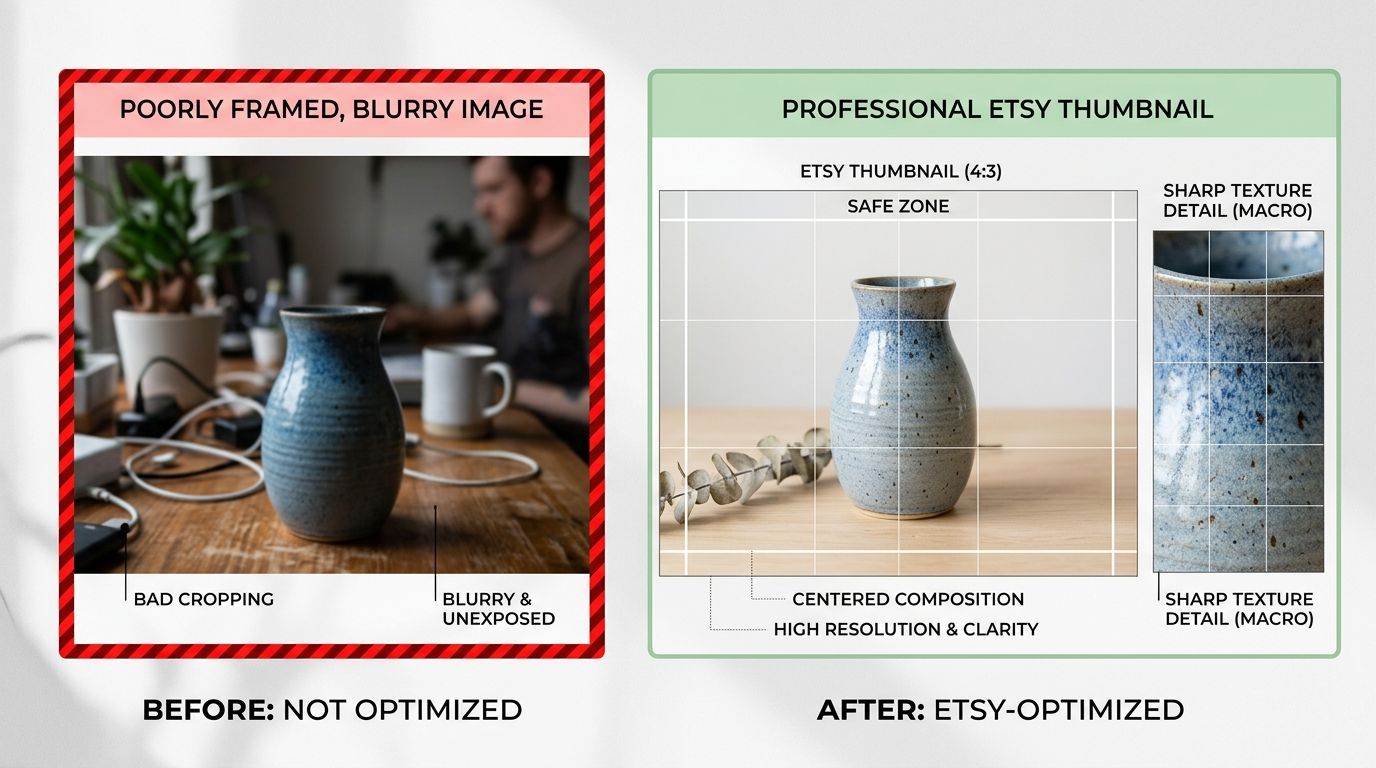
Uploading the correct 4:3 aspect ratio ensures your product stays centered and fully visible in Etsy search grids.
You cannot afford to lose clicks before a buyer even reaches your listing. The search page is ruthless. Your thumbnail is sitting next to dozens of direct competitors. If your image looks amateur, out of focus, or badly cropped, the buyer scrolls past it.
It is worth noting that Etsy does allow you to adjust the thumbnail crop manually after uploading. But doing this for hundreds of SKUs is a miserable way to spend an afternoon. Get the aspect ratio right in your camera or editing software, and the upload process takes seconds.
| Feature | Etsy Recommendation | Common Mistake |
|---|---|---|
| Aspect Ratio | 4:3 (Landscape) | 1:1 (Square) |
| Shortest Side | 2000 Pixels | Below 800 Pixels |
| Color Profile | sRGB | CMYK or Adobe RGB |
| File Format | JPG | PNG or HEIC |
What are the exact Etsy photo dimensions for 2026?
The technical baseline for an Etsy listing requires more than just making sure the picture is not blurry. You are designing an asset that must perform perfectly on a desktop monitor, a tablet, and a mobile phone. Understanding the mechanics of etsy photo dimensions is the first step to standardizing your shop.
The 2000-pixel benchmark
Etsy recommends a minimum of 2000 pixels for the shortest side of your image. This specific number exists for one reason: the zoom function. When a buyer clicks on your image to inspect the texture of a knitted sweater or the clasp on a handmade necklace, Etsy loads the higher resolution file.
If you upload an image that is only 800 pixels wide, the zoom function becomes entirely useless. The image will pixelate, and the buyer will lose confidence in the quality of your work. Conversely, you do not need to upload massive 6000-pixel raw files. Anything significantly over 2500 pixels is just wasting bandwidth and slowing down your page load time.
Aspect ratio and the thumbnail crop
The aspect ratio is the proportional relationship between an image's width and height. Etsy is built entirely around a 4:3 aspect ratio. This means the image is slightly wider than it is tall. Think of a standard landscape photograph rather than a perfect square or a tall vertical Instagram story.
When you browse Etsy, every single listing image in the search results is displayed as a 4:3 rectangle. If you upload a square 1:1 image, Etsy will chop off the top and bottom to make it fit. If you upload a vertical 9:16 image, it will cut right through the center. Leaving your etsy main photo size up to an automated cropping tool is dangerous. You must frame your shots specifically for 4:3.
Etsy product photo requirements you cannot ignore
Beyond dimensions, Etsy has strict technical constraints regarding file size, file types, and color formatting. Missing these details will either block your upload entirely or quietly ruin the buyer experience.
File types and size limits
Etsy accepts JPG, PNG, and GIF files. For product photography, you should almost exclusively use JPG. PNG files are excellent for graphics with transparent backgrounds, but they create massive file sizes when used for high-resolution photographs. Keep your files under 1MB whenever possible to ensure fast loading times.
If your file exceeds Etsy's 1MB soft recommendation, it will still upload, but the platform compresses it aggressively behind the scenes. That aggressive compression is exactly what causes color banding and fuzzy edges on sharp objects. When testing out iPhone product photography, make sure to export your final images as optimized JPGs rather than the default HEIC format Apple uses, which Etsy does not support.
The color space trap
Have you ever uploaded a perfectly edited photo only to watch the colors turn washed out or neon the moment it hits your Etsy shop? You fell into the color space trap. Browsers and mobile apps interpret colors using the sRGB color profile. If your camera or editing software is set to Adobe RGB or CMYK, the internet will not know how to read those colors accurately.
Before saving your final images, confirm that your color profile is set to sRGB. This guarantees that the dusty rose ceramic mug you photographed actually looks dusty rose to the buyer in California viewing it on their phone.
How to structure your Etsy listing image optimization
Once you have the technical specifications memorized, you have to decide what actually goes into the frame. An optimized listing does not just meet the minimum etsy image requirements 2026 demands. It actively sells the product.
The margins matter
Even when you upload a perfect 4:3 image, you need to leave breathing room around your product. Never let the edges of your item touch the edges of the frame. This negative space serves two purposes. First, it makes the product look premium. Crowded images feel cheap. Second, it protects your item from slight variations in how different mobile browsers render the Etsy interface.
If you sell a tall item like a candlestick or a slim vase, center it perfectly and leave at least ten percent of the frame empty on all sides. This framing technique ensures nothing gets lost in translation.
Filling all ten slots strategically
Etsy gives you ten image slots per listing. Leaving any of them blank is leaving money on the table. Buyers cannot pick up your product, turn it over, or feel its weight. Your photos must do the physical translation for them.
Your first image is the hook. It needs a clean, distraction-free background. Images two through five should answer technical questions. Show the scale next to a familiar object. Show the back of the item. Zoom in on the texture. Images six through ten should sell the lifestyle. If you need help structuring this visual narrative, reading up on how to optimize listing image quantity will show you exactly what flow works best.
Managing Etsy image production at scale
Taking ten perfect photos for one product is manageable. Taking ten perfect photos for forty new variations of a product is a logistical nightmare. This is the exact moment where many Etsy sellers compromise on quality to save time.
The breaking point of DIY shoots
If you are running a handmade brand and trying to schedule physical photo shoots for every new product variant, you are paying for logistics, not quality. You spend half your day setting up lights, ironing backdrops, and waiting for the right afternoon sun. Then you spend the rest of the week editing out shadows and adjusting crops to meet Etsy listing image specs.
This traditional process limits how fast you can launch new inventory. It forces you to batch your releases simply because the photography takes too long. As your shop grows, you have to transition from a craftsman taking pictures in the living room to an ecommerce operator building product photos that convert reliably at scale.
AI product photography for Etsy sellers
Generative AI is not magic. If your initial product shot is out of focus or heavily shadowed, an AI tool cannot invent the missing physical details. You still need a clean, well-lit base image.
But once you have that single, clear base image, AI product photography changes the math completely. Instead of building five different physical sets to show your product in different rooms, you can upload your base image to CherryShot AI. You select a visual mode like Minimalist or Lifestyle, and the tool generates campaign-ready photos in minutes.
The output is already formatted cleanly. The lighting matches the environment. You avoid the entire editing bottleneck. At $10 for 50 images, the per-image cost drops to pennies. More importantly, the turnaround time goes from a weekend project to a twenty-minute task. You can get your new items listed and ranking in search while your competitors are still waiting for their camera batteries to charge.
Audit your product listing images for 2026
Review your top five performing listings to verify they meet the 2000-pixel minimum and 4:3 aspect ratio. Updating these core assets often results in immediate improvements to your click-through rates. Use our tool to reformat your existing catalog into high-resolution, marketplace-optimized files today.
Try CherryShot AIFrequently Asked Questions
What is the ideal photo size for Etsy listings?
The ideal photo size for Etsy is 2000 pixels on the shortest side with a 4:3 aspect ratio. High-resolution images ensure your product remains sharp when potential buyers zoom in to check fine details. Maintaining these specific dimensions prevents the platform from applying awkward automatic crops to your main listing photo.
What aspect ratio does Etsy use for listing photos?
Etsy defaults to a 4:3 aspect ratio for all thumbnails displayed in search results and shop pages. Deviating from this ratio forces the platform to crop your imagery, which frequently cuts off important parts of your product. Always shoot and export your assets in a landscape 4:3 orientation to guarantee that your entire item stays centered and visible to every shopper.
How many photos should I add to an Etsy listing?
You should fill all ten available image slots for every single listing you create. Online buyers cannot physically interact with your product, so your photos must answer their questions through various angles and contexts. A complete set should include hero shots, scale references, detail close-ups, and lifestyle images to build buyer trust and maximize your conversion rates.
Does photo quality affect Etsy search ranking?
High-quality photography significantly impacts your search ranking by increasing the click-through rate of your listings. Etsy prioritizes products that generate consistent engagement and sales. When your thumbnails look professional and accurately represent the item, more shoppers click your listing, signaling to the search algorithm that your content is highly relevant to user intent.
Can I use AI-generated photos on Etsy?
You can use AI tools to generate backgrounds and lifestyle settings as long as your actual product is shown accurately. Software like CherryShot AI helps you place real product photos into professional, studio-grade environments without the cost of physical sets. This approach keeps your visual quality high and consistent across your entire catalog without misleading customers about the product they are purchasing.
Succeeding on Etsy is about removing friction for the buyer. When your images meet the exact etsy listing photo size requirements, load instantly, and showcase your item in a realistic environment, you win the click. Stop fighting with endless DIY reshoots and manual cropping. Check out CherryShot AI to see how easy it is to generate perfectly sized, campaign-ready images for your entire shop catalog.