eBay Product Photos: Requirements, Best Practices, and Algorithm Rules
Most eBay sellers treat product photos as a simple compliance checklist. They snap three pictures in a dark room, upload the files, hit publish, and wonder why their impressions flatline. The truth is that your eBay product photos are not just visual aids. They are the primary data input for the search algorithm. If your main image fails to earn a click, your listing drops in rank.
Definition
The eBay search algorithm is a tracking system that monitors buyer behavior to rank listings. High click-through rates on primary images signal relevance to the system, systematically pushing items higher in search results.
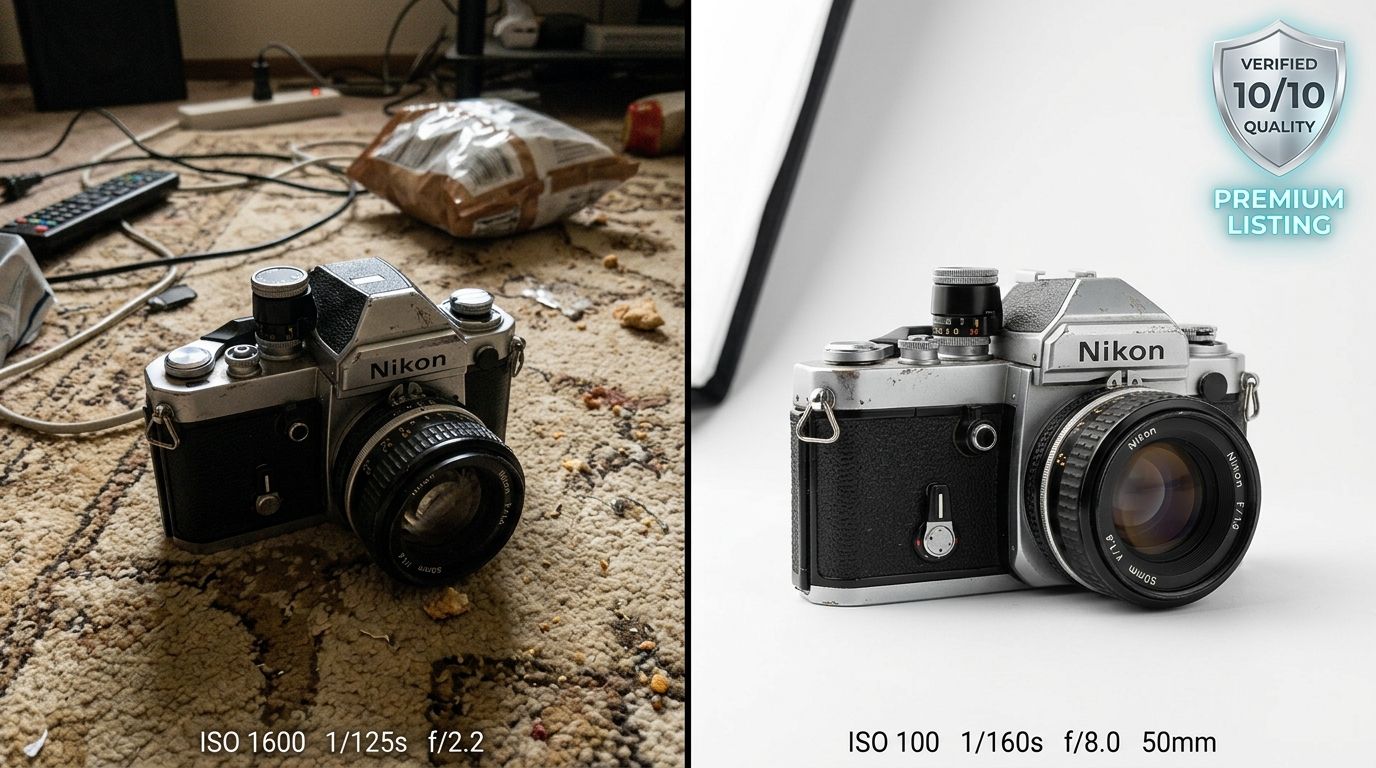
Any seller relying on manufacturer stock photos or dimly lit desk snapshots in 2026 is actively destroying their own conversion rate. Buyers scroll right past stock imagery because it looks exactly like every other dropshipper on the platform. The visual standard has simply moved too high to get away with low-effort uploads.
AI product photography has introduced a massive shift here, but there is a clear trade-off. AI generation is incredible for standardizing backgrounds and lighting across a massive catalog, but it will not fix a fundamentally blurry source image taken with a dirty phone lens. You have to capture good structural detail first.
The Official eBay Product Image Requirements
Before you can worry about the search algorithm, you have to get past the upload filters. eBay maintains a strict image policy. Listings that violate these rules are routinely suppressed from search results or removed entirely without warning.
Size and Resolution Limits
eBay requires every image to be a minimum of 500 pixels on its longest side. That is the hard floor. However, uploading a 500-pixel image is a terrible idea. At that size, the platform disables the image zoom feature. Buyers rely on the zoom tool to inspect details, read labels, and verify the condition of used items. The optimal resolution for eBay product photos is 1600 pixels on the longest side. This guarantees high-definition zoom on both desktop screens and the mobile app.
| Image Resolution | Buyer Experience | Platform Result |
|---|---|---|
| Under 500 pixels | Blurry details, unreadable tags | Listing rejected by eBay filters |
| Exactly 500 pixels | Standard viewing, no zoom available | Lower conversion rate on detailed items |
| 1600 pixels (Recommended) | High-definition inspection on all devices | Activates mandatory zoom feature |
The Ban on Text and Watermarks
Ten years ago, eBay search results looked like a chaotic billboard. Sellers plastered "FREE SHIPPING" text, store logos, and massive red borders over every main image. eBay banned this practice entirely. Your main image must contain the product and nothing else. No promotional text, no seller logos, no watermarks, and no decorative borders. The focus must remain exclusively on what the buyer is actually purchasing.
How eBay Photos Feed the Search Algorithm
Understanding the rules is only half the job. Understanding how eBay interprets your images is where you actually gain a competitive advantage. The eBay search algorithm is highly sensitive to buyer behavior.
(Worth noting: the system does not literally scan your image for artistic beauty or perfect lighting. The algorithm watches human behavior. High click-through rates teach the system that your photo accurately answers the buyer's search intent.)
Click-Through Rate Determines Visibility
When a buyer searches for a "vintage leather jacket," eBay displays dozens of results. The algorithm monitors which listings get clicked. If your main photo is bright, clearly framed, and shows the jacket on a clean background, buyers will click it. Every click is a positive signal. If your photo is dark and cluttered, buyers will scroll past it. A low click-through rate tells eBay that your listing is irrelevant to the search term, and your ranking drops accordingly.
Conversion Rate Locks in Your Rank
Getting the click is the job of the main photo. Converting the sale is the job of the secondary gallery photos. Buyers want proof. They want to see the back of the item, the tags, the stitching, and any flaws. Poor imagery is the leading driver of abandoned carts and return requests. Understanding exactly what makes product photos convert is essential to turning that initial click into completed revenue. If buyers click your listing but bounce because you only uploaded two blurry photos, your conversion rate sinks. eBay aggressively demotes listings with low conversion rates.
Best Practices for High-Volume Sellers
Running a successful eBay store requires moving inventory efficiently. You cannot spend twenty minutes photographing a single fifteen-dollar item. You need a system that balances speed with algorithm compliance.
Maximizing the Gallery Allowance
eBay gives every listing up to 24 photo slots for free. Leaving these blank is a mistake. While you might not need all 24 for a simple t-shirt, you should absolutely use them for electronics, auto parts, or high-end collectibles. If you are unsure how many product images to use, the baseline rule is eight. Shoot the front, back, both sides, top, bottom, the manufacturer tag, and one close-up of the material texture.
The Truth About Pure White Backgrounds
Does eBay require a pure white background? The short answer is no. Policy states you need a "neutral" background. However, the business answer is yes. A solid white background on your main image allows your listing to be pulled into Google Shopping ads. If you shoot your items on a wood floor or a patterned rug, Google will reject the image, and you lose access to millions of external buyers.
This requirement is where many sellers lose hours of their day. Manually editing out backgrounds with digital clipping paths is slow and expensive. This is exactly where AI product photography changes the workflow. Sellers upload a basic product image, select the Classic mode, and get a campaign-ready photo with a pristine white background in minutes. The per-image cost drops to under $5. The bottleneck shifts from tedious photo editing directly back to sourcing more inventory.
Standardizing with What You Have
You do not need a professional DSLR camera to rank on eBay. The device in your pocket is entirely capable of capturing high-converting shots if you understand how to control the light. Many top sellers run their entire operation relying on DIY product photography with an iPhone. The secret is consistency. Use the same lighting setup, the same angle for your primary shot, and the same aspect ratio for every single listing. When a buyer visits your store page, the unified visual presentation signals that you are a legitimate business, not a casual hobbyist cleaning out a garage.
Scale requires standardization. Whether you shoot a dozen items a week or a hundred items a day, treating your product photography as a systematic process rather than an afterthought is the fastest way to increase your eBay sell-through rate.
Frequently Asked Questions
What are eBay's product photo requirements?
eBay mandates that all uploaded listing images measure a minimum of 500 pixels on their longest edge. This platform policy ensures shoppers can clearly verify the physical condition of merchandise across both desktop interfaces and the mobile application. You must upload files sized at exactly 1600 pixels while stripping away all borders, watermarks, and promotional text to successfully activate the mandatory high-definition zoom function for buyers.
How many photos should I use on eBay listings?
eBay permits sellers to upload up to 24 complimentary photos for every individual product listing. The algorithm favors comprehensive galleries because extensive documentation minimizes post-sale return rates and customer disputes. You must fill at least eight to twelve photo slots to capture the front profile, back profile, side angles, close-up texture shots, and clear visual evidence of any physical wear.
Does eBay require a white background?
eBay requires a neutral background for all standard listings rather than strictly mandating a pure white canvas. The search algorithm heavily favors clean backdrops because they eliminate visual distractions and keep the buyer focused entirely on the merchandise. You must strip out all background clutter and apply a solid white backdrop to your primary image to guarantee your product qualifies for placement within Google Shopping campaigns.
How do eBay photos affect search ranking?
eBay relies on buyer engagement metrics rather than simple keyword matches to dictate product search rankings. A high-quality primary photo captures immediate attention and consistently drives more clicks from shoppers browsing the main results page. You must upload bright, sharply focused main images to increase your click-through rate, which forces the search algorithm to push your listing higher above competing sellers.
Can I use AI to create eBay product photos?
Sellers routinely apply artificial intelligence photography tools to replace messy backgrounds and correct poor lighting conditions for their marketplace inventory. This automated workflow accelerates the listing process for high-volume merchants managing massive daily product uploads. You must configure your software to strictly modify the environment while maintaining a completely unedited, accurate representation of the physical item the customer will receive.
Key Takeaways
- Upload photos at 1600 pixels to unlock the zoom feature for mobile and desktop buyers.
- Keep text, logos, borders, and watermarks completely off your main search image.
- Use a pure white background on your main image to qualify for Google Shopping visibility.
- Fill at least eight gallery slots to document flaws and drive the final conversion.
Mastering eBay product photos is a high-leverage activity. When you improve the quality of your images, you immediately improve your click-through rate, which directly trains the algorithm to favor your listings. If you are tired of spending hours manually editing backgrounds just to meet these standards, CherryShot AI gives you a faster way to scale your visual output.
Standardize your eBay listing photos
Stop manually editing backgrounds for every new item. Process your raw inventory shots into clean, algorithm-friendly images with perfect white backgrounds in seconds.
Try CherryShot AI